

Introduction
Spire.PDF from E-iceblue is a .NET component that lets you manipulate PDF documents programmatically. Spire.PDF for .NET is a professional .NET library specially designed for developers to create, read, write, convert and print PDF document files from any .NET platform with fast and high-quality performance.
Background
I got an opportunity from a China based company E-iceblue, to review one of their products. I selected Spire.PDF from E-iceblue, which is a .NET component that lets you manipulate PDF documents programmatically.
Namespace
- using Spire.Pdf;
- using Spire.Doc.Documents;
Add Reference
- Add the following reference
- Add the Spire.Pdf, Spire.Doc and Spire.License DLL files to the bin folder
- Spire.Pdf contains the PDF conversion libraries.
- Spire.Doc contains the doc conversion libraries.
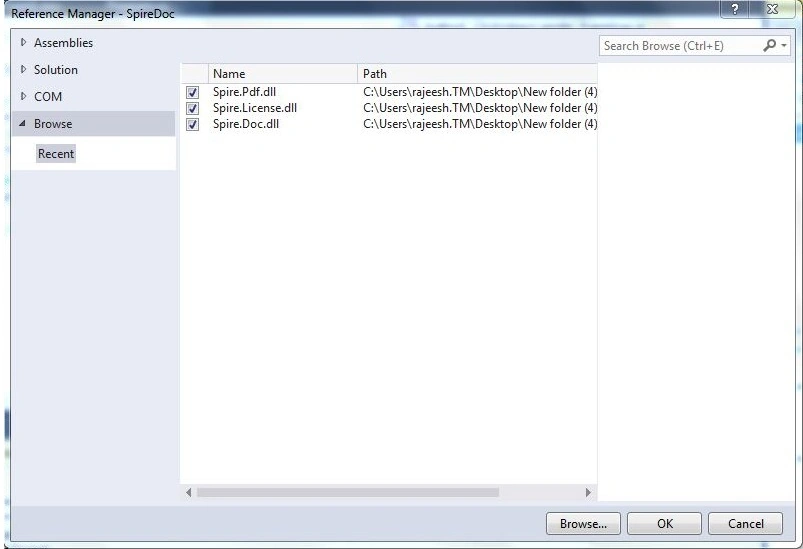
Figure 1: Add Reference
Code
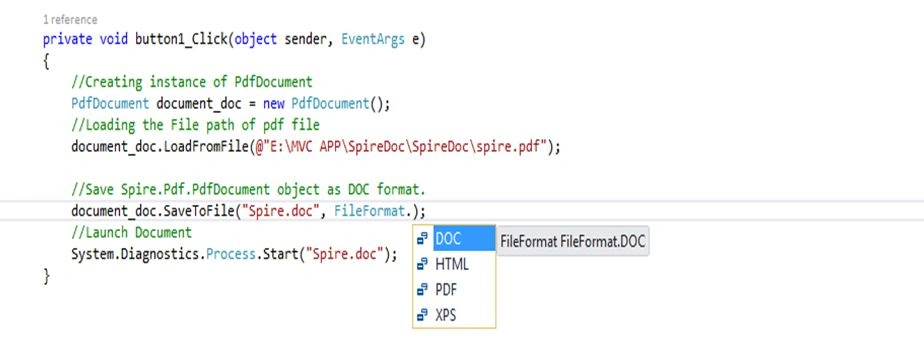
Figure 2: Code
Creating the instance of PdfDocument:
PdfDocument document_doc = new PdfDocument();
Load the file location, in this code “spire.pdf” is a PDF file as in the following:
document_doc.LoadFromFile(@"E:\MVC APP\SpireDoc\SpireDoc\spire.pdf");
Convert the PDF file into Document format using “FileFormat.Doc” as in the following:
document_doc.SaveToFile("Spire.doc", FileFormat.DOC);
Launch the conversion process as in the following:
System.Diagnostics.Process.Start("Spire.doc");
Examples
The following converts a PDF to Xps:
- //Creating instance of PdfDocument
- PdfDocument document = new PdfDocument();
- //Loading the File path of pdf file
- document.LoadFromFile(@"E:\MVC APP\SpireDoc\SpireDoc\SpireXps.pdf");
- //Save Spire.Pdf.PdfDocument object as XPS format.
- document.SaveToFile("SpireXps.xps", FileFormat.XPS);
- //Launch XPS
- System.Diagnostics.Process.Start("SpireXps.xps");

Figure 3: Output 1
The following converts a PDF to Doc:
- //Creating instance of PdfDocument
- PdfDocument document_doc = new PdfDocument();
- //Loading the File path of pdf file
- document_doc.LoadFromFile(@"E:\MVC APP\SpireDoc\SpireDoc\spire.pdf");
- //Save Spire.Pdf.PdfDocument object as DOC format.
- document_doc.SaveToFile("Spire.doc", FileFormat.DOC);
- //Launch Document
- System.Diagnostics.Process.Start("Spire.doc");
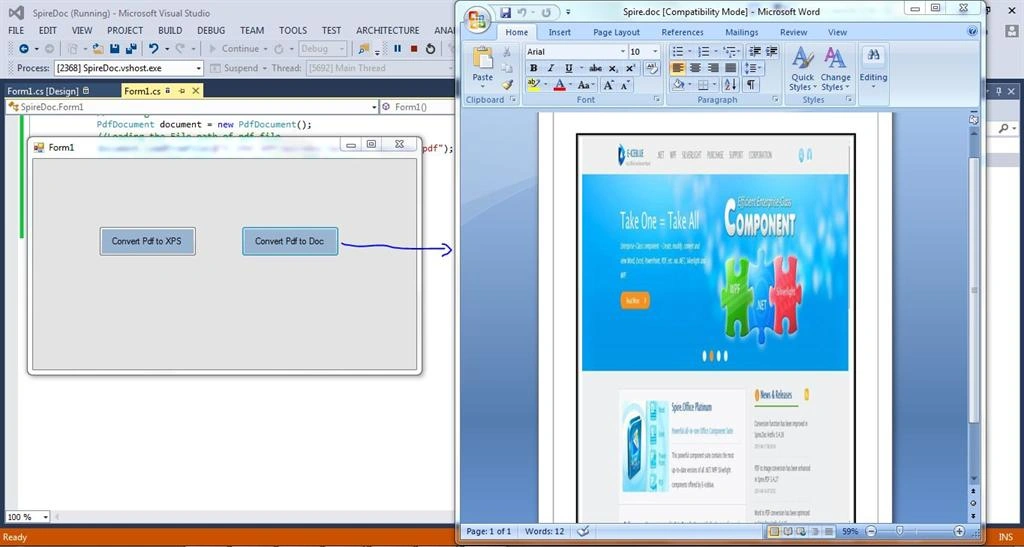
Figure 4: Output2
Important points
- Merge/split PDF documents.
- Set PDF position, title display, resize, page mode and print scaling, and so on.
- Protect PDF documents by setting passwords and digital signature.
- Overlay documents.
- Decrypt PDF Document.
- Fast Conversion Process.
Reference
Here is the article from my tech blog:
Delpin Susai RajPosted Aug 28, 2016, 7:24 AM
Nice
Santhakumar MunuswamyPosted Jun 27, 2015, 11:40 AM
Thanks for nice one
Van LaiPosted Jun 25, 2015, 9:58 PM
Thanks a lot for sharing.
Upendra Pratap ShahiPosted Jun 25, 2015, 8:39 AM
Good one Rajeesh Menoth
Saritha K TPosted Jun 25, 2015, 6:33 AM
Great one
Prasanth RadhakrishnanPosted Jun 25, 2015, 6:33 AM
Nice man. go ahead.. :)