

Here's a guide on generating PDF or image files from HTML using wkhtmltopdf in C#. This method is widely used due to wkhtmltopdf’s capability to handle complex HTML, CSS, and even JavaScript, producing high-quality PDFs or images.
1. Setting Up wkhtmltopdf
wkhtmltopdf is a command-line tool that converts HTML to PDF and images using Webkit. Before integrating it with C#, you’ll need to.
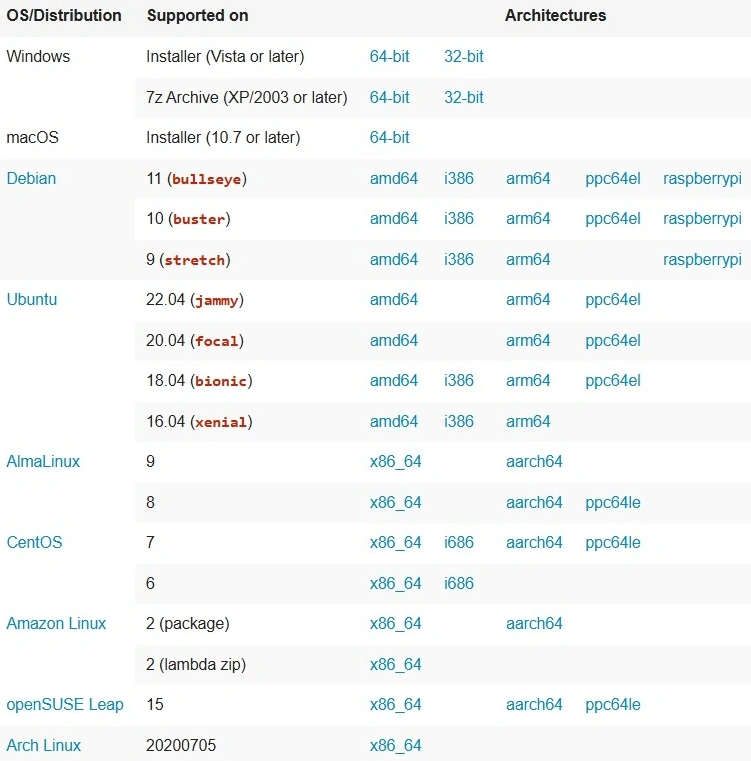
- Download wkhtmltopdf from the official site.
- Install it on your machine and note the installation path (usually C:\Program Files\wkhtmltopdf on Windows).
2. Creating a C# Wrapper Engine for wkhtmltopdf
In C#, you can call wkhtmltopdf using System.Diagnostics.Process to execute command-line arguments. Here’s a basic implementation.
- Interface for Convert Items
- Process Path will be exe path of Engine
- Engine Type will be 1-> PDF Engine, 2-> Image Engine If we need more we can add future.
public interface IConverterWebKitEngine { string ProcessPath { get; } int EngineType { get; } bool ConvertContent(string inputPath, string outputPath); } - PDF Engine Implementation.
public class PDFConsoleConverter : IConverterWebKitEngine { private readonly ILogger<PDFConsoleConverter> _logger; private readonly IWebHostEnvironment _hostingEnvironment; public string ProcessPath { get; } public int EngineType { get; } = 1; public PDFConsoleConverter(ILogger<PDFConsoleConverter> logger, IWebHostEnvironment hostingEnvironment) { _logger = logger; _hostingEnvironment = hostingEnvironment; ProcessPath = _hostingEnvironment.WebRootPath + @$"\Tool\wkhtmltopdf.exe"; } public bool ConvertContent(string inputPath, string outputPath) { try { var ticks = DateTime.UtcNow.Ticks; string switches = ""; #region headers switches += "--header-center wkhtmltopdf "; switches += "--header-line "; switches += "--header-spacing 5 "; #endregion #region general switches += "--print-media-type "; switches += "--margin-top 40mm --margin-bottom 10mm --margin-right 10mm --margin-left 10mm "; switches += "--page-size A4 "; #endregion #region footer switches += "--footer-line "; switches += "--footer-center \"[page] of [topage]\" "; #endregion string processPdfpath = ProcessPath; Process process = new Process(); process.StartInfo.UseShellExecute = true; process.StartInfo.FileName = processPdfpath; process.StartInfo.Arguments = $"{switches} \"{inputPath}\" \"{outputPath}\" "; process.Start(); } catch (Exception ex) { _logger.LogCritical(ex.Message); return true; } return true; } } - Image Engine Implementation.
public class ImageConsoleConverter : IConverterWebKitEngine { private readonly ILogger<ImageConsoleConverter> _logger; private readonly IWebHostEnvironment _hostingEnvironment; public string ProcessPath { get; } public int EngineType { get; } = 2; public ImageConsoleConverter(ILogger<ImageConsoleConverter> logger, IWebHostEnvironment hostingEnvironment) { _logger = logger; _hostingEnvironment = hostingEnvironment; ProcessPath = _hostingEnvironment.WebRootPath + @$"\Tool\wkhtmltoimage.exe"; } public bool ConvertContent(string inputPath, string outputPath) { try { var ticks = DateTime.UtcNow.Ticks; string processPdfpath = ProcessPath; Process process = new Process(); process.StartInfo.UseShellExecute = true; process.StartInfo.FileName = processPdfpath; process.StartInfo.Arguments = $"\"{inputPath}\" \"{outputPath}\" "; process.Start(); } catch (Exception ex) { _logger.LogCritical(ex.Message); return true; } return true; } } - Using the Engine in Our Methods.
public class BussinessConstants
{
    public static int ConvertEngineType_PDF = 1;
    public static int ConvertEngineType_Image = 2;
}

[ApiController]
[Route("[controller]")]
public class FileConvertController : ControllerBase
{
    private readonly ILogger<FileConvertController> _logger;
    private readonly IWebHostEnvironment _hostingEnvironment;
    private readonly IEnumerable<IConverterWebKitEngine> _converterWKs;

    public FileConvertController(
        ILogger<FileConvertController> logger,
        IWebHostEnvironment hostingEnvironment,
        IServiceProvider serviceScope)
    {
        _logger = logger;
        _hostingEnvironment = hostingEnvironment;
        _converterWKs = serviceScope.GetServices<IConverterWebKitEngine>();
    }

    [HttpGet("GetPDF")]
    public IEnumerable<string> GetPDF()
    {
        var ticks = DateTime.UtcNow.Ticks;

        var outputPdf = _hostingEnvironment.WebRootPath + $"\\OutputFiles\\Sync{ticks}.pdf";
        string inputPath = _hostingEnvironment.WebRootPath + $"\\InputFiles\\Sync{ticks}.html";

        string inputText =
            "<html><head><title>Example of Paragraph tag</title></head><body style=\"line-height:1.6\">" +
            "<p><b>HTML</b> stands for <i><u>Hyper Text Markup Language.</u></i> It is used to create " +
            "web pages and applications. This language is easily understandable by the user and also " +
            "modifiable. It is actually a Markup language, hence it provides a flexible way for designing " +
            "the web pages along with the text.</p>HTML file is made up of different elements.<b>An element</b> " +
            "is a collection of <i>start tag, end tag, attributes and the text between them</i>.<p></p>" +
            "<h6>HTML to PDF / Image</h6><h5>HTML to PDF / Image</h5><h4>HTML to PDF / Image</h4>" +
            "<h3>HTML to PDF / Image</h3><h2>HTML to PDF / Image</h2><h1>HTML to PDF / Image</h1></body></html>";

        System.IO.File.WriteAllText(inputPath, inputText);

        if (_converterWKs.Any())
        {
            IConverterWebKitEngine converterWK = _converterWKs.FirstOrDefault(x => x.EngineType == BussinessConstants.ConvertEngineType_PDF);
            converterWK?.ConvertContent(inputPath, outputPdf);
        }

        return new List<string> { "A", "B" };
    }

    [HttpGet("GetImage")]
    public IEnumerable<string> GetImage()
    {
        var ticks = DateTime.UtcNow.Ticks;

        var outputImage = _hostingEnvironment.WebRootPath + $"\\OutputFiles\\Sync{ticks}.png";
        string inputPath = _hostingEnvironment.WebRootPath + $"\\InputFiles\\Sync{ticks}.html";

        string inputText =
            "<html><head><title>Example of Paragraph tag</title></head><body style=\"line-height:1.6\">" +
            "<p><b>HTML</b> stands for <i><u>Hyper Text Markup Language.</u></i> It is used to create " +
            "web pages and applications. This language is easily understandable by the user and also " +
            "modifiable. It is actually a Markup language, hence it provides a flexible way for designing " +
            "the web pages along with the text.</p>HTML file is made up of different elements.<b>An element</b> " +
            "is a collection of <i>start tag, end tag, attributes and the text between them</i>.<p></p>" +
            "<h6>HTML to PDF / Image</h6><h5>HTML to PDF / Image</h5><h4>HTML to PDF / Image</h4>" +
            "<h3>HTML to PDF / Image</h3><h2>HTML to PDF / Image</h2><h1>HTML to PDF / Image</h1></body></html>";

        System.IO.File.WriteAllText(inputPath, inputText);

        if (_converterWKs.Any())
        {
            IConverterWebKitEngine converterWK = _converterWKs.FirstOrDefault(x => x.EngineType == BussinessConstants.ConvertEngineType_Image);
            converterWK?.ConvertContent(inputPath, outputImage);
        }

        return new List<string> { "A", "B" };
    }
}
Notes. (Please ensure the below points).
- Ensure that the wkhtmltopdf.exe file is accessible by the C# application.
- wkhtmltopdf works best with HTML files that are fully self-contained (e.g., inline CSS and JavaScript).
- You may need to handle permissions if running on a server environment.
Conclusion
This method enables you to utilize wkhtmltopdf's rendering engine within C# applications, facilitating HTML-to-PDF and HTML-to-image conversions with high accuracy. With additional customization, you can modify this code to accommodate various document formats and needs.
Part 2: Converting HTML to PDF or Image in C# Using wkhtmltopdf Part 2 - Header & Footer
Join the conversation! Your thoughts help the community grow.