

In this article, I am going to share you one of my biggest experiences on converting PPT/PPTX to PDF file.
- Using Office Automation objects
- Using LibreOffice
- By making use of Aspose
- Using Spire.Presentation
- With the help of OpenOffice
- Using SharePoint PowerPoint Services
- Using ASP.NET Core Web API based solution
Here, I have used Microsoft.Office.Core and Microsoft.Office.Interop.PowerPoint libraries to convert PPT/PPTX file to PDF file. By using these libraries, I am able to convert PPT/PPTX file to PDF file when I run on IIS Express. If I host the same code snippet on IIS Server, it is throwing an error as below.

The following official article from Microsoft summarizes issues with using Office Automation objects on Server-side (unattended execution, parallel execution, etc.).
https://support.microsoft.com/en-in/help/257757/considerations-for-server-side-automation-of-office
Please go through the below link; Microsoft has clearly specified as below:
"Microsoft does not currently recommend, and does not support, Automation of Microsoft Office applications from any unattended, non-interactive client application or component (including ASP, ASP.NET, DCOM, and NT Services), because Office may exhibit unstable behavior and/or deadlock when Office is run in this environment."
But still, I wanted to try with a few other techniques.
Technique 1
By setting the MIME type in IIS Server with below steps.
Step 1
Press Windows key + R.
Step 2
Type "inetmgr" and press Enter key.
Step 3
Click on "MIME Types".
Step 4
Click on "Add" button and set the below MIME types,

Outcome
No luck :(
Technique 2
I have configured the same MIME types in web.config file as below.

Outcome
No luck :(
Technique 3
I thought this might be a COM permissions problem. I tried the below steps -
Step 1
Start > Run > dcomcnfg and then add the Component Services snap-in manually if you can’t find the app under step 3)
Step 2
Navigate to Component Services > Computers > My Computer > DCOM Config
Step 3
Locate the MS application giving you trouble (eg: “Microsoft Excel Application” for Excel or “Microsoft Word 97 – 2003 Document” for Word)
Step 4
Right click > Properties.
Step 5
In the Security tab, select Customize under Launch and Activation Permissions and click Edit…
Step 6
Add the account under which the site is running (eg: Network Service) and assign Local Launch & Local Activation permissions.
Outcome
No luck :(
Technique 4
I set web application permission in Internet Information Services (IIS) with full permission for the below users.
- CREATOR OWNER
- SYSTEM
- Users
- Administrators
- IUSR
- IIS_IUSRS
Outcome
No luck :(
Technique 5
I have created a Windows Service for the same code snippet and self hosting at "services.msc". See the below screenshot for reference.
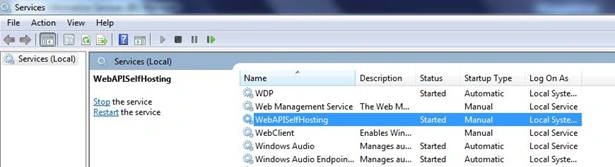
Outcome
No luck :(
In the same way, I have tried with some other techniques but none of them worked.
Using LibreOfficeLibreOffice is a free and an open source library. I have tried with this library and experienced a few rendering issues as below.
- While converting WordArts especially 3D Text.
- And for some kind of background graphics and animations.
First of all, make a note, Aspose is a paid one. I have tried with trial version and found few observations as below.
There are rendering issues
- While converting WordArt especially 3D Text.
- For some kind of background graphics and animations.
May be the rendering issues happen due to trial version but I am not sure.
Using PresentationThis library also is a paid one. I have tried with this library and experienced the same issues which I faced with Aspose library. Maybe the rendering issues are due to the trial version but I am not sure.
Using OpenOfficeOpenOffice is a free and open source library. I have tried with this library and experienced with the same issues which I faced with LibreOffice library.
Using SharePoint PowerPoint ServicesSharePoint cost could be much higher than just going for other direct commercial libraries (like Aspose, etc.,). And if you buy a SharePoint server, then it costs around 8 to 10 lakhs. There is a SharePoint Server 2013 available on AWS with 30 days free trial as well. And it costs USD $3.5 per hour. For more details, have a look at link (https://aws.amazon.com/marketplace/pp/B01BXJ8FSK).
We don't know whether the sample code snippet works as expected or not in SharePoint Server. It requires that the original PPT/PPTX document is stored on SharePoint server and the resultant PDF is also stored on SharePoint server. And there are two ways of achieve converting PPT/PPTX to PDF file, one by creating a program that runs on SharePoint server box, other using a Web Services API of SharePoint, where the program can run on box other than SharePoint. And we do not know which one works and which one is the best solution.
Note
Since we are not sure with the sample code snippet whether that will work or not on SharePoint Server, that is why it is very difficult to convince the Client and it is always better to go with some other alternatives.
Finally, I was able to achieve my requirement (converting PPT/PPTX file to PDF file) using ASP.NET Core with Office Automation objects as a standalone application.
ASP.NET Core Web API based solution, where the Web API server will run in interactive user mode, will accept HTTP calls for conversion. This will in turn use MS Office automation objects.
Now, it's time to show you step by step in practical.
Step 1 Create a ASP.Net Core application
- Click on "New Project".
- Expand Templates and select Web.
- Since we are going to create, select "ASP.Net Core Web Application (.NET Core)" template.
- Give the project name own your wish, let say "WebAppCoreConverter", then click on OK button.

Step 2 Select the project template
Here, I have selected "Web API" template because I want to create as a service method and will expose to outside world, so that everyone can be able to consume my created service method irrespective of programming languages (.NET, JAVA, AS400, SharePoint etc.)
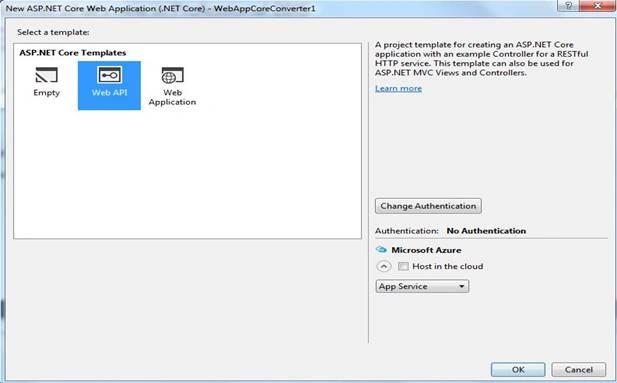
Step 3 Create business components in the project
Create a folder and name it, as per your wish. I have named it as "DocumentConverter". In this folder, we are going to create the business components where the actual logic resides. We are going to write a code in such a way that, it can be easily Extendable and Maintainable. To understand the code structure, you should be good in minimum basic Design Patterns and SOLID principles. Here, I am not going to discuss on Design Patterns and SOLID principles (if you don't know, then you can search online and learn) because our focus in this article is different.
I am going to create an interface (IConverter.cs) with method with 3 input parameters.
- Source location
- Target location
- Input file type
Here, the intention is, the method should support for multiple input file types (PPT, PPTX, Word, Excel etc.) into PDF file based on the supplied source and destination file locations.
IConverter.cs
- using System;
- using System.Collections.Generic;
- using System.Linq;
- using System.Text;
- namespace WebAppCoreConverter.DocumentConverter
- {
- public interface IConverter
- {
- short convert(String sourcePath, String targetPath, ContentType sourceType);
- }
- public interface IDocumentConverterFactory
- {
- IConverter getConverter(ConversionType convType);
- }
- }
I am going to create a utility class (common.cs) where I am going to place the commonly used
- Methods
- Enumerations etc.
common.cs
- using System;
- using System.Collections.Generic;
- using System.Linq;
- using System.Text;
- using System.IO;
- namespace WebAppCoreConverter.DocumentConverter
- {
- public enum ContentType
- {
- DOC,
- DOCX,
- XLS,
- XLSX,
- VSD,
- VDX,
- PPT,
- PPTX,
- XDW,
- PDF,
- XPS,
- JPEG,
- JPG,
- BMP,
- PNG,
- TIF,
- TIFF,
- GIF,
- SVG,
- TXT,
- RTF,
- XML,
- CSV,
- UNKNOWN = -1
- }
- public class Util
- {
- public static void releaseObject(object obj)
- {
- Console.WriteLine("MethodName: releaseObject of Class: Util started");
- try
- {
- System.Runtime.InteropServices.Marshal.ReleaseComObject(obj);
- obj = null;
- }
- catch (Exception exReleaseObject)
- {
- obj = null;
- // Console.WriteLine(CMSResourceFile.REALESE_FAILED+ exReleaseObject);
- }
- finally
- {
- GC.Collect();
- GC.WaitForPendingFinalizers();
- GC.Collect();
- GC.WaitForPendingFinalizers();
- }
- Console.WriteLine("MethodName: releaseObject of Class: Util ended");
- }
- public static string getTargetFileName(string contentPath, string contentName, ContentType contentType)
- {
- string getTargetFileNameStatus = string.Empty;
- try
- {
- string tempFileName = Path.GetFileNameWithoutExtension(contentName) + ".";
- tempFileName += contentType.ToString().ToLower();
- getTargetFileNameStatus = Path.Combine(contentPath, tempFileName);
- }
- catch (Exception exGetTargetFileName)
- {
- }
- return getTargetFileNameStatus;
- }
- public static short getFileExtension(string sourcePath, out ContentType fileExtn)
- {
- short getFileExtnStatus = 0;
- fileExtn = ContentType.UNKNOWN;
- try
- {
- string tempFileExtn = Path.GetExtension(sourcePath);
- tempFileExtn = tempFileExtn.Replace(".", string.Empty);
- fileExtn = (ContentType)Enum.Parse(typeof(ContentType), tempFileExtn, true);
- }
- catch (Exception exGetFileExtension)
- {
- } return getFileExtnStatus;
- }
- }
- public enum ConversionType
- {
- Doc2Pdf,
- Pdf2Img,
- Img2Img
- }
- }
I am going to create a factory class (DocumentConverterFactory.cs) which decides the conversion type.
DocumentConverterFactory.cs
- using System;
- using System.Collections.Generic;
- using System.Linq;
- using System.Text;
- namespace WebAppCoreConverter.DocumentConverter
- {
- public class DocumentConverterFactory : IDocumentConverterFactory
- {
- public IConverter getConverter(ConversionType convType)
- {
- IConverter converter = null;
- switch (convType)
- {
- case ConversionType.Doc2Pdf:
- converter = new ConvDoc2PdfWithMsOffice();
- break;
- case ConversionType.Pdf2Img:
- case ConversionType.Img2Img:
- default:
- break;
- }
- return converter;
- }
- }
- }
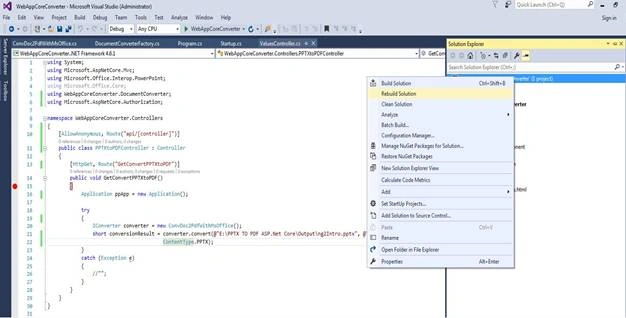


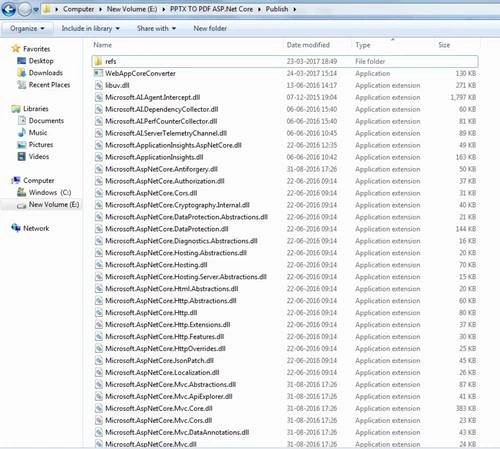




soni ronakPosted Dec 28, 2019, 9:08 AM
I am using Microsoft.Office.Interop.PowerPoint and it's working fine. But if server goes idle then it's not working application object through null exception. when i just reopen the server using RDP then it's working fine.
Ali PolatPosted Nov 15, 2018, 9:27 PM
Thank you Santosh. :)
Marvin GarcíaPosted Sep 21, 2018, 4:36 PM
Interesting article! I have one question though, to use Microsoft.Office.Interop.PowerPoint you need MS Office installed in the standalone machine that's running the application, right?