

Cookies in JavaScript
Cookies are variables stored on the visitor's (client's) computer. When the client's browser requests a page, cookies are also obtained. JavaScript can be used to create and retrieve cookie values.
Cookies are often the most efficient way to remember and track preferences, purchases, commissions, and other information required to improve visitor and website statistics.
Example
- For Name- The first time visitors arrive at your web page, they must fill in their name. The name is then stored in a cookie. The name is retrieved from the stored cookie. The next time visitors arrive at your page, they could get a welcome message like "Welcome John Doe!"
- For Date- The first time a visitor arrives at your web page, the current date is stored in a cookie. The data is retrieved from the stored cookie. The next time visitors arrive at your page, they could get a message like "Your last visit was on Tuesday, September 04, 2013!"
How do Cookies Work in JavaScript?
The server sends some data to the visitor's browser as a cookie. If the browser accepts the cookie, it is stored as plain text in the visitor's hard drive. And when the visitor arrives at another page of your site, the browser sends the same cookie to the server for retrieval.
We can say a cookie is plain text data records of 5 variables
- Expire
- Domain
- Path
- Secure
- Name=Value
Expire variable in cookies
The date the cookie will expire. The cookie will expire when the visitor quits the browser if this is blank.
Domain in cookies
The Domain is the name of our Website.
Path in cookies
The path to the directory or web page that sets the cookie. If you want to retrieve the cookie from any directory or page, this may be blank.
Secure in cookies
If this field contains the word "secure" then the cookie may only be retrieved with a secure server. If this field is blank, no such restriction exists.
Name=Value in cookies
Cookies are set and retrieved in the form of key and value pairs.
So those are the main components of a cookie.
In JavaScript, we can manipulate the cookies using the cookie property of the document. Here we can "Read, Create, Modify, and delete" a cookie.
Syntax
document.cookie = "key1=value1;key2=value2;expires=date";
Now let's do some Live Examples.
Storing Cookies in JavaScript
The simplest way to create a cookie is to assign a string value to the "document. cookie" object that looks like the syntax above.
<html>

<head>
    <script type="text/javascript">
        function writeCookie() {
            if (document.myform.customer.value == "") {
                alert("Enter some value!");
                return;
            }
            cookievalue escape(document.myform.customer.value) + ";";
            document.cookie = "name=" + cookievalue;
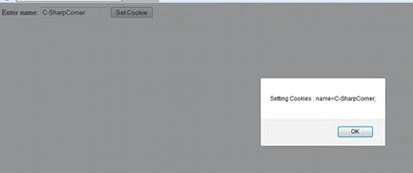
            alert("Setting Cookies :" + "name=" + cookievalue);
        }
    </script>
</head>

<body>
    <form name="myform" action="Give your Name Here">
        Enter name: <input type="text" name="customer" />
        <input type="button" value="Set Cookie" onclick="writeCookie();" />
    </form>

</html>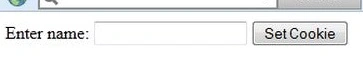




Amit Kumar SinghPosted Feb 6, 2016, 6:57 AM
Good One
Mukesh Kumar TiwariPosted Apr 1, 2014, 4:17 AM
nice article........