

In Java, copying the elements of one array to another is a common operation that can be accomplished in several ways. This article will demonstrate how to copy all elements from one array to another using the Scanner class for user input. We will cover a simple iterative method to achieve this.
Understanding Arrays in Java
An array in Java is a data structure that holds a fixed number of values of a single type. When you need to duplicate an array, it's essential to create a new array and copy the elements to avoid reference issues. Simply assigning one array to another will only create a reference to the original array, meaning changes to one will affect the other.
Copying an Array using user input
Here’s a complete Java program that demonstrates how to copy all elements from one array to another using user input.
Code example
import java.util.Scanner;

public class ArrayCopyExample {
    public static void main(String[] args) {
        Scanner scanner = new Scanner(System.in);

        // Input: Size of the array
        System.out.print("Enter the size of the array: ");
        int size = scanner.nextInt();

        // Initialize the source array
        int[] sourceArray = new int[size];

        // Input: Elements of the source array
        System.out.println("Enter " + size + " elements:");
        for (int i = 0; i < size; i++) {
            sourceArray[i] = scanner.nextInt();
        }

        // Initialize the destination array
        int[] destinationArray = new int[size];

        // Copying elements from sourceArray to destinationArray
        for (int i = 0; i < size; i++) {
            destinationArray[i] = sourceArray[i];
        }

        // Output: Displaying the copied array
        System.out.println("Copied Array:");
        for (int element : destinationArray) {
            System.out.print(element + " ");
        }

        // Close the scanner
        scanner.close();
    }
}
Explanation
- Importing Scanner: We import java.util.Scanner to read user input.
- User Input for Array Size: The program prompts the user to enter the size of the array.
- Initializing Source Array: We create an integer array named sourceArray based on the specified size.
- Inputting Elements: A loop allows users to enter elements into sourceArray.
- Initializing Destination Array: We declare another integer array named destinationArray of the same size.
- Copying Elements: A loop iterates through sourceArray, copying each element into destinationArray.
- Displaying Copied Array: Finally, we print out the elements of destinationArray.
- Closing Scanner: The scanner is closed to prevent resource leaks.
Run the Program
To run this program
- Save it as ArrayCopyExample.java.
- Open your terminal or command prompt.
- Navigate to the directory where you saved the file.
- Compile the program
javac ArrayCopyExample.java -
Run the compiled class.
java ArrayCopyExample
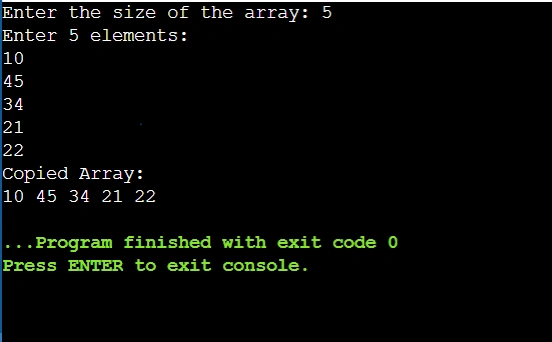
Output
Join the conversation! Your thoughts help the community grow.