

I recently have been engaged in an assignment where I had to copy large chunks of data from one dataset to another in memory. When I say large chunks, I am talking about hundreds of thousands of rows. Not only I had to copy the data but go through each row of the dataset, do some calculations, and update the rows of the new dataset.
To do so, I decided to use DataTable objects. If you go through the rows of a DataTable and direct copy rows from one DataTable, you will get an exception saying "Row is already being used by another table".
The simplest way is to clone an existing DataTable, loop through all rows of source DataTable and copy data from column by column and add row to the destination DataTable. The following code does the same:
For Each dr As DataRow In sourceTable.Rows
   r = destinationTable.NewRow
   r("Name") = dr("Name")
   r("City") = dr("City")
   r("Cost") = dr("Cost")
   destinationTable.Rows.Add(r)
Next
DataTable.ImportRow Method
The second method is using DataTable.ImportRow method. The ImportRow method of DataTable copies a row into a DataTable with all of the properties and data of the row. It actually calls NewRow method on destination DataTable with current table schema and sets DataRowState to Added. The following code does the same as we did in the previous code snippet.
For Each dr As DataRow In sourceTable.Rows
    destinationTable.ImportRow(dr)
Next
Performance
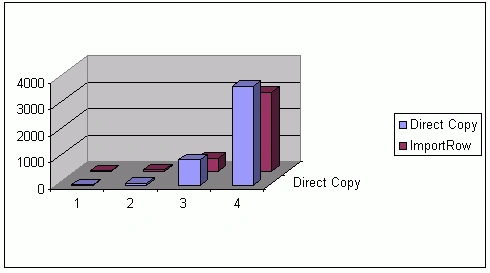
The following chart compares the time versus the number of records copied. If you have a small number of rows, it will not make a big difference but when you start importing hundreds of thousands of rows, for example, 500,000 in my case, there was a difference of almost 9 seconds.
Here are the numbers for both methods:
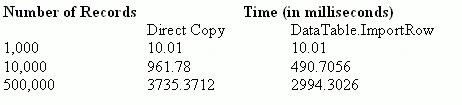
When I tried to copy over 1 million rows, DataTable.ImportRow method took 17 seconds but I got a memory exception using the direct copy method.
Summary
When it comes to copying bulk of data in memory from one DataTable to another, DataTable.ImportRow method comes in handy. This article compares both direct copy and ImportRow method and we saw ImportRow method may reduce the processing time when dealing with large data. See the attached source code for more details.
maria louisaPosted Mar 2, 2013, 4:12 AM
I want to fetch the data from one table to another table in sql database by using C# with asp.net coding. How to do that??? Can you give idea.
Sheetal MahajanPosted Aug 22, 2012, 12:29 AM
Quite helpful article. Thanks for sharing.
Muhammad ShoaibPosted Mar 27, 2012, 2:44 AM
A very good article and very helpful for me to solve my problem. Thanks
Sandeepan KunduPosted May 2, 2011, 4:37 AM
The above code can be done using "Merge" instead of "ImportRow" which is specifically meant for bulk operation. Instead of enumerating for each row of source table, we can directly use i.e. the following code For Each dr As DataRow In sourceTable.Rows destinationTable.ImportRow(dr) Next can be written as destinationTable.Merge(sourceTable)
pardhasaradhi kogantiPosted May 8, 2010, 9:27 AM
please can you send me a console application
pawan kumarPosted Apr 5, 2010, 6:05 AM
hello mahesh chand, im new to this site, i want copy a particular table copy in first database to second database , actually i searching but i didn't get the answer,when i click the button then data in first database copy into second database, one thing i tell u same name of table in the both database , so plz help me send to my mail id [email protected] , i hope u understand the my problem ...
Glen HarvyPosted Aug 30, 2006, 2:35 AM
Isn't his article supposed to be in C#? I'm learning Mahesh and I don't need to study VB as well :-)
Cosmin 0Posted Jul 18, 2006, 2:29 PM
Hello Mr. Mahesh I tryed to use your "destinationTable.ImportRow(dr)" function member. My issue is the update of a dataBase table with a dataSet table as a parameter using C#. Below is the function I used in my code ---> verry simple. I noticed that in line :updates = da.Update(tmpDS, tableName) ,updates variable is 0 ,so no update possible. Perhaps this is not the way to do the update. IF you can help me with some hints , thanks in advance. public DataSet dsUpdateData(DataSet ds, string tableName, string ConnectionString) { //use a Local temporary dataset DataSet tmpDS = new DataSet(); try { //dataAdapter object SqlDataAdapter da = new SqlDataAdapter(SQLQuery + tableName, ConnectionString); //update dataset with records from DataBase int updates = da.Fill(tmpDS,tableName); //update tmpDS with the parameter dataset foreach (DataRow dataRow in ds.Tables[tableName].Rows) { tmpDS.Tables[tableName1].ImportRow(dataRow); tmpDS.Tables[tableName1].AcceptChanges(); } //update the dataBase<<<---- here I get now update updates = da.Update(tmpDS, tableName); return tmpDS; } catch (Exception ex) { Debug.WriteLine(ex.ToString()); } }