

As a developer, we used to write so many simple applications for PoC or research having few lines of code. To do that, it is required to open Visual Studio, create a solution, build it and then delete after testing it. In these scenarios, we can use this application to edit and run the code quickly as in the following screenshot:
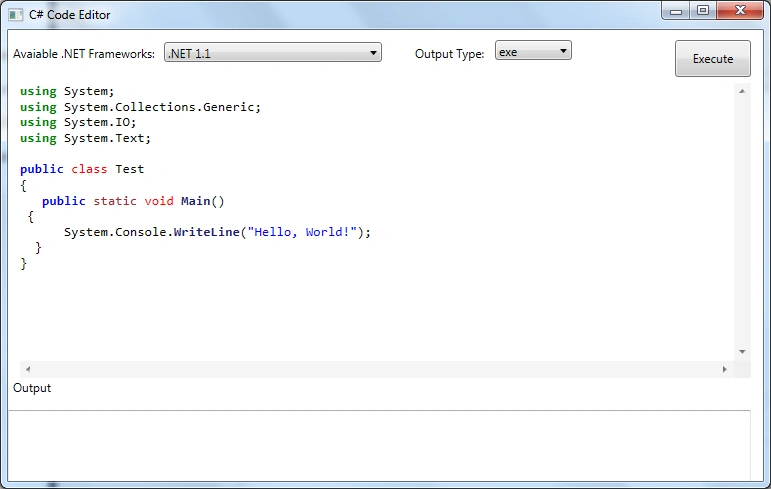
Figure 1: Programm
Create a WPF application and name it MyCodeEditor in Visual Studio 2010. Then add AvalonEdit library using NuGet as in the following screenshot. This is having an advanced textbox with built-in support for code formatting\coloring like Visual Studio Editor.
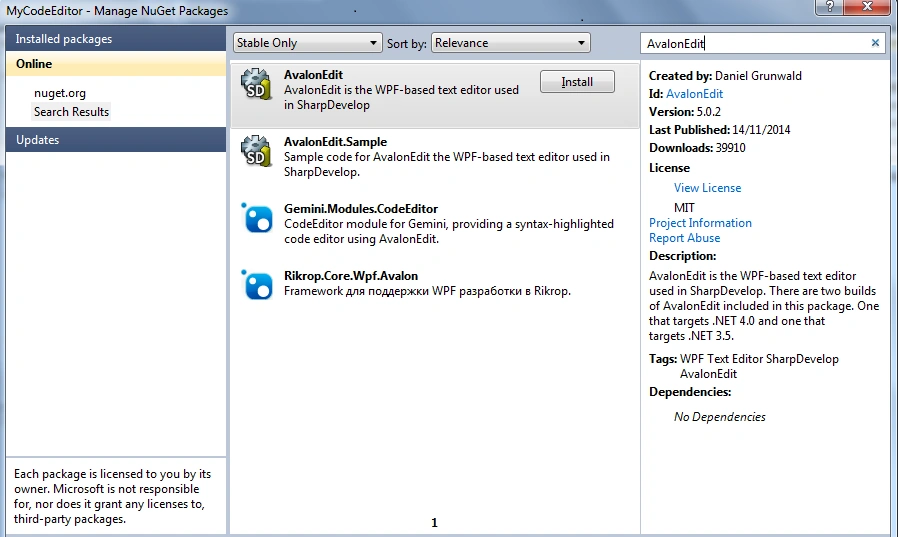
Figuire 2: Studio Editor
Design the UI with an option to select target framework, select output type as dll or exe, button to execute the code written and AvalonEdit control for editing our code and a textbox to show output of C# compiler as in the following screenshot:
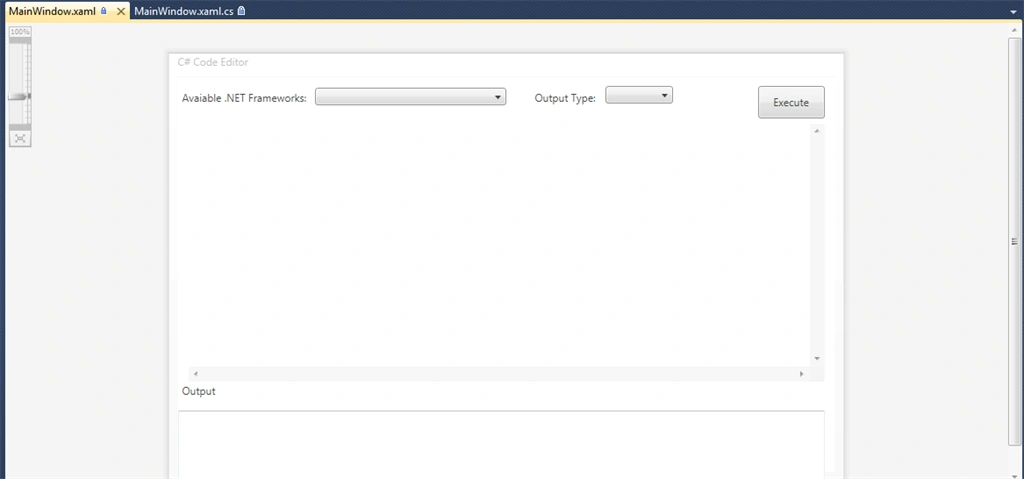
Figure 3: Design the UI
In window_loaded event, we used KB318785 to find list of .NET frameworks installed through registry keys.
- private void Window_Loaded(object sender, RoutedEventArgs e)
- {
- AddVersion(@
- "Software\Microsoft\.NET Framework\Policy\v1.0", "1.0 ");
- AddVersion(@
- "SOFTWARE\Microsoft\NET Framework Setup\NDP\v1.1.4322", "1.1 ");
- AddVersion(@
- "Software\Microsoft\NET Framework Setup\NDP\v2.0.50727", "2.0 ");
- AddVersion(@
- "SOFTWARE\Microsoft\NET Framework Setup\NDP\v3.0", "3.0 ");
- AddVersion(@
- "SOFTWARE\Microsoft\NET Framework Setup\NDP\v3.5", "3.5 ");
- AddVersion(@
- "SOFTWARE\Microsoft\NET Framework Setup\NDP\v4\Full", "4.0 ");
- CboTypes.SelectedIndex = 0;
- OutputCC.Text = "";
- textEditor.Text = "using System;\r\nusing System.Collections.Generic;\r\nusing System.IO;\r\nusing System.Text;\r\n\r\npublic class Test\r\n{\r\n public static void Main() \r\n {\r\n System.Console.WriteLine(\"Hello, World!\"); \r\n }\r\n}";
- CboVersions.SelectedIndex = 0;
- }
In Button_Click event, we will write code to read C# code entered in AvalonEdit control, save it as a file, pass it to corresponding csc.exe based on selected framework version, read output of csc.exe and pass it to output textbox control as in the following code snippet:
- private void Button_Click(object sender, RoutedEventArgs e)
- {
- try
- {
- ClearOldData();
- string code = textEditor.Text;
- string selectedVersion = CboVersions.Text;
- File.WriteAllText(@
- "C:\Test.cs", code);
- string installPath = GetInstallPath(selectedVersion);
- if (!string.IsNullOrEmpty(installPath))
- {
- Process p = new Process();
- p.StartInfo.UseShellExecute = false;
- p.StartInfo.RedirectStandardOutput = true;
- p.StartInfo.FileName = installPath + "csc.exe";
- p.StartInfo.CreateNoWindow = true;
- p.StartInfo.Arguments = @
- " /target:" + (CboTypes.Text == "dll" ? "library" : "exe") + @
- " /out:c:\myfile." + CboTypes.Text + @
- " c:\test.cs";
- p.Start();
- string output = p.StandardOutput.ReadToEnd();
- p.WaitForExit();
- output = output.Substring(output.IndexOf("reserved") + 9);
- if (string.IsNullOrEmpty(output.Replace("\r\n", "")))
- {
- OutputCC.Text = "Build Successful...";
- if (CboTypes.Text != "dll")
- {
- Process.Start(@
- "c:\myfile.exe");
- OutputCC.Text += "\r\n File Path:c:\\myfile.exe";
- } else
- {
- OutputCC.Text += "\r\n File Path:c:\\myfile.dll";
- }
- } else
- {
- OutputCC.Text = output;
- }
- }
- } catch (Exception ex)
- {
- OutputCC.Text = ex.Message;
- }
- }
- <?xml version="1.0"?>
- <configuration>
- <appSettings>
- <add key="1.0" value=""/>
- <add key="1.1" value=""/>
- <add key="2.0" value=""/>
- <add key="3.0" value=""/>
- <add key="3.5" value="C:\Windows\Microsoft.NET\Framework64\v3.5\"/>
- <add key="4.0" value=""/>
- </appSettings>
- <startup>
- <supportedRuntime version="v4.0" sku=".NETFramework,Version=v4.0"/>
- </startup>
- </configuration>
Let’s run the application and enter few lines of code as in the following screenshot:
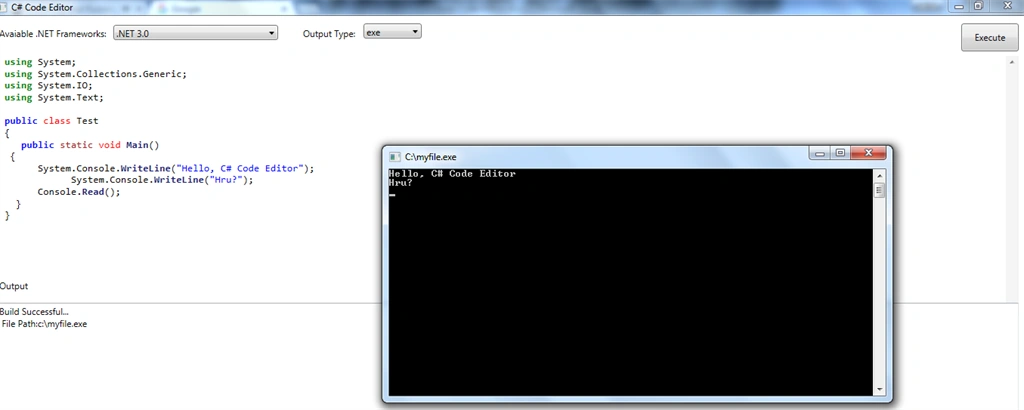
Figure 4: Run the App
We can further extend this application by providing options like adding reference to external assembly, edit\compile multiple files, intellisense support in AvalonEdit textbox etc. This application will save time in creating and running simple C# applications for our PoC or research activities. I am attaching source code for reference. I hope this article will be helpful for all.
Sibeesh VenuPosted Sep 10, 2015, 8:10 AM
Nice Share
Vipul MalhotraPosted Sep 10, 2015, 5:08 AM
nice
Rajeesh MenothPosted Sep 10, 2015, 1:32 AM
Nice One
Ankit BansalPosted Sep 10, 2015, 1:03 AM
good one..thanks...
Jaipal ReddyPosted Sep 9, 2015, 11:56 PM
Nice one sir.
Pankaj Kumar ChoudharyPosted Sep 9, 2015, 9:36 PM
Nice Explain Sir.........
Santhakumar MunuswamyPosted Sep 9, 2015, 3:17 PM
Thanks for nice article
Mohammed IbrahimPosted Sep 9, 2015, 2:04 PM
nice share
Karthikeyan KPosted Sep 9, 2015, 12:15 PM
Good one sir...Thanks for sharing us
RakeshPosted Sep 9, 2015, 12:06 PM
Good share sir