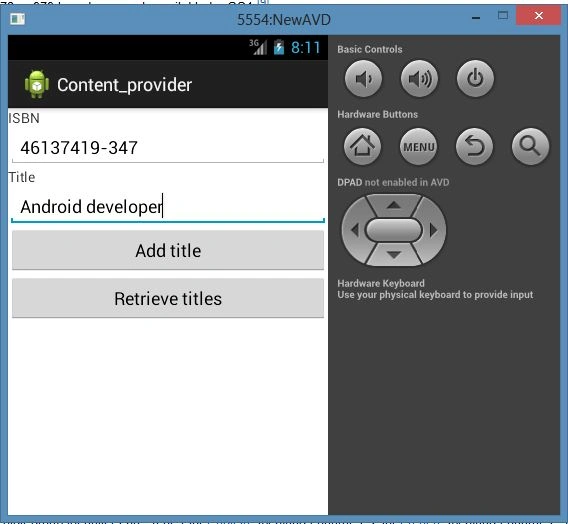
Introduction

In this article I explain what a content provider is. A content provider is a collection of information of which a provider uses a way to access itself using another application. For example Contacts is a content provider because whenever we text a message, we want to import a number from the contact, then the contact provides us access to itself through another app, smsApplication. But in this article I create my own content provider that will provide all the content that will be available in this content provider, as described in the following procedure.
Step 1
Create a new project as "File" -> "New" -> "Android Application Project" as shown below.
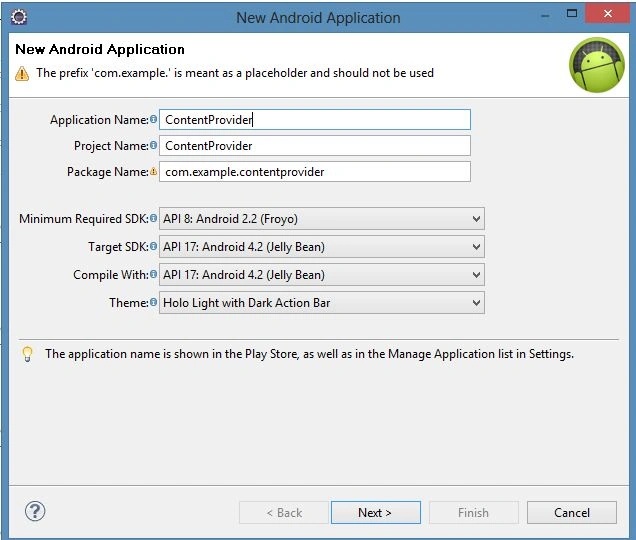
Content_provider.jpg
Step 2
Now open the XML file "res/layout/activity_main.xml" and update it as in the following code.
  1. <?xml version="1.0" encoding="utf-8"?>
  2. <LinearLayout xmlns:android="http://schemas.android.com/apk/res/android"
  3. android:orientation="vertical"
  4. android:layout_width="fill_parent"
  5. android:layout_height="fill_parent" >
  6. <TextView
  7. android:layout_width="fill_parent"
  8. android:layout_height="wrap_content"
  9. android:text="ISBN" />
  10. <EditText
  11. android:id="@+id/txtISBN"
  12. android:layout_height="wrap_content"
  13. android:layout_width="fill_parent" />
  14. <TextView
  15. android:layout_width="fill_parent"
  16. android:layout_height="wrap_content"
  17. android:text="Title" />
  18. <EditText
  19. android:id="@+id/txtTitle"
  20. android:layout_height="wrap_content"
  21. android:layout_width="fill_parent" />
  22. <Button
  23. android:text="Add title"
  24. android:id="@+id/btnAdd"
  25. android:layout_width="fill_parent"
  26. android:layout_height="wrap_content" />
  27. <Button
  28. android:text="Retrieve titles"
  29. android:id="@+id/btnRetrieve"
  30. android:layout_width="fill_parent"
  31. android:layout_height="wrap_content" />
  32. </LinearLayout>
Step 3
Open Java from "src/com.newandroid.project/MainActivity.java" and update it with the following code.
  1. package com.content_provider;
  2. import android.app.Activity;
  3. import android.os.Bundle;
  4. import android.util.Log;
  5. import android.view.View;
  6. import android.widget.Button;
  7. import android.widget.EditText;
  8. import android.widget.ListView;
  9. import android.widget.Toast;
  10. import android.content.ContentValues;
  11. import android.database.Cursor;
  12. import android.net.Uri;
  13. public class MainActivity extends Activity {
  14. /** Called when the activity is first created. */
  15. ListView lv;
  16. @Override
  17. public void onCreate(Bundle savedInstanceState) {
  18. super.onCreate(savedInstanceState);
  19. setContentView(R.layout.activity_main);
  20. ContentValues editedValues = new ContentValues();
  21. editedValues.put(ContentDiary.TITLE, "Android Tips and Tricks");
  22. getContentResolver().update(
  23. Uri.parse(
  24. "content://com.ContentDiary.provider.books/books/2"),
  25. editedValues,
  26. null,
  27. null);
  28. getContentResolver().delete(
  29. Uri.parse("content://com.ContentDiary.provider.books/books/2"),
  30. null, null);
  31. getContentResolver().delete(
  32. Uri.parse("content://com.ContentDiary.provider.books/books"),
  33. null, null);
  34. ListView lv=(ListView) findViewById(R.id.view);
  35. Button btnAdd = (Button) findViewById(R.id.btnAdd);
  36. btnAdd.setOnClickListener(new View.OnClickListener() {
  37. public void onClick(View v) {
  38. ContentValues values = new ContentValues();
  39. values.put("title", ((EditText) findViewById(R.id.txtTitle)).getText().toString());
  40. values.put("isbn", ((EditText) findViewById(R.id.txtISBN)).getText().toString());
  41. Uri uri = getContentResolver().insert(
  42. Uri.parse("content://com.ContentDiary.provider.books/books"),
  43. values);
  44. Toast.makeText(getBaseContext(),uri.toString(), Toast.LENGTH_LONG).show();
  45. }
  46. });
  47. Button btnRetrieve = (Button) findViewById(R.id.btnRetrieve);
  48. btnRetrieve.setOnClickListener(new View.OnClickListener() {
  49. public void onClick(View v) {
  50. //---retrieve the titles---
  51. Uri allTitles = Uri.parse(
  52. "content://com.ContentDiary.provider.books/books");
  53. Cursor c = managedQuery(allTitles, null, null, null, "title desc");
  54. if (c.moveToFirst()) {
  55. do{
  56. Log.d("ContentProviders",
  57. c.getString(c.getColumnIndex(
  58. ContentDiary._ID)) + ", " +
  59. c.getString(c.getColumnIndex(
  60. ContentDiary.TITLE)) + ", " +
  61. c.getString(c.getColumnIndex(
  62. ContentDiary.ISBN)));
  63. } while (c.moveToNext());
  64. }
  65. }
  66. });
  67. }
  68. }
Step 5
Create a new Java file "ContentDairy.java" as "src/com.content_provider/ContentDairy.java" and update it using the following code.
  1. package com.content_provider;
  2. import android.content.ContentProvider;
  3. import android.content.ContentUris;
  4. import android.content.ContentValues;
  5. import android.content.Context;
  6. import android.content.UriMatcher;
  7. import android.database.Cursor;
  8. import android.database.SQLException;
  9. import android.database.sqlite.SQLiteDatabase;
  10. import android.database.sqlite.SQLiteOpenHelper;
  11. import android.database.sqlite.SQLiteQueryBuilder;
  12. import android.net.Uri;
  13. import android.text.TextUtils;
  14. import android.util.Log;
  15. public class ContentDiary extends ContentProvider
  16. {
  17. public static final String PROVIDER_NAME =
  18. "com.ContentDiary.provider.books";
  19. public static final Uri CONTENT_URI =
  20. Uri.parse("content://"+ PROVIDER_NAME + "/books");
  21. public static final String _ID = "_id";
  22. public static final String TITLE = "title";
  23. public static final String ISBN = "isbn";
  24. private static final int BOOKS = 1;
  25. private static final int BOOK_ID = 2;
  26. private static final UriMatcher uriMatcher;
  27. static{
  28. uriMatcher = new UriMatcher(UriMatcher.NO_MATCH);
  29. uriMatcher.addURI(PROVIDER_NAME, "books", BOOKS);
  30. uriMatcher.addURI(PROVIDER_NAME, "books/#", BOOK_ID);
  31. }
  32. //---for database use---
  33. private SQLiteDatabase booksDB;
  34. private static final String DATABASE_NAME = "Books";
  35. private static final String DATABASE_TABLE = "titles";
  36. private static final int DATABASE_VERSION = 1;
  37. private static final String DATABASE_CREATE =
  38. "create table " + DATABASE_TABLE +
  39. " (_id integer primary key autoincrement, "
  40. + "title text not null, isbn text not null);";
  41. private static class DatabaseHelper extends SQLiteOpenHelper
  42. {
  43. DatabaseHelper(Context context) {
  44. super(context, DATABASE_NAME, null, DATABASE_VERSION);
  45. }
  46. @Override
  47. public void onCreate(SQLiteDatabase db)
  48. {
  49. db.execSQL(DATABASE_CREATE);
  50. }
  51. @Override
  52. public void onUpgrade(SQLiteDatabase db, int oldVersion,
  53. int newVersion) {
  54. Log.w("Content provider database",
  55. "Upgrading database from version " +
  56. oldVersion + " to " + newVersion +
  57. ", which will destroy all old data");
  58. db.execSQL("DROP TABLE IF EXISTS titles");
  59. onCreate(db);
  60. }
  61. }
  62. @Override
  63. public int delete(Uri arg0, String arg1, String[] arg2) {
  64. // arg0 = uri
  65. // arg1 = selection
  66. // arg2 = selectionArgs
  67. int count=0;
  68. switch (uriMatcher.match(arg0)){
  69. case BOOKS:
  70. count = booksDB.delete(
  71. DATABASE_TABLE,
  72. arg1,
  73. arg2);
  74. break;
  75. case BOOK_ID:
  76. String id = arg0.getPathSegments().get(1);
  77. count = booksDB.delete(
  78. DATABASE_TABLE,
  79. _ID + " = " + id +
  80. (!TextUtils.isEmpty(arg1) ? " AND (" +
  81. arg1 + ')' : ""),
  82. arg2);
  83. break;
  84. default: throw new IllegalArgumentException("Unknown URI " + arg0);
  85. }
  86. getContext().getContentResolver().notifyChange(arg0, null);
  87. return count;
  88. }
  89. @Override
  90. public String getType(Uri uri) {
  91. switch (uriMatcher.match(uri)){
  92. //---get all books---
  93. case BOOKS:
  94. return "vnd.android.cursor.dir/vnd.learn2develop.books ";
  95. //---get a particular book---
  96. case BOOK_ID:
  97. return "vnd.android.cursor.item/vnd.learn2develop.books ";
  98. default:
  99. throw new IllegalArgumentException("Unsupported URI: " + uri);
  100. }
  101. }
  102. @Override
  103. public Uri insert(Uri uri, ContentValues values) {
  104. //---add a new book---
  105. long rowID = booksDB.insert(
  106. DATABASE_TABLE,
  107. "",
  108. values);
  109. //---if added successfully---
  110. if (rowID>0)
  111. {
  112. Uri _uri = ContentUris.withAppendedId(CONTENT_URI, rowID);
  113. getContext().getContentResolver().notifyChange(_uri, null);
  114. return _uri;
  115. }
  116. throw new SQLException("Failed to insert row into " + uri);
  117. }
  118. @Override
  119. public boolean onCreate() {
  120. Context context = getContext();
  121. DatabaseHelper dbHelper = new DatabaseHelper(context);
  122. booksDB = dbHelper.getWritableDatabase();
  123. return (booksDB == null)? false:true;
  124. }
  125. @Override
  126. public Cursor query(Uri uri, String[] projection, String selection,
  127. String[] selectionArgs, String sortOrder) {
  128. SQLiteQueryBuilder sqlBuilder = new SQLiteQueryBuilder();
  129. sqlBuilder.setTables(DATABASE_TABLE);
  130. if (uriMatcher.match(uri) == BOOK_ID)
  131. //---if getting a particular book---
  132. sqlBuilder.appendWhere(
  133. _ID + " = " + uri.getPathSegments().get(1));
  134. if (sortOrder==null || sortOrder=="")
  135. sortOrder = TITLE;
  136. Cursor c = sqlBuilder.query(
  137. booksDB,
  138. projection,
  139. selection,
  140. selectionArgs,
  141. null,
  142. null,
  143. sortOrder);
  144. //---register to watch a content URI for changes---
  145. c.setNotificationUri(getContext().getContentResolver(), uri);
  146. return c;
  147. }
  148. @Override
  149. public int update(Uri uri, ContentValues values, String selection,
  150. String[] selectionArgs) {
  151. int count = 0;
  152. switch (uriMatcher.match(uri)){
  153. case BOOKS:
  154. count = booksDB.update(
  155. DATABASE_TABLE,
  156. values,
  157. selection,
  158. selectionArgs);
  159. break;
  160. case BOOK_ID:
  161. count = booksDB.update(
  162. DATABASE_TABLE,
  163. values,
  164. _ID + " = " + uri.getPathSegments().get(1) +
  165. (!TextUtils.isEmpty(selection) ? " AND (" +
  166. selection + ')' : ""),
  167. selectionArgs);
  168. break;
  169. default: throw new IllegalArgumentException("Unknown URI " + uri);
  170. }
  171. getContext().getContentResolver().notifyChange(uri, null);
  172. return count;
  173. }
  174. }
Step 6
Open and update the "AndroidManifest.xml" file from "res/AndroidManifest.xml" and update it as given below.
  1. <?xml version="1.0" encoding="utf-8"?>
  2. <manifest xmlns:android="http://schemas.android.com/apk/res/android"
  3. package="com.content_provider"
  4. android:versionCode="1"
  5. android:versionName="1.0" >
  6. <uses-sdk
  7. android:minSdkVersion="8"
  8. android:targetSdkVersion="17" />
  9. <application
  10. android:allowBackup="true"
  11. android:icon="@drawable/ic_launcher"
  12. android:label="@string/app_name"
  13. android:theme="@style/AppTheme" >
  14. <activity
  15. android:name="com.content_provider.MainActivity"
  16. android:label="@string/app_name" >
  17. <intent-filter>
  18. <action android:name="android.intent.action.MAIN" />
  19. <category android:name="android.intent.category.LAUNCHER" />
  20. </intent-filter>
  21. </activity>
  22. <provider android:name="ContentDiary"
  23. android:authorities="com.ContentDiary.provider.books" />
  24. </application>
  25. </manifest>
Step 7
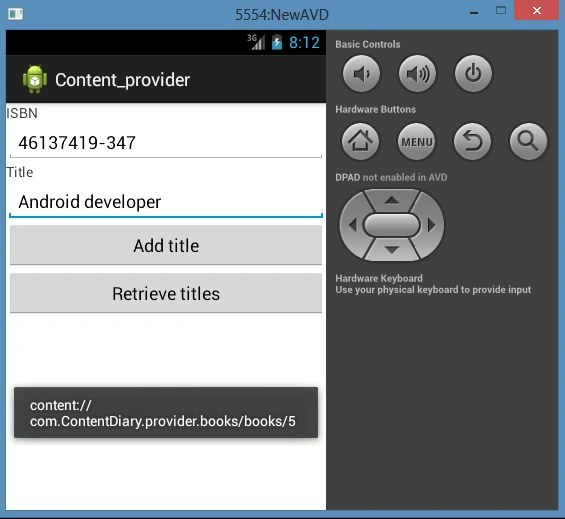
See the output:
isbn.jpg
You can use the URI "content://com.contentDAiry.provider.books/books/5" in another application.
uri_contentProvider.jpg