Now many websites or applications create captcha image text validation for new registration or security. We will see step by step how to create image text value validation for textbox data pass.
Step 1: Create catch image page with suitable name.

Figure 1: Image page
Step 2: Write Catch image code
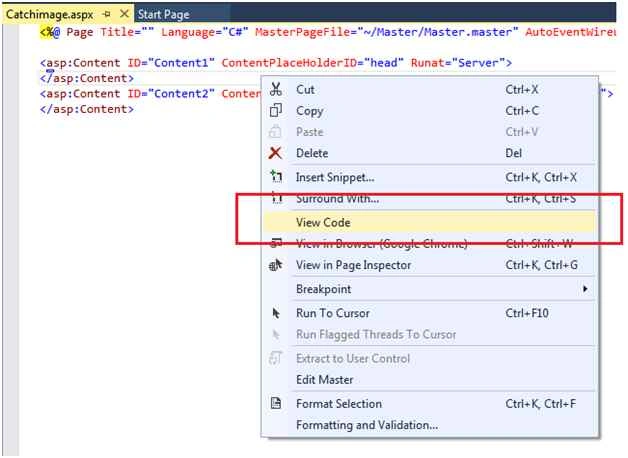
Figure 2: Catch image page
Now write the following code to create text image value on catchimage.aspx.cs page.
Catchimage.aspx.cs Code:
- using System;
- using System.Collections.Generic;
- using System.Linq;
- using System.Web;
- using System.Web.UI;
- using System.Web.UI.WebControls;
-
- using System.Drawing;
- using System.Drawing.Drawing2D;
- using System.Drawing.Imaging;
-
- public partial class UI_Catchimage : System.Web.UI.Page
- {
- protected void Page_Load(object sender, EventArgs e)
- {
- Response.Clear();
- int height = 50;
- int width = 100;
- Bitmap bt = new Bitmap(width, height);
-
- RectangleF rectf = new RectangleF(7, 5, 0, 0);
-
- Graphics grph = Graphics.FromImage(bt);
- grph.Clear(Color.White);
- grph.SmoothingMode = SmoothingMode.AntiAlias;
- grph.InterpolationMode = InterpolationMode.HighQualityBicubic;
- grph.PixelOffsetMode = PixelOffsetMode.HighQuality;
- grph.DrawString(Session["ImgValue"].ToString(), new Font("Times New Roman", 13, FontStyle.Regular), Brushes.Blue, rectf);
- grph.DrawRectangle(new Pen(Color.Red), 1, 1, width - 2, height - 2);
- grph.Flush();
- Response.ContentType = "images/download.png";
- bt.Save(Response.OutputStream, ImageFormat.Jpeg);
- grph.Dispose();
- bt.Dispose();
- }
- }
Step 3: Add Sing Up page.
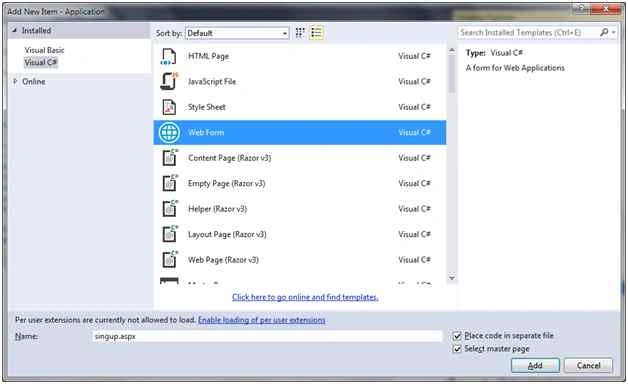 Figure 3:
 Add sign up Web form
Now write design code using some ASP.NET control like textbox control, button control, and image control to display text value as image and Ajax script manager control. Update panel control as in the following design code.
Singup.aspx design page: 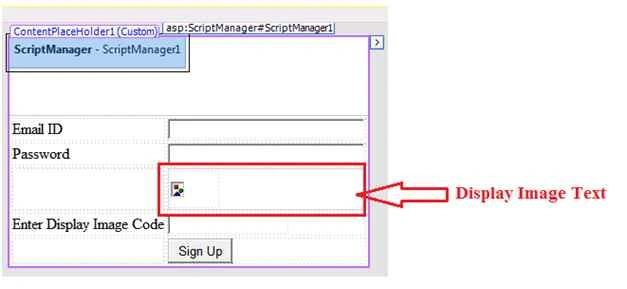 Figure 4:
 Design page
Design code:
- <%@ Page Title="" Language="C#" MasterPageFile="~/Master/Master.master" AutoEventWireup="true" CodeFile="singup.aspx.cs" Inherits="UI_singup" %>
-
- <asp:Content ID="Content1" ContentPlaceHolderID="head" Runat="Server">
- </asp:Content>
- <asp:Content ID="Content2" ContentPlaceHolderID="ContentPlaceHolder1" Runat="Server">
- <asp:ScriptManager ID="ScriptManager1" runat="server">
- </asp:ScriptManager>
- <div>
- <table style="border: solid 1px inherit; padding: 15px; position: relative; top: 50px;"
- >
- <tr>
- <td> Email ID </td>
- <td>
- <asp:TextBox ID="txtEmailID" runat="server" Width="200px"></asp:TextBox>
- </td>
- </tr>
- <tr>
- <td> Password </td>
- <td>
- <asp:TextBox ID="txtPassword" runat="server" TextMode="Password" Width="200px"></asp:TextBox>
- </td>
- </tr>
- <tr>
- <td>
- </td>
- <td>
- <asp:UpdatePanel ID="UpdateImage" runat="server">
- <ContentTemplate>
- <table>
- <tr>
- <td style="height: 40px; width:50px;">
- <asp:Image ID="btnImg" runat="server" />
- </td>
- </tr>
- </table>
- </ContentTemplate>
- </asp:UpdatePanel>
- </td>
- </tr>
- <tr>
- <td> Enter Display Image Code </td>
- <td>
- <asp:TextBox ID="txtImage" runat="server"></asp:TextBox>
- </td>
- </tr>
- <tr>
- <td></td>
- <td colspan="2">
- <asp:Button ID="btnRegiser" runat="server" Text="Sign Up" OnClick="btnRegister_Click" />
- </td>
- </tr>
- </table>
- </div>
- </asp:Content>
Now write the following code to display text image control from catchimage.aspx page to singup.aspx as in the following code:
Singup.aspx.cs code: - using System;
- using System.Collections.Generic;
- using System.Linq;
- using System.Web;
- using System.Web.UI;
- using System.Web.UI.WebControls;
- using System.Text;
-
- public partial class UI_singup : System.Web.UI.Page
- {
- protected void Page_Load(object sender, EventArgs e)
- {
- if (!IsPostBack)
- {
- FillImageText();
- }
- }
- void FillImageText()
- {
- try
- {
- Random rdm = new Random();
- string combination = "0123456789ABCDEFGHIJKLMNOPQRSTUVWXYZabcdefghijklmnopqrstuvwxyz";
- StringBuilder ImgValue = new StringBuilder();
- for (int i = 0; i < 5; i++)
- {
- ImgValue.Append(combination[rdm.Next(combination.Length)]);
- Session["ImgValue"] = ImgValue.ToString();
- btnImg.ImageUrl = "catchimage.aspx?";
- }
- }
- catch
- {
- throw;
- }
- }
- protected void btnRegister_Click(object sender, EventArgs e)
- {
- if (Session["ImgValue"].ToString() != txtImage.Text)
- {
- Response.Write("Invalid Image Code");
- }
- else
- {
- Response.Write("Valid Image Code");
- }
- FillImageText();
- }
-
- }
Now complete your code to run.
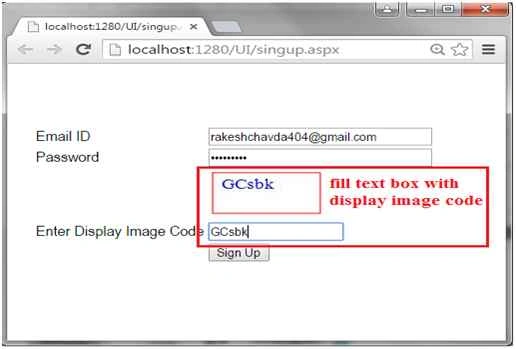 Figure 2:
 Match code
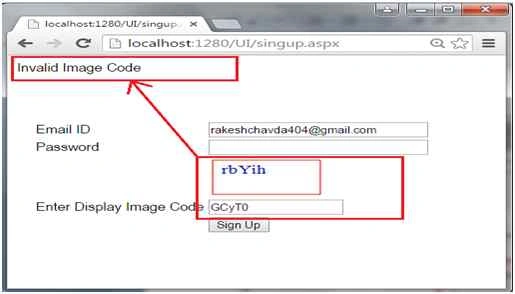 Figure 6:
 Mismatch code
I hope you understood how to create an image text value.


Pramod PeyyalaPosted May 11, 2018, 1:34 AM
It's Very Nice Artical
Santhakumar MunuswamyPosted Oct 18, 2015, 3:54 AM
Good one
Sibeesh VenuPosted Oct 12, 2015, 3:19 AM
Nice Share
Muhammad Aqib ShehzadPosted Oct 12, 2015, 3:11 AM
nice elaboration, good article
Humayun Kabir MamunPosted Oct 12, 2015, 12:45 AM
Nice...
Nilesh JadavPosted Oct 12, 2015, 12:07 AM
Good work on Captcha
Harshad PansuriyaPosted Oct 12, 2015, 12:00 AM
Nice one
Debendra DashPosted Oct 11, 2015, 2:11 PM
nice one.....
Praveen KumarPosted Oct 11, 2015, 12:52 PM
Awesome
Rajeesh MenothPosted Oct 11, 2015, 12:47 PM
Nice One..!!