
Introduction:
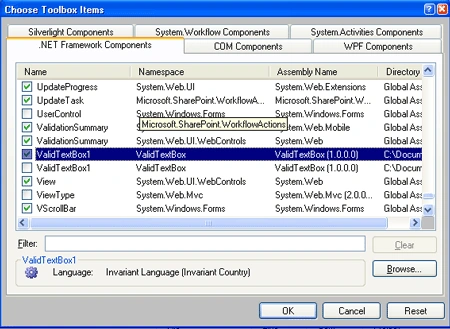
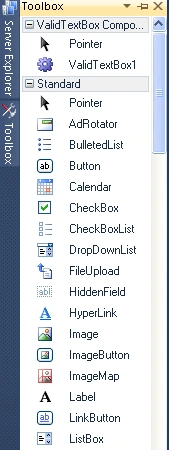
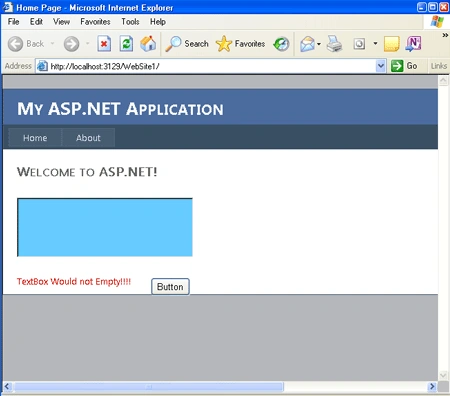
Now we are going to discuss about how to create a custom web control in ASP.NET. How do we create and use them in ASP.NET web site application? As we know, a custom control is a control made by the user for a specific purpose and later we can use it in our application. In this article we are going to see how we can create and implement a custom web control. Now we are going to make a required valid Textbox value which checks that the Text box has the value or not, if not then it will give an error that it cannot not be empty. This web control will inherit from the Textbox web control, and will automatically add a required field validator at run-time. We will just define an Instance of the required field validator.
Let see how we create and use it:
Step 1: Now create a web server control application
-
First go to File->New->Project->ASP.NET Server Control
-
Name it as Valid Text box
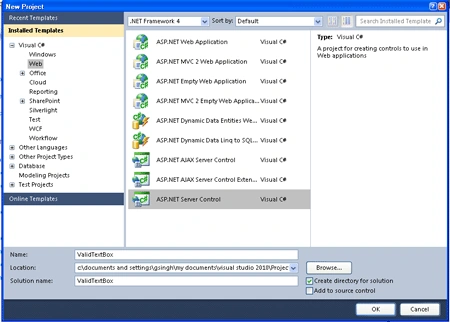
Step 2: Code of the Class to validate the Textbox's Text
Code :
using
System;
using
System.Collections.Generic;
using
System.ComponentModel;
using
System.Linq;
using
System.Text;
using System.Web;
using
System.Web.UI;
using
System.Web.UI.WebControls;
namespace
ValidTextBox
{
[DefaultProperty("ch")]
[ToolboxData("<{0}:ValidTextBox1
runat=server></{0}:ValidTextBox1>")]
public class
ValidTextBox1 :
TextBox
{
[Bindable(true)]
[Category("Appearance")]
[DefaultValue("")]
[Localizable(true)]
public string
ch
{
get
{
String s = (String)ViewState["ch"];
return ((s ==
null) ? "[" +
this.ID + "]"
: s);
}
set
{
ViewState["ch"] =
value;
}
}
private
RequiredFieldValidator rfv;
public string
NotValid;
public string
C_Script = "true";
Bhuvan PandeyPosted Jul 13, 2016, 6:01 AM
Hi Sapna. Thanks to share this article. But I try to execute the same code but code is not working. Even I don't know, how to pass "TextBox would not empty" error message.
Vipul MalhotraPosted Jun 29, 2015, 3:32 AM
Nice article..Thanks for sharing
FAROOKH MANSURIPosted Jun 9, 2015, 1:29 AM
Hi Sapna , It's nice article...
Vishnu BhangalePosted Feb 6, 2015, 3:50 AM
sir it give me an error like Control 'ServerControl1' referenced by the ControlToValidate property of '' cannot be validated
vilas jadhavPosted Jun 18, 2014, 9:36 AM
code is not working ...please send me working code
Rajkumar PalnatiPosted Mar 8, 2013, 6:12 AM
Hi, Very Good Example.. I have created it as same the thing is problem at "protected override void On_Init(EventArgs e)" and later i correted that now i'm not getting any validation message pls send me detailed information about this on [email protected] Thanks in Advance
Santosh YadavPosted Mar 2, 2013, 3:22 AM
very nice article.. Thanks.
nguyen DCPosted Feb 18, 2013, 6:16 AM
Hi, Sapna. I have created a question here: http://www.c-sharpcorner.com/forums/thread/201763/how-to-create-many-tags-in-one-tag-using-webcontrol-in-asp.aspx Please help me if pleasure, thanks so much.
nguyen DCeditedPosted Feb 18, 2013, 6:04 AMEdited Feb 18, 2013, 6:06 AM
Hi, Sapna. I want to create a webcontrol with result like below: <myControls:MyGraph id="myGraph1" runat="server"> <Colors> <myControls:ColorD Value="#abcdef" /> <myControls:Color> Blue </myControls:Color> <myControls:ColorD Value="#1ad234" /> <myControls:ColorD Value="#123456" /> </Colors> </myControls:MyGraph> and I want to know the order of them too.May you help me about this? Thanks and best regards, Nguyen DC
amir sajjadiPosted Jan 31, 2013, 12:36 PM
THANK YOU. NOT WORK IN VB.NET !!!
Anil KumarPosted Oct 20, 2011, 2:09 AM
Nice One...