

Introduction
Today we will create page navigation in Windows Store apps. In Windows Store apps, page navigation allows you to navigate between two pages or more than two pages. To implement page navigation in Windows Store apps you must use the Navigation method of the Frame class. In the navigation method we put the page name where you want to create a navigation link.
Step 1
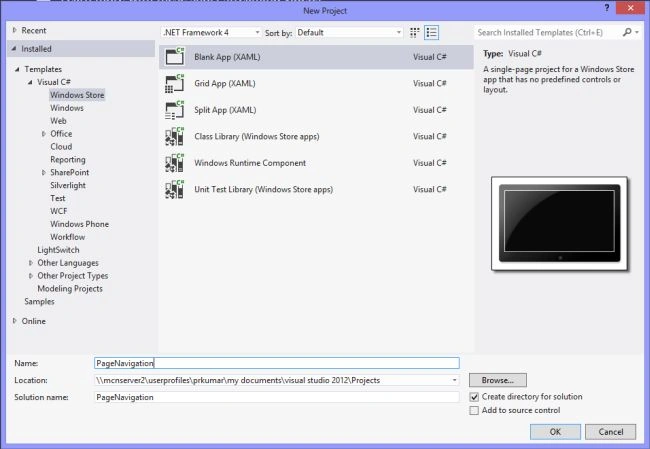
Open Visual Studio 2012 and create a Windows Store app project.
Step 2
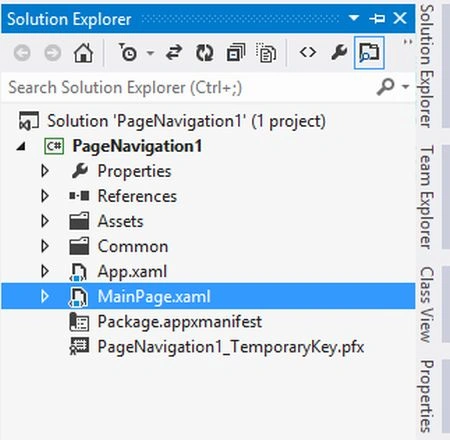
Go to Solution Explorer and double-click on "MainPage.xaml".
Step 3
The "MainPage.xaml" page is as in the following code:
<Page
x:Class="PageNavigation1.MainPage"
xmlns="http://schemas.microsoft.com/winfx/2006/xaml/presentation"
xmlns:x="http://schemas.microsoft.com/winfx/2006/xaml"
xmlns:local="using:PageNavigation1"
xmlns:d="http://schemas.microsoft.com/expression/blend/2008"
xmlns:mc="http://schemas.openxmlformats.org/markup-compatibility/2006"
mc:Ignorable="d">
<Grid Background="{StaticResource ApplicationPageBackgroundThemeBrush}">
Join the conversation! Your thoughts help the community grow.