

In this article, I will explain how to create a one-time connection string in a Windows Forms form without using ConfigurationManager properties. Suppose you want to create a connection string in the app.config file. Then what are the steps required for that? Let us keep this simple. First we add a connection string in the app.config file. Then we write simple code as in the following:
<connectionStrings>
<add name="connectionstr" connectionString="Data Source=MCNDESKTOP43;Initial Catalog=EmpDetail;Persist Security Info=True;User ID=sa;Password=*****"
providerName="System.Data.SqlClient" />
</connectionStrings>
Then what we do in the C# page is we just add a namespace "using System.Configuration;" and we write the following code:
string connstr = ConfigurationManager.ConnectionStrings["connectionstr"].ToString();
The string variable named "connstr" will then have the connection string.
For example: SqlDataAdapter da = new SqlDataAdapter("sql auery",connstr);
Note that most experienced programmers prefer to use this approach. Use the following procedure.
Step 1
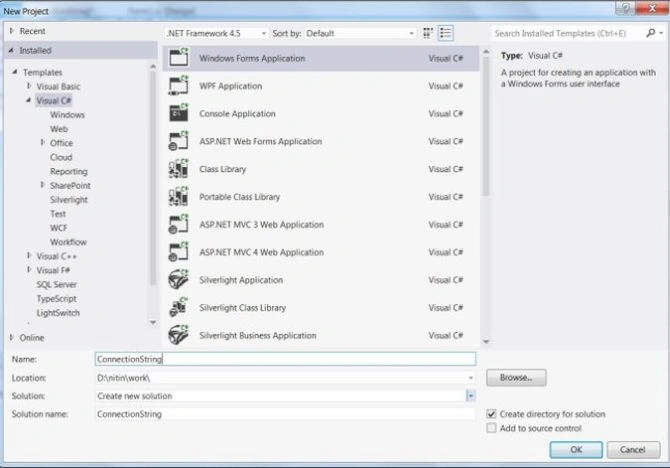
Open Visual Studio 2012 and click "File" -> "New" -> "Project...". A window is opened. In this window, click Windows Forms Application under Visual C#.
Give the name of your application as "ConnectionString" and then click OK.
Step 2
After Step 1, a new window is opened on the right side. This window is called the Solution Explorer. The Solution Explorer contains the properties, App.config file, References, Form1.cs file and Program.cs file as in the following:

Step 3
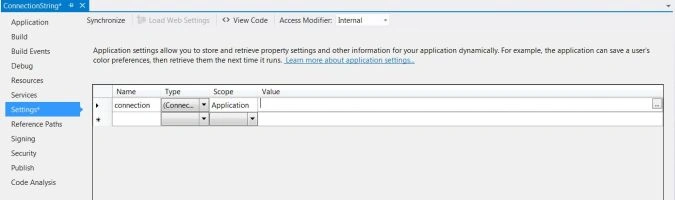
Just go to the "Properties" node then double-click on "Settings.Settings". You will then get a grid with columns for Name, Type, Scope and Value as in the following:

Step 4
Now, specify a name, then click in the Type cell. In the drop-down box choose "Connection String". Then set the Scope to "Application".
Step 5
Then click in the value cell and an ellipsis ("...") will appear in the right. Click on the ellipsis and create the connection string.


Usman AzamPosted Apr 16, 2018, 5:56 AM
That is easy way to connection string
SubashPosted Sep 7, 2016, 2:02 AM
Very useful for me
SubashPosted Sep 7, 2016, 2:02 AM
Thank you
jyothi kunaPosted Jul 25, 2016, 3:54 AM
Can i use string as scope type and value as null
GokulPosted Jun 20, 2016, 6:25 AM
this very help for me
minakshi mohapatraPosted Jan 15, 2014, 4:17 AM
use the gridview control from the toolbox & accordingly write the code for insert, update & delete operation.
sunil dhundePosted Jul 17, 2013, 1:00 PM
sir can you please tell me how to use app.conifg connection string for inserting updataing and deleting the records too in c#.net pls asap
Sharad GuptaPosted Mar 18, 2013, 5:54 AM
nice one nitin