

In this article we will look at how multiple teams can be created from data present in a CSV file. We will be using Teams PowerShell to achieve this.
System Assumptions
This script will be executed in a Windows machine, with the Teams creation instructions being read from an CSV file. PowerShell ISE will be used to execute the commands and scripts.
Input File
This is the scenario. The CSV input file contains 15 teams with their details like – Team name, Team description, Visibility and owner of the team. We will use this data as the input for creating our teams via a PowerShell script.
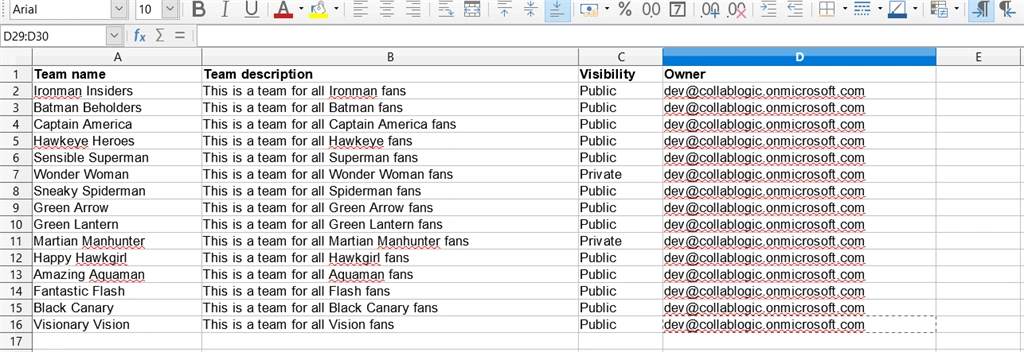
Command for creating a team
The command for creating a team via PowerShell is shown below.
New-Team -DisplayName "My Dummy Team" -Description "This is a dummy team" -Owner "[email protected]" -Visibility Public
The above cmdlet creates a new team with parameters we specify and returns a Group object with a GroupID property. Along with this, an associated O365 Unified Group is also created to back the team.
To get more details about this command, run this below cmdlet to view the detailed help.
Get-Help New-Team
Script for bulk creation of teams
The script that will create the teams from input file is as follows,
- #Connnect to Microsoft Teams
- $connection = Connect - MicrosoftTeams
- try {
- #CSV File Path.Change this location accordingly
- $filePath = "C:\Users\Satya\Desktop\CreateBulkTeams.csv"
- #read the input file
- $loadFile = Import - Csv - Path $filePath
- foreach($row in $loadFile) {
- $teamName = $row.
- 'Team name'
- $teamDescription = $row.
- 'Team description'
- $teamOwner = $row.Owner
- $teamVisibility = $row.Visibility
- #create the team with specified parameters
- $groupID = New - Team - DisplayName $teamName - Owner $teamOwner - Description $teamDescription - Visibility $teamVisibility
- Write - Host "Team "
- $teamName " created successfully..."
- }
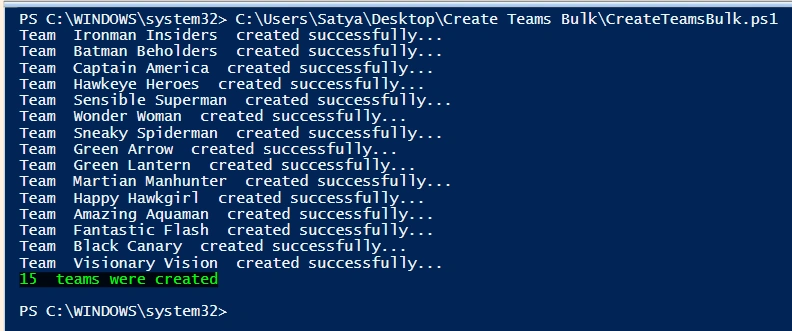
- Write - Host $loadFile.Count " teams were created" - ForegroundColor Green - BackgroundColor Black
- } catch {
- Write - Host "An error occurred:"
- Write - Host $_
- }
Patrick SazonPosted Dec 13, 2021, 5:39 AM
Not working.
Xin WangPosted Jan 17, 2021, 12:36 PM
Appreciate it! It's a great post to learn.