

What are UDFs in Hive?
In Hive, users can define their own functions to meet certain requirements, which is what we often call user-defined functions(UDFs).
And we can pretty much create a function in any language and plug it into our Hive query using the Hive TRANSFORM clause.
TRANSFORM helps us to add our own mappers and reducers to process the data.
In this article, we will learn how to create Hive UDF with C#.
Normal Hive Query
Before we get started, let's do some preparatory work for the later examples to demonstrate.
Create a new table named ods.t_test
create EXTERNAL table IF NOT EXISTS ods.t_test(
id int,
name string,
phone string
)
ROW FORMAT DELIMITED FIELDS TERMINATED BY '\t'
lines terminated by '\n'
stored as textfile ;
Insert a small amount of data.
insert into `ods`.`t_test`(id, name, phone)
values(1, 'cat', '123'), (2, 'dog', '456');
Here's the regular SQL we wrote in hive.
select id, name, phone
from ods.t_test
limit 10;
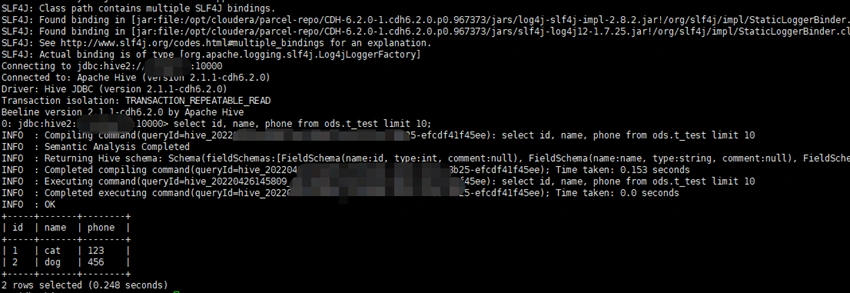
Next, we try to customize a UDF in C#, and add prefix for output results from the Hive query.
Create C# Custom UDF
What we need to do is actually very simple:
- Read the result of the query from the standard input
- Parse the result of the query
- Add prefix for the parsed data or other operation you want
- Put the new data into the standard output
public class Program
{
    public static void Main(string[] args)
    {
        // work with multi command
        var p = "raw";
        if (args.Length > 0)
        {
            p = args[0];
        }

        string line;
        try
        {
            // receiving each record passed in from Hive via stdin
            while ((line = Console.ReadLine()) != null)
            {
                line = line.TrimEnd('\n');

                Handle(line, p);
            }
        }
        catch (Exception ex)
        {
            //bad format or end of line so do nothing
        }
    }

    private static void Handle(string input, string type)
    {
        // different handler for cmds
        if (type.Equals("raw", StringComparison.OrdinalIgnoreCase))
        {
            RawHandle(input);
        }
        else if (type.Equals("pre", StringComparison.OrdinalIgnoreCase))
        {
            AddPrefixHandle(input);
        }
        else
        {
            RawHandle(input);
        }
    }

    public static void AddPrefixHandle(string input)
    {
        // columns delimited by \t
        var field = input.Split('\t');

        var builder = new StringBuilder(512);

        for (int i = 0; i < field.Length; i++)
        {
            builder.Append($"pre-{field[i]}\t");
        }

        Console.WriteLine(builder.ToString().TrimEnd('\t'));
    }

    public static void RawHandle(string input)
    {
        // columns delimited by \t
        var field = input.Split('\t');

        var builder = new StringBuilder(512);

        for (int i = 0; i < field.Length; i++)
        {
            builder.Append($"{field[i]}\t");
        }

        Console.WriteLine(builder.ToString().TrimEnd('\t'));
    }
}

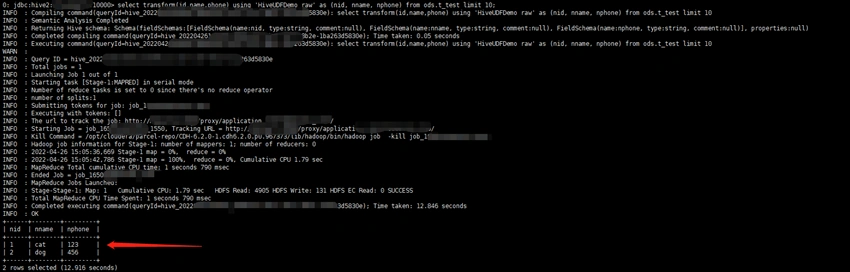
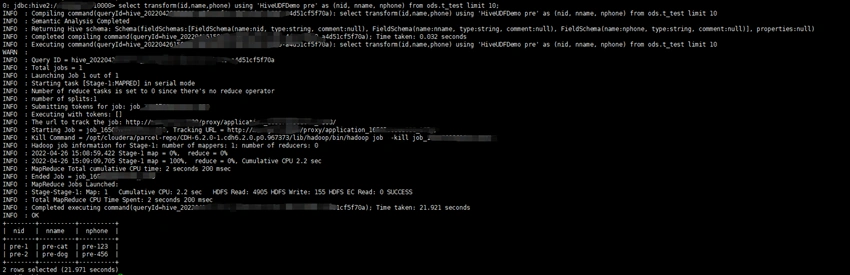
Join the conversation! Your thoughts help the community grow.