Abstract
In this article I built a small Windows Forms application that enables users to enter data into textboxes, save the data in a Word template and then export the Word template as a new Word or PDF file using the free Spire.Doc.
Introduction
In many situations, we could often be asked to fill out various kinds of forms that are launched by organizations such as a hospital, a school, a company or an investigation agency. Would it be possible for me to create a Windows Forms application that automatically generates a Word format file based on user's information? This idea eventually drove me to find a solution with a .NET Word API, the free Spire.Doc and share the scenario here in this article.
As I have shown in the abstract, the method in this solution can be very simple.
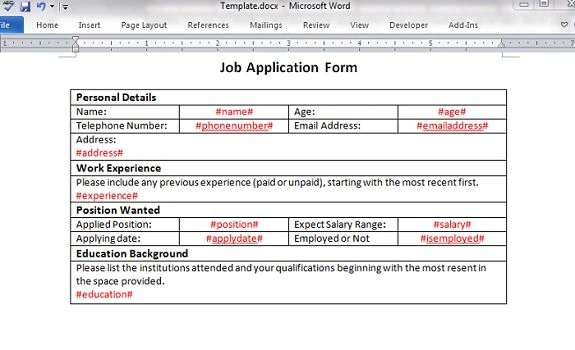
- First, I get a Word template prepared in which there are some strings preset between two “#" symbols.
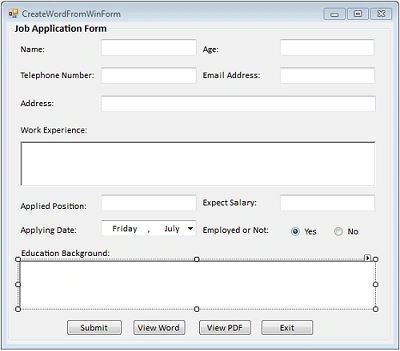
- Create a Windows Forms application to capture the personal data of users that will be used to replace the strings in the Word template.
- Finally, export the Word template as a new Word file or PDF file.
The below picture shows the Word template:
Creating the User Interface
Using the Code
Import necessary namespaces into the project.
- using System.IO;
- using Spire.Doc;
Add the following code to the Submit click event. As you can see from the code snippet, the
LoadFormFile(string fileName) method is called to load the Word template and another method
SaveToFile(string fileName, FileFormat fileFormat) is called to save the file as a new Word file or PDF file. Also Spire.Doc provides an easy method
Replace(string matchString,
string newValue,
bool caseSensitive, bool wholeWord) to replace the match string in the Word document with a new string.
-
- document = new Document();
- document.LoadFromFile(samplePath);
-
- Dictionary<string, string> dictReplace = GetReplaceDictionary();
-
- foreach (KeyValuePair<string, string> kvp in dictReplace)
- {
- document.Replace(kvp.Key, kvp.Value, true, true);
- }
-
- document.SaveToFile(docxPath, FileFormat.Docx);
-
- document.SaveToFile(pdfPath, FileFormat.PDF);
- MessageBox.Show("All tasks are finished.", "doc processing", MessageBoxButtons.OK, MessageBoxIcon.Information);
- document.Close();
In the code above,
GetReplaceDictionary() is a custom function predefined as below. By invoking this method, a Dictionary is established in which preset strings are stored as the Key and text box values are stored as the Value.
- Dictionary<string, string> GetReplaceDictionary()
- {
- Dictionary<string, string> replaceDict = new Dictionary<string, string>();
- replaceDict.Add("#name#", txtName.Text.Trim());
- replaceDict.Add("#age#",txtAge.Text);
- replaceDict.Add("#address#", txtAddress.Text.Trim());
- replaceDict.Add("#phonenumber#",txtPhonenumber.Text);
- replaceDict.Add("#emailaddress#",txtEmailaddress.Text);
- replaceDict.Add("#experience#", txtExperience.Text.Trim());
- replaceDict.Add("#position#", txtPosition.Text.Trim());
- replaceDict.Add("#salary#", txtSalary.Text);
- replaceDict.Add("#applydate#",dateTimePicker.Text);
- string isEmployed= this.radio_isEmployed_Yes.Checked ? "Yes" : "No";
- replaceDict.Add("#isemployed#", isEmployed);
- replaceDict.Add("#education#", txtEducation.Text.Trim());
-
- return replaceDict;
- }
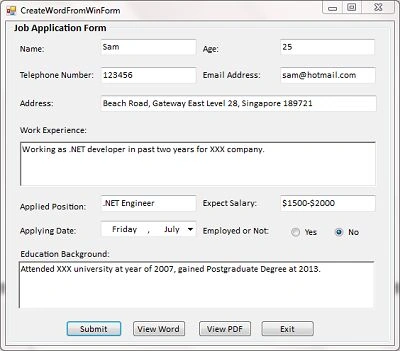
Run the program and insert data as follows:
Output
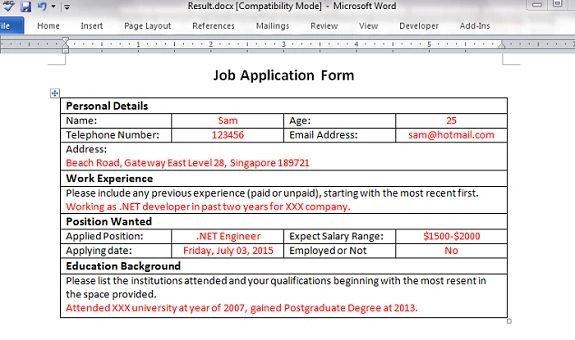
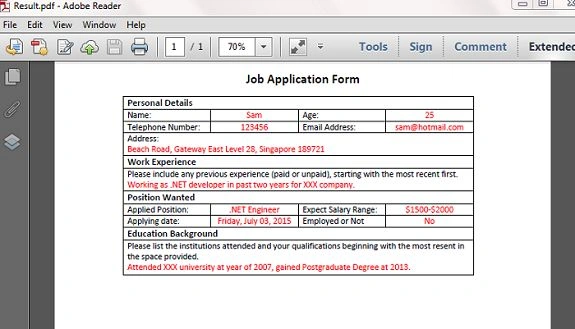
Click Submit, the program will automatically generate the Word and PDF files based on the user's information. Click View Word and View PDF to get the following results.
Note
Microsoft Word or Adobe Acrobat is not required to be installed on the system, but you need a Word viewer and PDF reader to view the file generated by Spire.Doc.
Thanks for reading and I hope you find this article helpful.


NURU DAWUDPosted Mar 29, 2023, 1:56 PM
Urgent, Please replay everyone! I have used this demo for my c# desktop application with Access database. It works fine when I run on visual studio but after changed to .exe file it puts 0 for every report. What shall I do?
Godfrey MapundaPosted Oct 30, 2022, 6:02 PM
Hi..i have been passing through this article and i'e tried to create the similar application to this.....but unfortunately when i use those odes on visual studio 2022........they bring nothing....
husin hashimPosted Aug 19, 2020, 8:33 AM
Is there an example like this but on an excel sheet instead of word document
Yasser ZaidPosted Sep 23, 2019, 11:50 PM
How can we apply this with repeated data in table
Antony BrunoPosted Feb 2, 2019, 4:33 AM
Try to zetword.com- this an advance word document processing API for .NET application
Maja HPosted Dec 18, 2018, 9:44 AM
Thanks for sharing this, Susan.
nanda vishalPosted Jun 12, 2018, 4:22 AM
I want to pass data from gridview daynamaclly how ??
Hayeenawhere HasanPosted Feb 7, 2018, 7:31 AM
Hello, I am a starter, can u plz provide me a similar program but instead we input the data in one textbox and it assign to places
Huynh HiPosted Jan 18, 2018, 9:05 AM
How to set font for word. that is Times New Roman
YoganjulaReddy GangarapuPosted Jun 9, 2017, 4:30 AM
Great Tutorial............Thank you....
Vinay KPosted Apr 10, 2017, 3:45 AM
Nice to share... Good article
Divahar RobinsonPosted Mar 8, 2017, 1:40 PM
Hello Susan. Thanks for the tutorial. Good one ! I tried using the community edition of the SPIRE DOC library, I find it super easy and pretty powerful. But at the same time, in thier website they have a friendly reminder as below, +++++++"Friendly Reminder: Free version is limited to 500 paragraphs and 25 tables. This limitation is enforced during reading or writing files. When converting word documents to PDF and XPS files, you can only get the first 3 page of PDF file"+++++ Does it mean that we can't use files that has more than 500 Paragraphs and 25 tables [talking about the file size] ?. Or its the total number of paragraphs that we can process throughout our entire work. Could you please throw some light if you got an insight about it. Best, Sahaya Divahar
Pritam ZopePosted Mar 2, 2017, 9:11 AM
Great one Susan....
AnkushPosted Jan 20, 2016, 2:47 AM
Susan, I have used the above code and modified as per my requirement, but I have one query i.e. after printing / transferring data to pdf or doc, the file is opened after creation, which I don't want as I have code to silently print the file. The file which is generated should not open and if possible can I delete it?
AnkushPosted Jan 20, 2016, 2:36 AM
Use the code this way to resolve ur query. I my self have used the above code to print in doc and pdf format,but I modified the code, as I wanted to transfer data from Data Gridview Dictionary<string, string> GetReplaceDictionary() { Dictionary<string, string> replaceDict = new Dictionary<string, string>(); replaceDict.Add("#name#", dgvReport.Rows[0].Cells[1].Value.ToString()); replaceDict.Add("#age#", dgvReport.Rows[1].Cells[1].Value.ToString()); replaceDict.Add("#address#", dgvReport.Rows[2].Cells[1].Value.ToString()); replaceDict.Add("#phonenumber#", dgvReport.Rows[3].Cells[1].Value.ToString()); return replaceDict; }
fabio botelhoPosted Jan 19, 2016, 6:33 PM
Susan I would you like some insite of you about how to export my datagridview itens to the table into word document. I tried to use Dictionary class but I get an error. How could I do this? Do you have some ideia to share?
AnkushPosted Jan 19, 2016, 4:00 AM
Is it possible to do without using spire.dll?
Heru WandiraPosted Sep 9, 2015, 2:08 AM
Thank you so much Susan. Very useful article!
Eranga TennakoonPosted Aug 11, 2015, 9:21 AM
Thanks you, this is nice article. I've a question, is this couple with any kind of license? Can you please explain me what's this spire.dll is?
Nilesh JadavPosted Jul 13, 2015, 7:01 AM
Good Article sir
Vipul MalhotraPosted Jul 13, 2015, 5:50 AM
Nice Article
Pankaj Kumar ChoudharyPosted Jul 13, 2015, 5:14 AM
Nice Start mam.......
Debasis SahaPosted Jul 13, 2015, 4:43 AM
Nice Article..
Neeraj KumarPosted Jul 13, 2015, 3:56 AM
Good one
Sanjay KumarPosted Jul 13, 2015, 3:34 AM
Nice Article! Susan Wong
Brian WheldalePosted Jul 7, 2015, 3:12 AM
This is so neat! It's also exactly what I need to know right now. It made me smile, thank you so much. :)
Faruk YildizPosted Jul 7, 2015, 2:02 AM
Thanks, nice sharing. Good working.
Susan WongPosted Jul 7, 2015, 1:52 AM
Thanks to all of you for reading my article.
Neeraj KumarPosted Jul 7, 2015, 1:22 AM
Good one
Sibeesh VenuPosted Jul 7, 2015, 12:50 AM
Nice Article! Thanks for sharing
SharadPosted Jul 7, 2015, 12:18 AM
nice article...
Gopi ChandPosted Jul 6, 2015, 10:41 PM
Good effort..welcome