

Advantages of Plugins
We can see lots of plugin enabled applications for example Winamp. The plugin enable application provides the following flexibilities:
- Reduced Size in Initial Deployment
- Incrementing the modules as plugins
- Customers can be benefited by choosing plugin modules thus reduction in cost
How Plugins works?
There will be 3 components in a plugin architecture application.
- Plugin container
- Plugin interface
- Plugins
The plugin container will serve as the host holding all plugins found in runtime.
The plugin interface provides as a standard of communication between the container and plugins.
The plugins are the actual piece of software which are located and loaded by the plugin container.
Execution
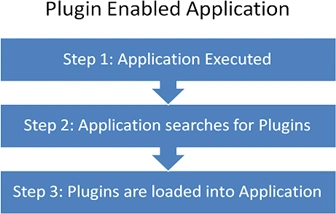
The plugin enabled application executes as depicted in the image below. After the application is executed, it will search for the plugins of associated interfaces. If any plugins are found they are instantiated and loaded into the application.
Diving into the Code
I hope we have had enough of theories. Now let us focus on how to build the actual code. In our example, we are trying to load plugins which contains forms. There is one Plugin.Core application which will perform as the plugin container and n number of plugin dlls which contain the forms.
Each form found will have a display name so that we can show it in the toolbar.
Component 1: Plugin Container .exe
This is a Windows Forms Application containing the main form to contain the plugins.
Component 2: Plugin. Interface.dll
This would be a Class Library containing the IPlugin interface.
public interface IPlugin
{
string Text { get; }
Form Form { get; }
Color BackColor { get; }
}
There will be a PluginLoader class which basically takes care of finding the plugins in a given folder and loading them into the system.
Component 3: BlueForm.Plugin.dll
This will be a Class Library project containing the plugins. The plugins are nothing other than classes which implements the IPlugin interface.
In our project, we are creating a plugin class named BlueFormPlugin which holds a form.
Note
For the time being I have used Windows Forms for a plugin example, but we can extend the same idea to ASP.NET, WPF, Windows Mobile applications too.
Summary
In this article the basic components of building the Plugin based application is explained. In the next part we can see the inner details of how the plugin can be identified and loaded into the application using Reflection.
Next Part
You can view the next part here.
Manav PandyaPosted Nov 13, 2016, 8:34 AM
Provide demo with ASP.NET MVC if possible sir Jean Paul sir ...
Manav PandyaPosted Nov 13, 2016, 8:34 AM
Can you help me with Plugin architecture with ASP.NET for E-commerce App Jean Paul
Manav PandyaPosted Nov 13, 2016, 8:33 AM
Nice article by thw way jean sir
Jean PaulPosted Nov 3, 2012, 6:23 PM
Yeah! Sam you are right. The PluginLoader.cs is no longer needed in the Plugin.Container project. (it was moved to the Plugin.Interface) project. Removing the file, makes it run properly.
Sam HobbseditedPosted Nov 3, 2012, 5:22 PMEdited Nov 3, 2012, 5:43 PM
In the attached zip file, the PluginLoader.cs file was missing from the Plugin.Container project. I removed it from the project and I think that worked. If we should not do that then please let us know what to do, otherwise I hope this comment is enough for people to know what to do. I am reading your articles and I hope I am able to use your plugin system.
David VillaPosted May 15, 2011, 8:52 AM
This is an excellent article. Plugin enabled applications are useful in many situations, but I have always thought they would be too difficult to implement. After reading this article, I now realise how easy they actually are. Thank You.