

Introduction
This article discusses the approach I used to develop a mobile version for a
Sharepoint 2010 publishing portal, after a lot of research I found that
Sharepoint out of the box features will not fit my business needs, so you will
find in this article the approach I used.
Note: I'm not sure that this is the best way to develop a mobile version for
sharepoint portal so feel free to send me your feedback and comments if you have
a better approach.
Sharepoint 2010 Mobile support limitations
Sharepoint 2010 has a mobile support but after research we found the following
limitations
- Sharepoint 2010 doesn't allow to create a
custom master page for your mobile site
- Sharepoint doesn't allow creating custom
style sheet and classes for mobile
- Publishing portal template is not
supported
- Any layout or any customization in the master pages will affect all other sites on the same farm
The Approach Used in My project
- Disable SharePoint default mobile
redirection feature to stop the redirection to the mbllists.aspx page.
- Create Http Module which detects that the
request is coming from a Mobile device and redirect to the Mobile home page.
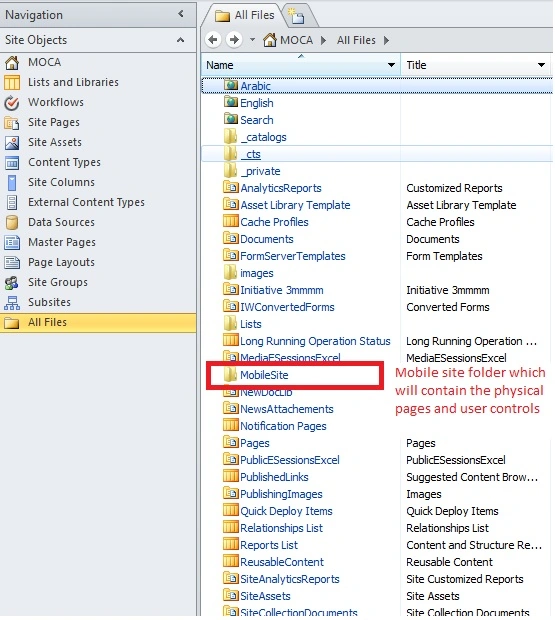
- Create a new sub site for mobile with an
optimized master page and layouts for mobile. (Physical pages and user
controls).
- Multilanguage support
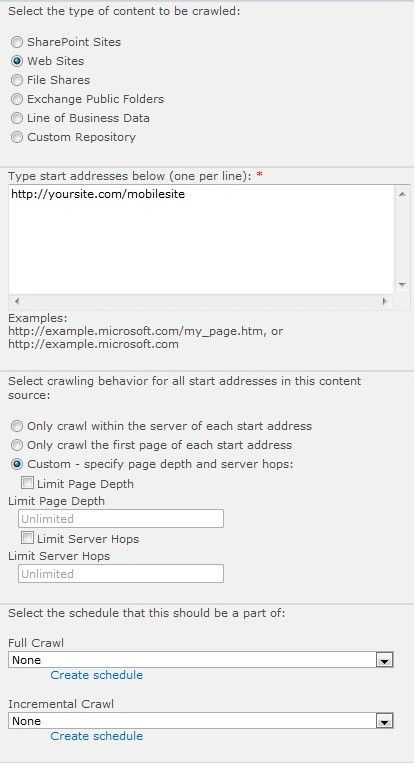
- Create the Search Control and search
result page from scratch (Querying the Crawler results).
- Create optimized style sheets and Masterpage for mobile.
Limitations of this approach
- The customer will not be able to create
any pages for the mobile site from the back end
- The customer will not be able to create
any subsites for the mobile site from the back end
- Will not be able to use SharePoint search, and the way around is to use SharePoint API and create the search controls and the result page from scratch.
The following sections will explain how to implement each point
1. Disable SharePoint default mobile
redirection feature to stop the redirection to the mbllists.aspx page
a. Open compat.browser file you will find it in the following directory
C:\inetpub\wwwroot\wss\VirtualDirectories\[port number]\App_Browsers
b. change isMobileDevice for each browser from True to False and save the file.
Example
<capabilities>
<capability name="isMobileDevice" value="false" />
<capability name="platform" value="WinCE" />
<capability name="supportsTouchScreen" value="true" />
</capabilities>
2. Create Http Module which detects that the request is coming from a Mobile
device and redirect to the Mobile home page
This is a normal Http Module which detects that the request is coming from a
mobile phone and redirect to the mobile site
Sample function used in the Module
public
static bool
isMobileBrowser()
{
//GETS THE CURRENT
USER CONTEXT
HttpContext context = HttpContext.Current;
//FIRST TRY BUILT IN ASP.NT CHECK
if (context.Request.Browser.IsMobileDevice)
{
return
true;
}
//THEN TRY CHECKING
FOR THE HTTP_X_WAP_PROFILE HEADER
if (context.Request.ServerVariables["HTTP_X_WAP_PROFILE"]
!= null)
{
return
true;
}
//THEN TRY CHECKING
THAT HTTP_ACCEPT EXISTS AND CONTAINS WAP
if (context.Request.ServerVariables["HTTP_ACCEPT"]
!= null &&
context.Request.ServerVariables["HTTP_ACCEPT"].ToLower().Contains("wap"))
{
return
true;
}
//AND FINALLY CHECK
THE HTTP_USER_AGENT
//HEADER
VARIABLE FOR ANY ONE OF THE FOLLOWING
if (context.Request.ServerVariables["HTTP_USER_AGENT"]
!= null)
{
//Create a list
of all mobile types
string[]
mobiles =
new[]
{
"midp",
"j2me",
"avant",
"docomo",
"novarra",
"palmos",
"palmsource",
"240x320",
"opwv",
"chtml",
"pda",
"windows ce",
"mmp/",
"blackberry", "mib/",
"symbian",
"wireless", "nokia",
"hand","android",
"mobi",
"phone", "cdm",
"up.b",
"audio",
"SIE-",
"SEC-",
"samsung",
"htc",
"mot-", "mitsu",
"sagem",
"sony"
,
"alcatel",
"lg",
"eric",
"vx",
"philips",
"mmm",
"xx",
"panasonic",
"sharp",
"wap",
"sch",
"rover", "pocket",
"benq",
"java",
"pt", "pg",
"vox",
"amoi",
"bird", "compal",
"kg",
"voda",
"sany",
"kdd",
"dbt",
"sendo",
"sgh",
"gradi",
"jb",
"dddi",
"moto",
"iphone"
};
//Loop through each item in the list created above
//and
check if the header contains that text
foreach
(string s in
mobiles)
{
if (context.Request.ServerVariables["HTTP_USER_AGENT"].
ToLower().Contains(s.ToLower()))
{
return
true;
}
}
}
return
false;
}
We call this function in the OnBeginRequest event handler as the following
public void
OnBeginRequest(Object s,
EventArgs e)
{
HttpApplication app = s as
HttpApplication;
HttpRequest request = HttpContext.Current.Request;
Vipul DarjiPosted Feb 8, 2013, 1:39 AM
Hi, Point no.6 is missing, creating optimized stylesheets & masterpage
Biju JPosted Sep 8, 2012, 3:07 AM
I am trying to bring a publishing site to mobile view? Are you sure that mobile view of publishing site is not supported?
Kunal MukhrejeePosted Mar 14, 2012, 5:59 AM
We can use Home page redirection way to redirect to Custom Mobile Page instead of mblists.apsx. and there we can have a link which will redirect us to a Subsite which has Mobile device enable as false. and that subsite will be light weight and with minimal customization only for mobile viewing. The idea behind this approach is that we dont write custom redirection and use sharepoint mobile redirection in first place. Let me know your inputs.
Ashish DoshiPosted Jun 3, 2011, 12:09 AM
A really good article to understand the concept. Keep it up.
Ravishankar SinghPosted May 30, 2011, 12:25 PM
Very good article Amr,even I wrote article on share point with mobility but its well explained. Good Work :)
Mahesh ChandPosted May 30, 2011, 9:23 AM
Good work Amr and welcome back. It's been a long time. Hope things are going well. Cheers!
Dinesh BeniwalPosted May 30, 2011, 9:03 AM
Welcome Back after a very long time.....
Dinesh BeniwalPosted May 30, 2011, 8:35 AM
Well Explained, thanks for sharing