

Background
One year back I wrote the following article: Creating AutoComplete Extender using ASP.NET which has huge response. Currently it has 32 k views. So by considering same requirement in ASP.NET MVC I decided to write same type of article using ASP.NET MVC with the help of jQuery UI library. So let us implement this requirement step by step,
Step 1. Create an ASP.NET MVC Application.
- "Start", then "All Programs" and select "Microsoft Visual Studio 2015".
- "File", then "New" and click "Project", then select "ASP.NET Web Application Template", then provide the Project a name as you wish and click on OK.
- Choose MVC empty application option and click on OK
Step 2. Add model class.
Right click on Model folder in the created MVC application and add class named City and right the following line of code,
City.cs
public class City
{
    public int Id { get; set; }
    public string Name { get; set; }
}
Step 3. Add user and admin controller
Right click on Controller folder in the created MVC application and add the controller class as,
Now after selecting controller template, click on add button then the following window appears,

Specify the controller name and click on add button, Now open the HomeController.cs file and write the following code into the Home controller class to bind and create the generic list from model class as in the following,
HomeController.cs
using System.Collections.Generic;
using System.Linq;
using System.Web.Mvc;
using AutoCompleteInMVCJson.Models;
namespace AutoCompleteInMVCJson.Controllers
{
    public class HomeController : Controller
    {
        // GET: Home
        [HttpGet]
        public ActionResult Index()
        {
            return View();
        }
        [HttpPost]
        public JsonResult Index(string Prefix)
        {
            //Note : you can bind same list from database
            List<City> ObjList = new List<City>()
            {

                new City {Id=1,Name="Latur" },
                new City {Id=2,Name="Mumbai" },
                new City {Id=3,Name="Pune" },
                new City {Id=4,Name="Delhi" },
                new City {Id=5,Name="Dehradun" },
                new City {Id=6,Name="Noida" },
                new City {Id=7,Name="New Delhi" }

        };
            //Searching records from list using LINQ query
            var Name = (from N in ObjList
                            where N.Name.StartsWith(Prefix)
                          select new { N.Name});
            return Json(Name, JsonRequestBehavior.AllowGet);
        }
    }
}
In the above code, instead of going to database for records we are creating the generic list from model class and we will fetch records from above generic list.
Step 4
Reference jQuery UI css and js library reference as there are many ways to add the reference of jQuery library into the our project. The following are some methods:
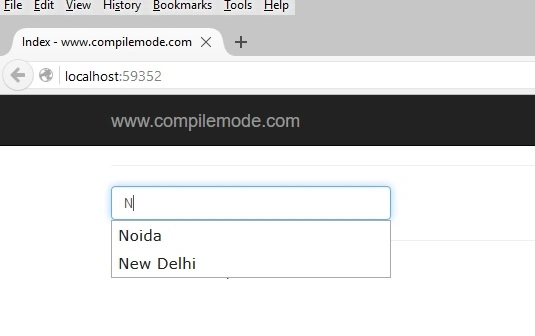
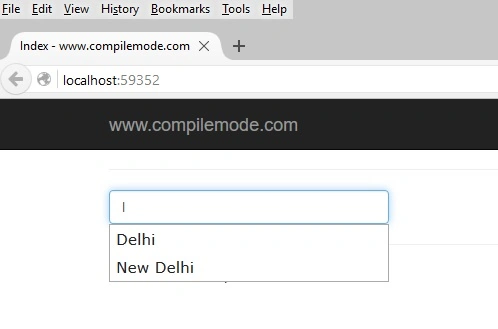
Desperado MuratPosted Mar 2, 2024, 11:33 PM
Thank you very much!
Avaz QarayevPosted May 6, 2022, 2:39 PM
Thanks a lot.
harold NdouPosted Mar 31, 2022, 8:45 AM
Useless doesn't work, please improve
Mahmoud SolimanPosted Mar 1, 2022, 3:37 PM
Hello thanks for this amazing article but I have an issue I call an async method in the controller and everything works fine, the result "item" shows up in the console BUT there is no popup select menu with the suggestions !!!
Sam SmithPosted Jan 11, 2022, 5:25 PM
Thanks for the great article. I am looking to find a way to update sql table bound to entity B from a selected value of the combobox bound to entity A. That is, if I have a list of customers in the table A I want to be able to select a customer from the dropdown list (or enter a new one in the combobox) and then update the transactional table B with the Customer's name for the selected EventID. Thanks in advance for your assistance
lakshmoji seemakurthiPosted Jun 25, 2021, 4:58 AM
I have downloaded the zip folder attached above it works, but when I tried to do it in another project (Code First) it's not working, Do I need to install any packages for this?
amrdavid davidPosted Apr 17, 2021, 2:51 PM
Not working Uncaught TypeError: $(...).autocomplete is not a function
Maimoon MaimoonPosted Apr 7, 2021, 1:00 PM
I do not understand what changes need to be made how can I get this to work. I did fix the names of the city class but I don't know what to change in web config
maulik moradiyaPosted Oct 19, 2020, 12:23 AM
Thank you sir for this amazing article.
anilkumar velamuriPosted Aug 16, 2020, 1:48 AM
Am getting this Error Uncaught TypeError: $(...).autocomplete is not a function Please Help me how to rectify
Khushboo KumariPosted Mar 29, 2020, 6:17 AM
But it's not working in under layout page pls help
Khushboo KumariPosted Mar 29, 2020, 5:52 AM
Working but there are slight mistakes change CityName to Name in js as well
Khushboo KumariPosted Mar 29, 2020, 5:44 AM
Not working
Sarmad YousifPosted Aug 9, 2019, 6:04 AM
Hi thank you for this. two questions: how to make the drop-down scrollable and how to tell the ajax to start searching after 3 characters input ex) if term.length >=3 do ajax.
David GGPosted Mar 3, 2019, 7:57 PM
This get top ranking on Google but is full of errors.
M. GhafoorPosted Jun 4, 2018, 5:23 AM
Article or the attached source zip seems to be incomplete. I cannot see the suggestions list below the text field while typing. By the way, "City" model name and its properties are not matching to the index.cshtml.
Chinna RPosted Apr 2, 2018, 2:58 AM
Hi, I am getting error like "javascript run time error:object does not support property or method 'autocomplete' could you please help me to resolve this
Pratiek SinghPosted Mar 3, 2018, 2:12 PM
Bro it helped me a lot. Although there were some small mistakes, But with some changes i am ready to go and all because of you. Thank you man
Mohammed MazharPosted Dec 3, 2017, 2:14 AM
I have 50000 record , how to optimize it
Stefan HoffmannPosted Oct 11, 2017, 6:19 AM
Got it running in Chrome and Firefox after changing attribute Name to CityName in Model and CityModel to City in index.cshtml. My from scratch developed solution (Visual Studio 2017) had two more lines at the botton of _layout.cshtml containing scripts. After deleting these lines my app works as described. After deleting the messages part of the function it also runs in IE.
Jan MenšíkPosted Oct 1, 2017, 4:11 AM
What a shitty zip file
Gabriel Marius PopescuPosted Jul 17, 2017, 11:35 AM
I believe this: @Html.EditorFor(model => model.CityName,... has to be @Html.EditorFor(model=> model.Name,...
Loc TanPosted Jul 10, 2017, 11:03 PM
Code is not working
Ravi KumarPosted Jul 5, 2017, 9:35 AM
Nice article..Good work !
Terry HulseyPosted Jun 14, 2017, 3:28 PM
Good. Works as advertised.
Terry HulseyPosted Jun 14, 2017, 3:27 PM
Too bad there's no soft carriage return in comments.
Terry HulseyPosted Jun 14, 2017, 3:27 PM
Instead of new { @class = "form-control" } I used new { @class = "form-control", @id = "CityName" }
Terry HulseyPosted Jun 14, 2017, 3:26 PM
@model AutoCompleteInMVCJson.Models.City
Terry HulseyPosted Jun 14, 2017, 3:25 PM
Some changes in Index.cshtml to make downloaded solution work:
HemlataPosted May 16, 2017, 2:42 AM
Please check code before publishing , Code is not working .
ta frePosted Mar 17, 2017, 7:07 AM
You'd need to make some changes to make this work: 1. This: $("#Name").autocomplete 2. The autocomplete is case-sensitive, so n won't show you anything. N would. Try the Chosen JQuery Plugin if you're after a fully fledged auto-complete library.. https://harvesthq.github.io/chosen/
Ravi PatilPosted Mar 2, 2017, 8:00 AM
Like the way of implementation, its helpful. Need help on how to load first 100 records by default when the control is loaded.
Mark TaborPosted Feb 26, 2017, 2:34 PM
I have changed the model but still i am not getting any suggestion when i inspact using f12 Uncaught TypeError: window.__weReportError is not a function at <anonymous>:1:248 but it is not related to autocomplete i think it is another error , why my auto complete does not show i just change the model from CityModel to City and CityName to Name
Rukhshanda IsrarPosted Jan 20, 2017, 3:46 AM
I just changed few things in this after that Its Working Fine for me :) Thanks a bunch @Vithal Wadje for helping me out
Muhammad USmanPosted Jan 19, 2017, 7:28 AM
My suggestions are coming but not displaying can any body fixed me this error
Rajat SrivastavaPosted Dec 11, 2016, 2:39 AM
For me a normal autocomplete function is working if a directly pass some hard coded values but if i do the above mentioned method it says autocorrect is not a function.
mahiPosted Nov 10, 2016, 9:57 AM
Ok. Finally Fixed Error. The answered. Thanks
mahiPosted Nov 10, 2016, 9:29 AM
I Fix the City Name error But So No Working this Source
mahiPosted Nov 10, 2016, 9:22 AM
I Download This Source but Not working properly
Atik ShaikhPosted Sep 20, 2016, 1:54 AM
I have used this approach and it works fine but how can i add another approach through which same textbox can search for country name from another table. need help
Vithal WadjePosted Aug 20, 2016, 10:34 PM
Typo Mistake , will correct it , Thanks
Dr.Ajay KashyapPosted Aug 19, 2016, 1:55 AM
Brother In This Program Model you create Name as CityModel But The Class Name In Model Is City......
rogerio ramalhoPosted Jun 25, 2016, 8:54 AM
error
rogerio ramalhoPosted Jun 25, 2016, 8:54 AM
Line 30: public class _Page_Views_Home_Index_cshtml : System.Web.Mvc.WebViewPage<AutoCompleteInMVCJson.Models.CityModel> {
Vithal WadjePosted Dec 19, 2015, 8:49 AM
Thanks
Muhammad Aqib ShehzadPosted Dec 19, 2015, 3:02 AM
nice appracoh
Vithal WadjePosted Dec 18, 2015, 12:23 PM
Thanks Santhakumar Munuswamy sir
Vithal WadjePosted Dec 18, 2015, 12:22 PM
Thanks Gowtham K sir
Vithal WadjePosted Dec 18, 2015, 12:21 PM
Thanks Shridhar Sharma sir
Vithal WadjePosted Dec 18, 2015, 12:21 PM
Thanks Upendra Pratap Shahi sir
Vithal WadjePosted Dec 18, 2015, 12:21 PM
Thanks Humayun Kabir Mamun sir
Vithal WadjePosted Dec 18, 2015, 12:21 PM
Thanks Sabyasachi Mishra sir
Santhakumar MunuswamyPosted Dec 18, 2015, 9:49 AM
Thanks for nice article.
Gowtham KPosted Dec 18, 2015, 7:37 AM
Good One
Shridhar SharmaPosted Dec 18, 2015, 4:46 AM
nice share sir
Upendra Pratap ShahiPosted Dec 18, 2015, 4:42 AM
nice one sir
Humayun Kabir MamunPosted Dec 18, 2015, 4:35 AM
Nice...
Sabyasachi MishraPosted Dec 18, 2015, 3:29 AM
Good one