

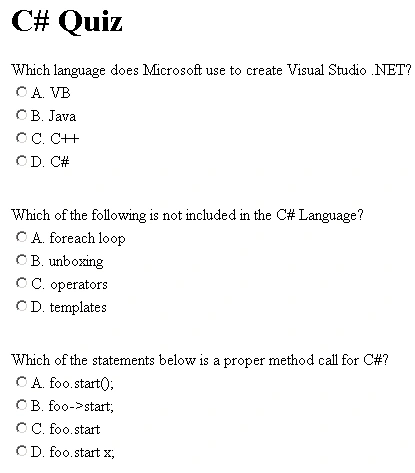
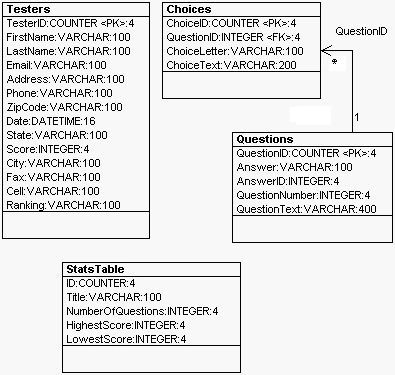
The structure of the Database is fairly simple. The questions are stored in the Questions Table along with the answers. The Choices are stored in the Choices table and are pointed to by the QuestionID key. The StatsTable holds the title and NumberOfQuestions. Finally, the Testers table holds the information for the people taking the test. (This table is not utilized in this example, but will be in part II of this article.)
The web page for the quiz is constructed on the fly using Microsoft WebForms, Tables, TableRows, and TableCells. Below is the code that reads the MSAccess data using ADO.NET and creates the table. Note that all of this is done in the PageLoad Event:
- private void Page_Load(object sender, System.EventArgs e) {
- if (!IsPostBack) {
- // This is the Initial Page Load. Draw the Quiz
- ReadQuizTitle();
- ReadQuestionsIntoTable();
- AddSubmitButton();
- } else {
- // The User has pressed the score button, calculate and publish the results
- HttpRequest r;
- r = this.Request;
- bool AreAllAnswered = CalculateScore(r);
- HttpResponse rs;
- rs = this.Response;
- if (AreAllAnswered == false) {
- rs.Write("You missed a few questions. Go back in your browser and answer them<P>");
- return;
- }
- // Write the score
- rs.Write("Your score is " + NumberCorrect.ToString() + " out of " + NumberOfQuestions.ToString() +
- "<P>");
- // Print out the corrected answers
- for (int num = 0; num < NumberOfQuestions; num++) {
- if (WrongArray[num].Length > 0)
- rs.Write(WrongArray[num]);
- }
- // Rank the User
- rs.Write(GetRanking());
- }
- }
The first half of the if statement is handled when the page first loads. This part is responsible for drawing the quiz. The second half of the if statement is executed after the user presses the Score Button. This part of the if statement will score the test and output a page giving the score, the missed questions, and a ranking.
Unfortunately, you can't tell much from the code above. So let's delve into what's happening in the ReadQuestionsIntoTable Routine:
- private void ReadQuestionsIntoTable() {
- // Fill the questions and choices tables in memory
- DataSet ds1 = new DataSet("questionsds");
- oleDbDataAdapter1.Fill(ds1, "Questions");
- oleDbDataAdapter2.Fill(ds1, "Choices");
- DataTable QuestionsTable = ds1.Tables["Questions"];
- DataTable ChoicesTable = ds1.Tables["Choices"];
- // create a data relation between the Questions and Choices Tables
- // so we can cycle through the choices for each question
- DataRelation QALink = new DataRelation("QuestionLink", QuestionsTable.Columns["QuestionID"],
- ChoicesTable.Columns["QuestionID"]);
- QuestionsTable.ChildRelations.Add(QALink);
- NumberOfQuestions = 0;
- // go through every row in the questions table
- // and place each question in the Table Web Control
- foreach(DataRow dr in QuestionsTable.Rows) {
- // create a row for the question and read it from the database
- TableRow tr = new TableRow();
- Table1.Rows.Add(tr);
- TableCell aCell = new TableCell();
- // get the text for the question and stick it in the cell
- aCell.Text = dr["QuestionText"].ToString();
- tr.Cells.Add(aCell);
- AnswerArray[NumberOfQuestions] = dr["Answer"].ToString();
- // create a row for the choices and read from the database
- int count = 0;
- // go through the child rows of the question table
- // established by the DataRelation QALink and
- // fill the choices for the table
- foreach(DataRow choiceRow in dr.GetChildRows(QALink)) {
- TableRow tr2 = new TableRow();
- Table1.Rows.Add(tr2);
- // create a cell for the choice
- TableCell aCell3 = new TableCell();
- aCell3.Width = 1000;
- // align the choices on the left
- aCell3.HorizontalAlign = HorizontalAlign.Left;
- tr2.Cells.Add(aCell3);
- // create a radio button in the cell
- RadioButton rb = new RadioButton();
- // assign the radio button to Group + QuestionID
- rb.GroupName = "Group" + choiceRow["QuestionID"].ToString();
- // Assign the choice to the radio button
- rb.Text = choiceRow["ChoiceLetter"].ToString() + ". " + choiceRow["ChoiceText"].ToString();
- // Assign the radio button id corresponding to the choice and question #
- rb.ID = "Radio" + NumberOfQuestions.ToString() + Convert.ToChar(count + 65);
- rb.Visible = true;
- // add the radio button to the cell
- aCell3.Controls.Add(rb);
- count++;
- }
- // add a table row between each question
- // as a spacer
- TableRow spacer = new TableRow();
- spacer.Height = 30;
- TableCell spacerCell = new TableCell();
- spacerCell.Height = 30;
- spacer.Cells.Add(spacerCell);
- Table1.Rows.Add(spacer); // add a spacer
- // Increment the # of Questions
- NumberOfQuestions++;
- }
- }
raju guntiPosted Jun 5, 2020, 5:39 AM
Hi every one, can you plz share me this project and my email is [email protected]
Harubiewe WasihuPosted Feb 13, 2018, 5:24 AM
Pls can i have code of of d quiz app in mysql server to my mail [email protected]
Nesimi AliyevPosted Jun 20, 2015, 7:49 AM
thank you
pemba sherpaPosted Jan 2, 2014, 7:50 AM
mr Bino B plz plz send me ur project. in my email [email protected]
taqi nazirPosted Jun 28, 2013, 8:11 AM
Hi, i am currently working on a similar project. will it be possible for u to send me the code as a reference. Thanks. My email address is [email protected]
jiemin leePosted May 24, 2012, 11:18 PM
Hi, i am currently working on a similar project. will it be possible for u to send me the code as a reference. Thanks. My email address is [email protected]
An Pham ThanhPosted May 22, 2012, 6:42 AM
Thank you very much!
Amber LeachPosted Aug 4, 2011, 8:55 AM
Hey Mike, I would really appreciate it if you can give me more examples of creating a C# quiz with SqlServer database
rahma harafshaPosted Apr 26, 2011, 2:15 PM
i need full source code if please
mohit ranjanPosted Feb 8, 2011, 11:58 PM
greate article
Prateek AggarwalPosted Jan 29, 2011, 10:32 AM
Hi....can u please mail me the code with sql sever database.... my id is [email protected]
Sarabjeet SinghPosted May 26, 2010, 11:50 AM
Great Project
meenu dwivediPosted May 21, 2010, 7:28 AM
it's really very helpfull.........thankyou
Bino BPosted Mar 16, 2010, 9:33 PM
Thanks Mike, great work really helpful..
Bino BPosted Mar 16, 2010, 9:33 PM
Thanks Mike, great work really helpful..
Mahalakshmi ThotaPosted Sep 29, 2009, 3:16 AM
it's good
rahul guptaPosted Aug 21, 2009, 1:18 AM
hi
patientD DPosted Aug 10, 2009, 1:44 PM
I downloaded WebQuiz.zip, extracted in a quiz folder, created the schema in sqlserver. How do I run this quiz? What do I ned to change to use my sqlserver database?
Garima bhutaniPosted Aug 30, 2008, 6:40 AM
error is coming on click of download link
Garima bhutaniPosted Aug 30, 2008, 6:40 AM
error is coming on click of download link
Kashif DastgirPosted Jun 9, 2007, 5:20 AM
hay, great work , when next part is coming and can i hav this code converted in vb.net and posted to ma email thanks in advance Regards Kashif
Maharnab ChatterjeePosted May 16, 2007, 3:21 AM
Excellent
karthikeyan calebPosted Apr 9, 2007, 2:00 AM
i want Creating Dynamic Web Quizzes using VB and ASP.NET. pls send coding to my mail address
nizaPosted Mar 19, 2007, 7:04 AM
looking forward for the part 2