Creating an insert, update and delete application in MVC 4 using Razor syntax. I am providing a small demo application.
Server Part
Starting with creating the table: tbInsertMobile.
Creating Table
- Create table tbInsertMobile
- (
- MobileID Bigint not null primary key IDENTITY(1,1),
- MobileName Nvarchar(100),
- MobileIMEno Nvarchar(50),
- mobileprice numeric(19,2),
- mobileManufacured Nvarchar(100),
- CreatedDate datetime default Getdate()
- )
Creating Stored Procedures
- Create proc Usp_InsertUpdateDelete
- @MobileID Bigint =0 ,
- @MobileName Nvarchar(100) = null,
- @MobileIMEno Nvarchar(50) = null,
- @mobileprice numeric(19,2) = 0,
- @mobileManufacured Nvarchar(100) = null,
- @Query int
- as
- begin
- if(@Query = 1)
- begin
- Insert into tbInsertMobile
- (
- MobileName ,
- MobileIMEno ,
- mobileprice,
- mobileManufacured
- )
- values
- (
- @MobileName ,
- @MobileIMEno ,
- @mobileprice,
- @mobileManufacured
- )
- if(@@ROWCOUNT > 0)
- begin
- select 'Insert'
- end
- end
- if(@Query = 2)
- begin
- update tbInsertMobile
- set
- MobileName =@MobileName ,
- MobileIMEno =@MobileIMEno ,
- mobileprice =@mobileprice,
- mobileManufacured =@mobileManufacured
- where tbInsertMobile.MobileID =@MobileID
- select 'Update'
- end
- if(@Query = 3)
- begin
- Delete from tbInsertMobile where tbInsertMobile.MobileID =@MobileID
- select 'Deleted'
- end
- if(@Query = 4)
- begin
- Select * from tbInsertMobile
- end
- End
- if(@Query = 5)
- begin
- Select * from tbInsertMobile where tbInsertMobile.MobileID =@MobileID
- end
Now for the code.
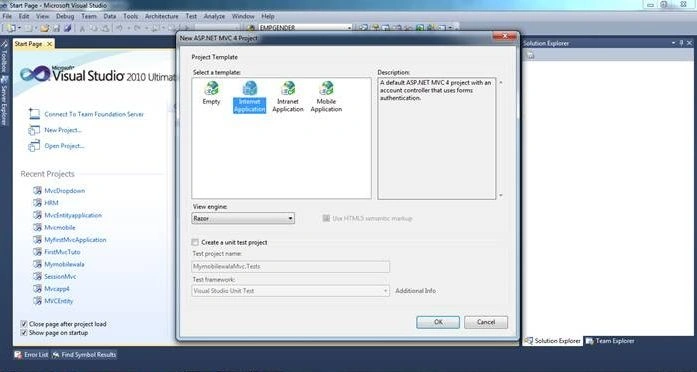
Begin by creating a MVC application as in the following:
After adding an application name the second screen will pop up prompting for a selection of a Project Template.
In this select Internet application and View Engine Razor and click OK.
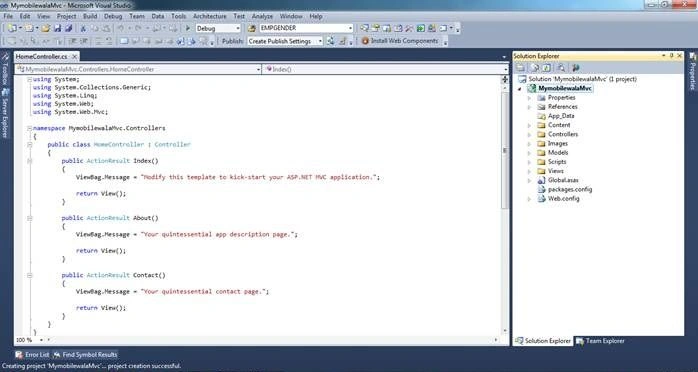
Then your project is created successfully.
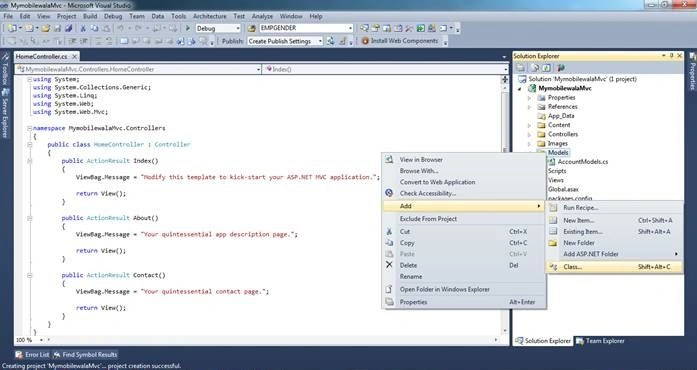
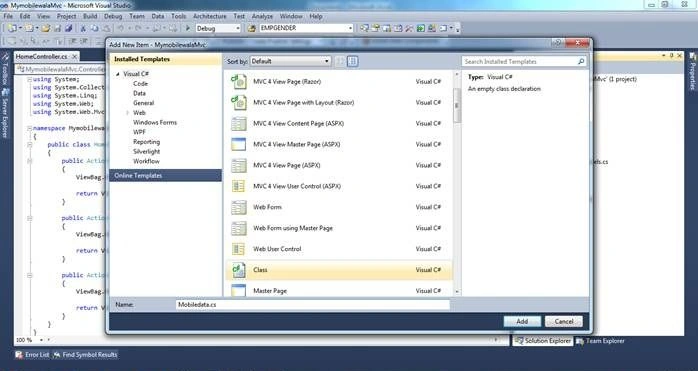
In this application I will first add a Model.
Provide the Model the name Mobiledata.cs.
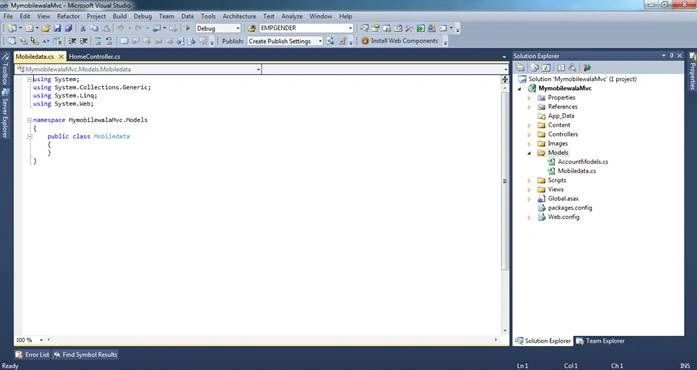
After creating the model:
In the Model I will declare Properties and Validation (DataAnnotations).
Here are a number of DataAnnotations that we can use in a model.
The following are the Data Annotations we can use in a Model:
- DisplayName: Provides a general-purpose attribute that lets you specify localizable strings to display.
- Required: A value is required
- DataType: The data type annotation can be used to specify the data type for validation.
- StringLength: Max. length of an array or string data allowed.
- DisplayFormat: Specify the display format for a property like various formats for the Date property.
- ReqularExpression: Validate the value of a property by specifyng a regular expression pattern.
- Range: Numeric range constraints for the data field value.
- MaxLength: Specify max length for a string property.
- Bind: Specify fields to include or exclude when adding parameter or form values to model properties.
- Compare: The Compares property compares two properties
- Key: Denotes one or more properties that uniquely identify an entity.
In the Model I added Properties and Validation.
Model Code
- using System.ComponentModel.DataAnnotations;
- namespace MymobilewalaMvc.Models
- {
- public class Mobiledata
- {
- public int MobileID {get;set;}
- [Required(ErrorMessage="Please Enter Mobile Name")]
- [Display(Name="Enter Mobile Name")]
- [StringLength(50, MinimumLength = 3, ErrorMessage = "Mobile Name must be between 3 and 50 characters!")]
- public string MobileName {get;set;}
- [Required(ErrorMessage="Please Enter MobileIMEno")]
- [Display (Name="Enter MobileIMEno")]
- [MaxLength (100,ErrorMessage="Exceeding Limit")]
- public string MobileIMEno {get;set;}
- [Required(ErrorMessage = "Please Enter Mobile Price")]
- [Display (Name="Enter Mobile Price")]
- [DataType(DataType.Currency)]
- public string mobileprice {get;set;}
- [Required(ErrorMessage = "Please Enter Mobile Manufacured")]
- [Display(Name = "Enter Mobile Manufacured")]
- [DataType(DataType.Text)]
- public string mobileManufacured { get; set; }
- }
- }
We have completed creating the Model. Let's start adding the controller.
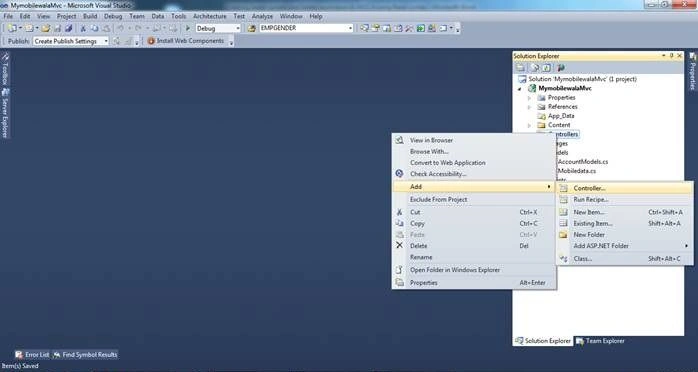
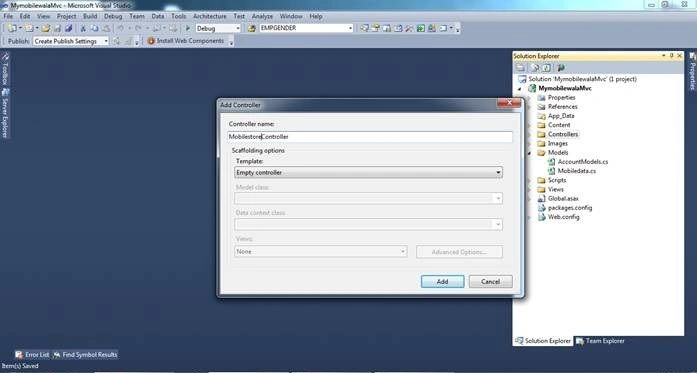
Select Controller; a new Window will then pop up asking for the Controller name.
Provide the name MobilestoreController. (We should add "Controller" as a suffix of all Controllers.)
And click on the Add button to add it.
If you do not understand what a controller is then see my first tutorial.
Now we will add a folder and class for accessing a Database Connection and doing the inserting, updating and deleting.
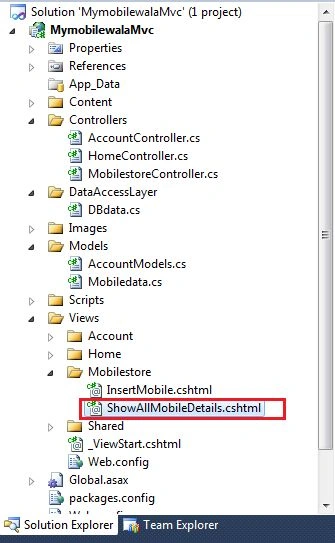
The following shows the added folder name DataAccessLayer.
Right-click on the DataAccessLayer folder and select add class then provide the class the name DBdata.cs.
- using System;
- using System.Collections.Generic;
- using System.Linq;
- using System.Web;
- using System.Data;
- using System.Data.SqlClient;
- using System.Configuration;
- using MymobilewalaMvc.Models;
The namespace MymobilewalaMvc.Models is used to access the model we created.
In the Model I have created the following 5 methods:
- InsertData
- UpdateData
- DeleteData
- SelectAllData
- SelectAllDatabyID
InsertData
- public string InsertData(Mobiledata MD)
- {
- SqlConnection con = null;
- string result = "";
- try
- {
- con = new SqlConnection(ConfigurationManager.ConnectionStrings["mycon"].ToString());
- SqlCommand cmd = new SqlCommand("Usp_InsertUpdateDelete", con);
- cmd.CommandType = CommandType.StoredProcedure;
- cmd.Parameters.AddWithValue("@MobileID", 0);
-
- cmd.Parameters.AddWithValue("@MobileName", MD.MobileName);
- cmd.Parameters.AddWithValue("@MobileIMEno", MD.MobileIMEno);
- cmd.Parameters.AddWithValue("@mobileprice", MD.mobileprice);
- cmd.Parameters.AddWithValue("@mobileManufacured", MD.mobileManufacured);
- cmd.Parameters.AddWithValue("@Query", 1);
- con.Open();
- result = cmd.ExecuteScalar().ToString();
- return result;
- }
- catch
- {
- return result = "";
- }
- finally
- {
- con.Close();
- }
- }
Update Data
- public string UpdateData(Mobiledata MD)
- {
- SqlConnection con = null;
- string result = "";
- try
- {
- con = new SqlConnection(ConfigurationManager.ConnectionStrings["mycon"].ToString());
- SqlCommand cmd = new SqlCommand("Usp_InsertUpdateDelete", con);
- cmd.CommandType = CommandType.StoredProcedure;
- cmd.Parameters.AddWithValue("@MobileID", MD.MobileID);
- cmd.Parameters.AddWithValue("@MobileName", MD.MobileName);
- cmd.Parameters.AddWithValue("@MobileIMEno", MD.MobileIMEno);
- cmd.Parameters.AddWithValue("@mobileprice", MD.mobileprice);
- cmd.Parameters.AddWithValue("@mobileManufacured", MD.mobileManufacured);
- cmd.Parameters.AddWithValue("@Query", 2);
- con.Open();
- result = cmd.ExecuteScalar().ToString();
- return result;
- }
- catch
- {
- return result = "";
- }
- finally
- {
- con.Close();
- }
- }
Delete Data
- public string DeleteData(Mobiledata MD)
- {
- SqlConnection con = null;
- string result = "";
- try
- {
- con = new SqlConnection(ConfigurationManager.ConnectionStrings["mycon"].ToString());
- SqlCommand cmd = new SqlCommand("Usp_InsertUpdateDelete", con);
- cmd.CommandType = CommandType.StoredProcedure;
- cmd.Parameters.AddWithValue("@MobileID", MD.MobileID);
- cmd.Parameters.AddWithValue("@MobileName", null);
- cmd.Parameters.AddWithValue("@MobileIMEno", null);
- cmd.Parameters.AddWithValue("@mobileprice", 0);
- cmd.Parameters.AddWithValue("@mobileManufacured", null);
- cmd.Parameters.AddWithValue("@Query", 3);
- con.Open();
- result = cmd.ExecuteScalar().ToString();
- return result;
- }
- catch
- {
- return result = "";
- }
- finally
- {
- con.Close();
- }
- }
SelectAllData
- public DataSet SelectAllData()
- {
- SqlConnection con = null;
- string result = "";
- DataSet ds = null;
- try
- {
- con = new SqlConnection(ConfigurationManager.ConnectionStrings["mycon"].ToString());
- SqlCommand cmd = new SqlCommand("Usp_InsertUpdateDelete", con);
- cmd.CommandType = CommandType.StoredProcedure;
- cmd.Parameters.AddWithValue("@MobileID",0);
- cmd.Parameters.AddWithValue("@MobileName", null);
- cmd.Parameters.AddWithValue("@MobileIMEno", null);
- cmd.Parameters.AddWithValue("@mobileprice", 0);
- cmd.Parameters.AddWithValue("@mobileManufacured", null);
- cmd.Parameters.AddWithValue("@Query", 4);
- con.Open();
- SqlDataAdapter da = new SqlDataAdapter();
- da.SelectCommand = cmd;
- ds = new DataSet(); da.Fill(ds);
- return ds;
- }
- catch
- {
- return ds;
- }
- finally
- {
- con.Close();
- }
- }
SelectAllDatabyID
- public DataSet SelectAllDatabyID(string MobileID)
- {
- SqlConnection con = null;
- string result = "";
- DataSet ds = null;
- try
- {
- con = new SqlConnection(ConfigurationManager.ConnectionStrings["mycon"].ToString());
- SqlCommand cmd = new SqlCommand("Usp_InsertUpdateDelete", con);
- cmd.CommandType = CommandType.StoredProcedure;
- cmd.Parameters.AddWithValue("@MobileID", MobileID);
- cmd.Parameters.AddWithValue("@MobileName", null);
- cmd.Parameters.AddWithValue("@MobileIMEno", null);
- cmd.Parameters.AddWithValue("@mobileprice", 0);
- cmd.Parameters.AddWithValue("@mobileManufacured", null);
- cmd.Parameters.AddWithValue("@Query", 4);
- con.Open();
- SqlDataAdapter da = new SqlDataAdapter();
- da.SelectCommand = cmd;
- ds = new DataSet();
- da.Fill(ds);
- return ds;
- }
- catch
- {
- return ds;
- }
- finally
- {
- con.Close();
- }
- }
Ha ha, finally we have completed the Transcation Part.
Let's return to the Controller we added.
Just Rebuild the application.
In the Controller add the following two methods:
- public ActionResult InsertMobile()
- {
- return View();
- }
- [HttpPost]
- public ActionResult InsertMobile(Mobiledata MB)
- {
- return View();
- }
Now I will add a View to the Controller.
Just right-click on Action result Insertmobile add select "Add View...".
After selecting Add View we will get a New Window.
Just select (create a strongly-typed view).
Inside that select the Model Name we created and click Add.
After adding like this a View will be generated.
With extension
.cshtml.
In the design we will use a HTMLHELPER Class.
To begin with form we use:
- @using (Html.BeginForm())
- {
- }
For the Label, TextBox and validation message we use:
- @Html.LabelFor(a => a.MobileName)
- @Html.TextBoxFor(a => a.MobileName)
- @Html.ValidationMessageFor(a => a.MobileName)
You will be thinking, what is "a"? It is a lamda expressiom.
The advantage of using a lamda expression is that you get compile-time checking of your properties. For example, if you rename ViewModel.Name to ViewModel.ClientName then all your Html.DisplayFor(x => model.Name) won't compile, thus making sure you change them. If you don't use lamda expressions then all your Html.Display() calls will work, but you will get hidden bugs with model binding that will not be immediately obvious of what's wrong.
The following is the complete design of InsertMobile.
- @model MymobilewalaMvc.Models.Mobiledata
- @{
- ViewBag.Title = "InsertMobile";
- }
- <h2>
- InsertMobile</h2>
- <table>
- <tr>
- <td>
- @Html.ActionLink("Show All Mobile List", "ShowAllMobileDetails")
- </td>
- </tr>
- </table>
- @using (Html.BeginForm())
- {
- <table width="100%">
- <tr>
- <td>
- @Html.LabelFor(a => a.MobileName)
- </td>
- </tr>
- <tr>
- <td>
- @Html.TextBoxFor(a => a.MobileName)
- @Html.ValidationMessageFor(a => a.MobileName)
- </td>
- </tr>
- <tr>
- <td>
- @Html.LabelFor(a => a.MobileIMEno)
- </td>
- </tr>
- <tr>
- <td>
- @Html.TextBoxFor(a => a.MobileIMEno)
- @Html.ValidationMessageFor(a => a.MobileIMEno)
- </td>
- </tr>
- <tr>
- <td>
- @Html.LabelFor(a => a.mobileManufacured)
- </td>
- </tr>
- <tr>
- <td>
- @Html.TextBoxFor(a => a.mobileManufacured)
- @Html.ValidationMessageFor(a => a.mobileManufacured)
- </td>
- </tr>
- <tr>
- <td>
- @Html.LabelFor(a => a.mobileprice)
- </td>
- </tr>
- <tr>
- <td>
- @Html.TextBoxFor(a => a.mobileprice)
- @Html.ValidationMessageFor(a => a.mobileprice)
- </td>
- </tr>
- <tr>
- <td colspan="2">
- <input id="Submit1" type="submit" value="submit" />
- </td>
- </tr>
- </table>
- }
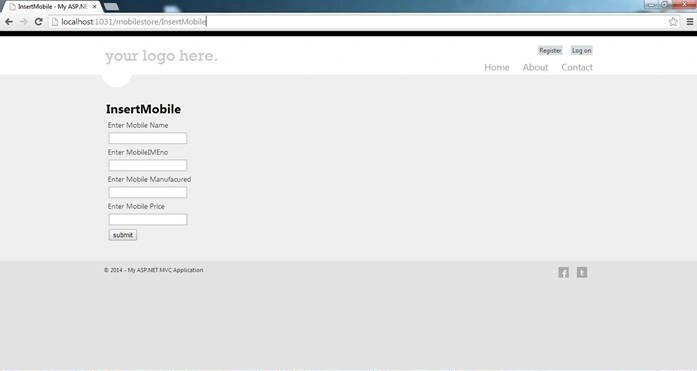
Now just run your application and check output.
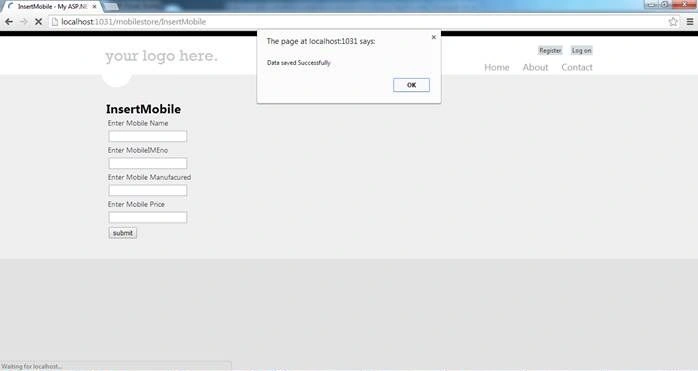
After Adding Insert code on [Httppost]:
- [HttpPost]
- public ActionResult InsertMobile(Mobiledata MB)
- {
- if (ModelState.IsValid)
- {
- DataAccessLayer.DBdata objDB = new DataAccessLayer.DBdata();
- string result = objDB.InsertData(MB);
- ViewData["result"] = result;
- ModelState.Clear();
- return View();
- }
- else
- {
- ModelState.AddModelError("", "Error in saving data");
- return View();
- }
- }
On cs.html
Added this to display message after saving data.
- @{
- if (ViewData["result"] != "" && ViewData["result"] != null)
- {
- ViewData["result"] = null;
- <script type="text/javascript" language="javascript">
- alert("Data saved Successfully");
- </script>
- }
- }
Run the application and insert records into it.
Now we have completed the Insert part.
Next we will create a basic grid view for displaying records.
For that we will add a new View but using the same Controller.
Let's begin with adding a View. A strongly typed View.
- public ActionResult ShowAllMobileDetails(Mobiledata MB)
- {
- return View();
- }
After creating Action Result just right-click on ActionResult and select Add View.
And also check:
- Create a strongly-typed view option
- Use a layout or master page
Select the same Model as we used when creating InsertMobile.
Just click on the Add button.
A new View has been created.
After this in the Model I am adding new Properties as in the following:
public DataSet StoreAllData { get; set; }
For storing values in a dataset and displaying values from a dataset on the View.
Because in MVC you can access a complete Model in a View.
In ActionResult I will access DBdata and get the dataset and pass it to a model dataset name.
(StoreAlldata)
- public ActionResult ShowAllMobileDetails(Mobiledata MB)
- {
- DataAccessLayer.DBdata objDB = new DataAccessLayer.DBdata();
- MB.StoreAllData = objDB.SelectAllData();
- return View(MB);
- }
After this on the view I will display data from the dataset using a for loop.
And also adding the 2 linkbuttons Edit and Delete.
- @Html.ActionLink("EDIT", "EDITMOBILEDATA", new { id = Model.StoreAllData.Tables[0].Rows[i]["MobileID"].ToString() })
- @Html.ActionLink("Delete", "DELETEMOBILEDATA", new { id = Model.StoreAllData.Tables[0].Rows[i]["MobileID"].ToString() })
Example
EDIT name of Button.
EDITMOBILEDATA is the name of the page; on a click it will redirect with id.
- @model MymobilewalaMvc.Models.Mobiledata
- @{
- ViewBag.Title = "ShowAllMobileDetails";
- }
- <h2>
- ShowAllMobileDetails</h2>
- <table>
- <tr>
- <td>
- @Html.ActionLink("Add New Mobiles", "InsertMobile")
- </td>
- </tr>
- </table>
- @{
- for (int i = 0; i < Model.StoreAllData.Tables[0].Rows.Count; i++)
- {
- var MobileID = Model.StoreAllData.Tables[0].Rows[i]["MobileID"].ToString();
- var MobileName = Model.StoreAllData.Tables[0].Rows[i]["MobileName"].ToString();
- var MobileIMEno = Model.StoreAllData.Tables[0].Rows[i]["MobileIMEno"].ToString();
- var Mobileprice = Model.StoreAllData.Tables[0].Rows[i]["mobileprice"].ToString();
- var MobileManufacured = Model.StoreAllData.Tables[0].Rows[i]["mobileManufacured"].ToString();
- <table width="100%">
- <tr>
- <td>
- MobileID
- </td>
- <td>
- MobileName
- </td>
- <td>
- Mobile IMEI No
- </td>
- <td>
- Mobileprice
- </td>
- <td>
- Mobile Manufactured
- </td>
- <td>
- EDIT
- </td>
- <td>
- DELETE
- </td>
- </tr>
- <tr>
- <td>
- @MobileID
- </td>
- <td>
- @MobileName
- </td>
- <td>
- @MobileIMEno
- </td>
- <td>
- @Mobileprice
- </td>
- <td>
- @MobileManufacured
- </td>
- <td>
- @Html.ActionLink("EDIT", "EDITMOBILEDATA", new { id = Model.StoreAllData.Tables[0].Rows[i]["MobileID"].ToString() })
- </td>
- <td>
- @Html.ActionLink("Delete", "DELETEMOBILEDATA", new { id = Model.StoreAllData.Tables[0].Rows[i]["MobileID"].ToString() })
- </td>
- </tr>
- <tr>
- <td>
- @Html.ActionLink("Add New Mobiles", "InsertMobile")
- </td>
- </tr>
- </table>
- }
- }
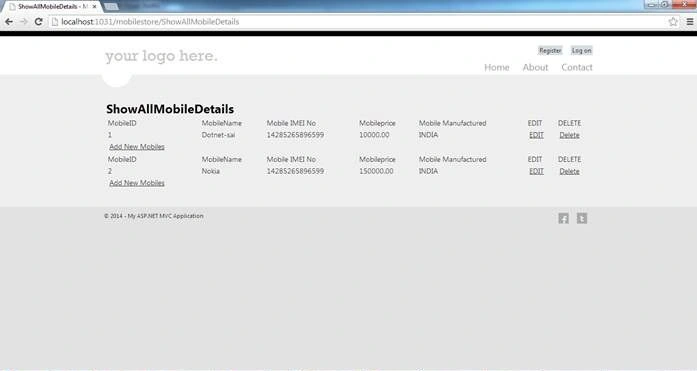
View of ShowAllMobileDetails:
Let's now add two new Views to the same controller.
1. EDITMOBILEDATA
In this ActionResult I have provided a string id to the method to receive an ID when I click on the Edit button.
After getting the ID, get data from the database depending on that id and display record.
- public ActionResult EDITMOBILEDATA(string id)
- {
- DataAccessLayer.DBdata objDB = new DataAccessLayer.DBdata();
-
- DataSet ds = objDB.SelectAllDatabyID(id);
- Mobiledata MB = new Mobiledata();
- MB.MobileID = Convert.ToInt32(ds.Tables[0].Rows[0]["MobileID"].ToString());
- MB.MobileName = ds.Tables[0].Rows[0]["MobileName"].ToString();
- MB.MobileIMEno = ds.Tables[0].Rows[0]["MobileIMEno"].ToString();
- MB.mobileprice = ds.Tables[0].Rows[0]["mobileprice"].ToString();
- MB.mobileManufacured = ds.Tables[0].Rows[0]["mobileManufacured"].ToString();
- return View(MB);
- }
Just right-click on ActionResult and add a View of a strong type.
After adding the view I will design the View to edit and update data.
- @model MymobilewalaMvc.Models.Mobiledata
- @{
- ViewBag.Title = "EDITMOBILEDATA";
- }
- <h2>
- EDITMOBILEDATA</h2>
- <table>
- <tr>
- <td>
- @Html.ActionLink("Show All Mobile List", "ShowAllMobileDetails")
- </td>
- </tr>
- </table>
- <br />
- @using (Html.BeginForm())
- {
- <table width="100%">
- <tr>
- <td colspan="2">
- @Html.HiddenFor(a => a.MobileID)
- </td>
- </tr>
- <tr>
- <td>
- @Html.LabelFor(a => a.MobileName)
- </td>
- </tr>
- <tr>
- <td>
- @Html.TextBoxFor(a => a.MobileName)
- @Html.ValidationMessageFor(a => a.MobileName)
- </td>
- </tr>
- <tr>
- <td>
- @Html.LabelFor(a => a.MobileIMEno)
- </td>
- </tr>
- <tr>
- <td>
- @Html.TextBoxFor(a => a.MobileIMEno)
- @Html.ValidationMessageFor(a => a.MobileIMEno)
- </td>
- </tr>
- <tr>
- <td>
- @Html.LabelFor(a => a.mobileManufacured)
- </td>
- </tr>
- <tr>
- <td>
- @Html.TextBoxFor(a => a.mobileManufacured)
- @Html.ValidationMessageFor(a => a.mobileManufacured)
- </td>
- </tr>
- <tr>
- <td>
- @Html.LabelFor(a => a.mobileprice)
- </td>
- </tr>
- <tr>
- <td>
- @Html.TextBoxFor(a => a.mobileprice)
- @Html.ValidationMessageFor(a => a.mobileprice)
- </td>
- </tr>
- <tr>
- <td colspan="2">
- <input id="Submit1" type="submit" value="Update" />
- </td>
- </tr>
- </table>
- }
- @{
- if (ViewData["resultUpdate"] != "" && ViewData["resultUpdate"] != null)
- {
- ViewData["resultUpdate"] = null;
- <script type="text/javascript" language="javascript">
- alert("Data Updated Successfully");
- </script>
- }
- }
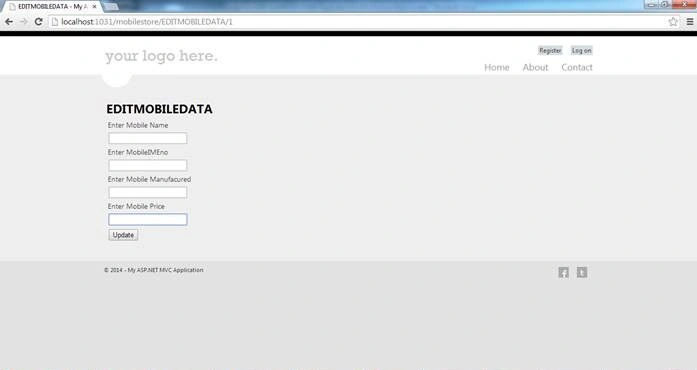
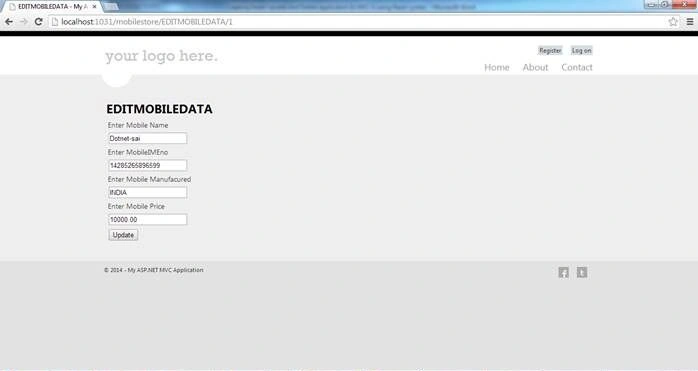
After clicking on the Edit Button from ShowAllmobileDetails.
Creating the same ActionResult of EDITMOBILEDATA with a model as a parameter for postdata.
- [HttpPost]
- public ActionResult EDITMOBILEDATA(Mobiledata MD)
- {
- DataAccessLayer.DBdata objDB = new DataAccessLayer.DBdata();
- string result = objDB.UpdateData(MD);
- ViewData["resultUpdate"] = result;
- return RedirectToAction("ShowAllMobileDetails", "Mobilestore");
- }
This will post data when the user will click the Update Button.
Adding the last View to delete records.
2. DELETEMOBILEDATA
In this ActionResult I have given a string id to the method to receive an ID when I click on the Delete button.
1. After getting an ID get data from the database and depending on that id display complete records and then it is possible to delete records.
- public ActionResult DELETEMOBILEDATA(string id)
- {
- DataAccessLayer.DBdata objDB = new DataAccessLayer.DBdata();
-
- DataSet ds = objDB.SelectAllDatabyID(id);
- Mobiledata MB = new Mobiledata();
- MB.MobileID = Convert.ToInt32(ds.Tables[0].Rows[0]["MobileID"].ToString());
- MB.MobileName = ds.Tables[0].Rows[0]["MobileName"].ToString();
- MB.MobileIMEno = ds.Tables[0].Rows[0]["MobileIMEno"].ToString();
- MB.mobileprice = ds.Tables[0].Rows[0]["mobileprice"].ToString();
- MB.mobileManufacured = ds.Tables[0].Rows[0]["mobileManufacured"].ToString();
- return View(MB);
- }
Right-click on Actionresult then select Add View.
After adding a Design View to show records when deleting.
- @model MymobilewalaMvc.Models.Mobiledata
- @{
- ViewBag.Title = "DELETEMOBILEDATA";
- }
- <h2>
- DELETEMOBILEDATA</h2>
- <table>
- <tr>
- <td>
- @Html.ActionLink("Add New Mobiles", "InsertMobile")
- </td>
- <td>
- @Html.ActionLink("Show All Mobile List", "ShowAllMobileDetails")
- </td>
- </tr>
- </table>
- <br />
- @using (Html.BeginForm())
- {
- <table width="100%">
- <tr>
- <td colspan="2">
- @Html.HiddenFor(a => a.MobileID)
- </td>
- </tr>
- <tr>
- <td>
- MobileName :-
- @Html.DisplayFor(a => a.MobileName)
- </td>
- </tr>
- <tr>
- <td>
- MobileIMEI Number:-
- @Html.DisplayFor(a => a.MobileIMEno)
- </td>
- </tr>
- <tr>
- <td>
- Mobile Manufacured :-
- @Html.DisplayFor(a => a.mobileManufacured)
- </td>
- </tr>
- <tr>
- <td>
- Mobileprice :-
- @Html.DisplayFor(a => a.mobileprice)
- </td>
- </tr>
- <tr>
- <td colspan="2">
- <input id="Submit1" onclick="return confirm('Are you sure you want delete');" type="submit"
- value="Delete" />
- </td>
- </tr>
- </table>
- }
Creating the same ActionResult of DELETEMOBILEDATA with a model as a parameter for postdata.
- [HttpPost]
- public ActionResult DELETEMOBILEDATA(Mobiledata MD)
- {
- DataAccessLayer.DBdata objDB = new DataAccessLayer.DBdata();
-
- string result = objDB.DeleteData(MD);
- return RedirectToAction("ShowAllMobileDetails", "Mobilestore");
- }
This will post data when the user clicks the Delete Button.
Finally we are completed with insert, update, and delete in MVC.










Vivek SavaniPosted Aug 21, 2017, 4:37 AM
Use query no 5 instead of query no 4 (selectalldatabyid) because it select only 1 row data while edit or delete entire row
Ganesh VirpatilPosted May 15, 2017, 6:27 AM
CS0116 A namespace cannot directly contain members such as fields or methodsMVC4 c:\users\ganesh\documents\visual studio 2015\Projects\MVC4\MVC4\DataAccessLayer\DBdata.cs 14 ActiveHow Can I FIx This Error....?
mustufa midPosted Oct 15, 2016, 7:59 AM
Sir Please edit this in yourr solution DBdata.cs > SelectAllDatabyID> cmd.Parameters.AddWithValue("@Query", 5) instead of @Query=4
lathiya kaushikPosted Oct 5, 2016, 2:23 AM
Same error like Pankaj jha
pankaj jhaPosted Aug 9, 2016, 8:21 AM
I expend most of time to resolve the error...but i didn't get the right solution...
pankaj jhaPosted Aug 9, 2016, 8:20 AM
How can i resolve this one ..when run ..cursosor goes on finlly block of DbData.cs of DataacessLayer page please help me....
pankaj jhaPosted Aug 9, 2016, 8:18 AM
An exception of type 'System.NullReferenceException' occurred in MymobilewalaMvc.dll but was not handled in user code Additional information: Object reference not set to an instance of an object.
pankaj jhaPosted Aug 9, 2016, 8:17 AM
Hey friend i am new in .net ..i have just sart work on mvc ...i followed your articels and the solution then i got execption....
Vinod ShelkePosted Aug 9, 2016, 5:33 AM
Nice Explained man.. Thank you Sai..
kishan mistryPosted Feb 22, 2016, 7:18 AM
Hey Please tell me what is a=>a.mobileId
kishan mistryPosted Feb 22, 2016, 6:06 AM
Superb illobration of the concept.Its planty much useful for the beginer like me. wonderful explanation with screen short
Former memberPosted Feb 14, 2016, 12:03 PM
you can find complete and simple code here : http://www.dotnetcode2u.com/2016/01/mvc4-cascading-dropddownlist-to-insert.html
Suyash SalunkhePosted Feb 10, 2016, 4:47 AM
1 No. Sirjee
Shubham KumarPosted Jan 18, 2016, 4:51 AM
this article gives me lots of info thnx but i want to perform all operation in one page how to do that ?
Anil KumarPosted Jan 4, 2016, 1:11 PM
Thank you.. nice article for beginners
Sanjay GuptaPosted Dec 21, 2015, 8:12 AM
It is good article, it has clear basic concept of data manipulation, Thanks
Zeeshan AzimPosted Dec 18, 2015, 2:49 PM
@Saineshwar Bageri ... Very nice explaination
Zeeshan AzimPosted Dec 18, 2015, 2:47 PM
Please correct this line in SelectAllDatabyID function ----> cmd.Parameters.AddWithValue("@Query", 5);
Upendra Pratap ShahiPosted Nov 19, 2015, 10:39 AM
use this- if(@Query = 5)begin Select * from tbInsertMobile where tbInsertMobile.MobileID =@MobileID end
Shumail IsmailPosted Nov 12, 2015, 2:32 AM
program not update and delete whole table just update first row ???
Upendra Pratap ShahiPosted Nov 6, 2015, 4:50 AM
nice sir..
Anil kumarPosted Aug 27, 2015, 3:11 AM
nice one...
kalyan kumarPosted Aug 18, 2015, 8:23 AM
hi Saineshwar, there is small correction in the model class , please change the mobile price type to int instead of string, because those who are new to MVC4 bit difficult to find out the error
kalyan kumarPosted Aug 13, 2015, 9:45 AM
nice one
Ashok KumarPosted Aug 10, 2015, 7:55 AM
how can i use apsx page in mvc please send me some video using dropdown and insert update and delete
Sumeet BrahamankarPosted Jul 6, 2015, 7:31 AM
Thank u very much sir.very nice artical.
Naveen NautiyalPosted Jun 23, 2015, 8:00 AM
very nice article... really very helpful.
Trung NguyễnPosted Jun 12, 2015, 6:43 AM
but, why don't inserted CreatedDate. I don't know how to insert it
Trung NguyễnPosted Jun 12, 2015, 6:30 AM
Thank you so much
Nikunj TrivediPosted Jun 10, 2015, 3:19 AM
Very Nice Article for beginners in MVC, I learnt a lot from this Article. Thank u sir.
Roshan VishwakarmaPosted May 30, 2015, 11:59 PM
nice artical
Ramandeep LongiaPosted May 20, 2015, 8:26 AM
thank u very much sir.very nice artical.
Ansuman PattnaikPosted May 16, 2015, 6:25 PM
can we use business integration and data access layers ?
Zeeshan AzimPosted May 12, 2015, 2:50 PM
Very nice Saineshwar Bageri .... You are my guru ! :)
asif mominPosted Apr 6, 2015, 7:57 AM
Nice article to start with MVC
Piyush GoriyaPosted Apr 3, 2015, 4:18 AM
i watched this article each and every line... And i learned something MVC Application. thank u very much sir
Piyush GoriyaPosted Apr 3, 2015, 4:17 AM
this is running code very useful for beginners
Elumalai GovindanPosted Mar 27, 2015, 7:02 AM
i watched this article each and every line... And i learned something MVC Application. thank u very much sir
Elumalai GovindanPosted Mar 27, 2015, 6:58 AM
@Saineshwar Bageri, Thank u sir, its very helpful for me. i am beginner for MVC...Thanks a lot...
Saineshwar BageriPosted Mar 12, 2015, 2:42 AM
you must creates database and run the scripts in side that i have given in downloads and then configure connection string according to that
Sanket KadlagPosted Mar 12, 2015, 2:38 AM
I'm getting a "NullReferenceException was unhandled by user code" error when attempting the first insert. What should i have to do with the con string in web.config. Please help as im new to MVC. Thanks..
mahesh muglikarPosted Feb 5, 2015, 8:19 AM
Thanks man.
M DPosted Jan 28, 2015, 11:54 AM
"Manufactured" is spelled wrong in the table, procedure and code. Take note of this if you're trying to recreate the application. Took me an hour to figure out why this wasn't working.
M DPosted Jan 28, 2015, 10:45 AM
I'm getting a "NullReferenceException was unhandled by user code" error when attempting the first insert. It's pointing to the "con.Close();" I'm not sure if this has something to do with setting up the connection to the database. I created the table and stored procedure from the instructions, but maybe I need to reference the name of the database? I don't see anything in the code that does that.
Faiz AhmadPosted Jan 28, 2015, 6:57 AM
Nice article
shambhu sharanPosted Jan 26, 2015, 9:11 AM
nice for beginner..
Puneet KankarPosted Dec 29, 2014, 2:15 AM
this is running code very useful for beginners
Prashan De SeramPosted Dec 23, 2014, 9:55 AM
thanx Saineshwar Bageri..it is very helpful to me...it is good article..thnx again (y)
Amol JadhavPosted Dec 12, 2014, 9:20 AM
simple and understandable code... great work
sreeranga prasad sanePosted Nov 26, 2014, 7:03 AM
stupendous explanation ..tanq
Tariq HashmiPosted Oct 27, 2014, 9:02 AM
very nice
Narayanan RamachandranPosted Oct 13, 2014, 7:31 AM
it is good article and i want to add grid with insert update,delete
yasir aliPosted Oct 2, 2014, 4:10 AM
Nice Article & good Example.
Jamuna VPosted Sep 12, 2014, 11:45 AM
sir,can you plz help me to solve this error
Jamuna VPosted Sep 12, 2014, 11:44 AM
Cannot find table 0.error in for (int i = 0 ; i < Model.StoreAllData.Tables[0].Rows.Count; i++)
Saineshwar BageriPosted Sep 9, 2014, 9:13 AM
Niam Mundhe please check my other post related to dropdownlist and radiobuttonlist you will get answer
nilam mundhePosted Sep 9, 2014, 9:09 AM
very nice code thank you
nilam mundhePosted Sep 9, 2014, 9:09 AM
Plz Send The Code how i can use database binded dropdown control in insert form by using Stored Procedure [email protected]
Ravendra SinghPosted Aug 14, 2014, 7:03 AM
very Nice thank you
santosh kundkarPosted Aug 11, 2014, 9:02 AM
Nice one
Vishal MahajanPosted Jul 19, 2014, 1:27 AM
Saineshwar Bageri Sir That Code is not related to database column binded dropdown
Vishal MahajanPosted Jul 18, 2014, 5:52 AM
Saineshwar Bageri Sir Plz Send The Code how i can use database binded dropdown control in insert form by using Stored Procedure If i use dataset in Bussiness Class Send me Code on My Email Id [email protected]
Rajesh BhanushaliPosted Jul 16, 2014, 6:40 AM
Very nice article
Raseeth APosted Jul 14, 2014, 4:38 AM
Nice material
bianca menacho MenachoPosted Jul 8, 2014, 1:05 AM
Line 25: Line 26: for (int i = 0; i < Model.StoreAllData.Tables[0].Rows.Count; i++) Line 27: {
bianca menacho MenachoPosted Jul 8, 2014, 1:05 AM
i have this error on the showAllMobileDetails.cshtml
Saineshwar BageriPosted Jun 26, 2014, 12:34 AM
khaled Eltaweel sir have you run query which i had provided and created Database. and also sir make changes in web.config file .
khaled EltaweelPosted Jun 25, 2014, 10:20 AM
the Action don't complete and return reference not set to an instance of an object.please guide me
khaled EltaweelPosted Jun 25, 2014, 10:16 AM
i have this Error
Saineshwar BageriPosted Jun 20, 2014, 11:50 PM
do you have sql server installed sir
Vishal MahajanPosted Jun 20, 2014, 7:42 AM
i am using Your Post and but operation is not working such as insert update delete select Error Occur: Object reference not set to an instance of an object.please guide me