

ASP.NET Core is a revolutionary web framework from Microsoft that enables developers to build high-performance, modern web applications that can run on Windows, Linux, and macOS . Its cross-platform support is one of the most transformative aspects of the framework, allowing developers to create applications that are platform-independent, lightweight, and cloud-ready.
Let’s explore how ASP.NET Core achieves this level of cross-platform compatibility, its architecture, tools, and examples of how developers can leverage it to build and deploy apps seamlessly across different operating systems.
1. The Evolution Towards Cross-Platform
Traditionally, ASP.NET applications were tied to the Windows operating system and the .NET Framework, limiting flexibility in deployment and hosting options. This changed with the introduction of .NET Core (now unified under the .NET platform ).
ASP.NET Core was rewritten from scratch to be:
Modular and lightweight
Open-source and community-driven
Platform-independent
Cloud-optimized
This means developers can now build once and deploy anywhere — whether on Windows servers, Linux containers, or macOS environments.
2. Cross-Platform Architecture
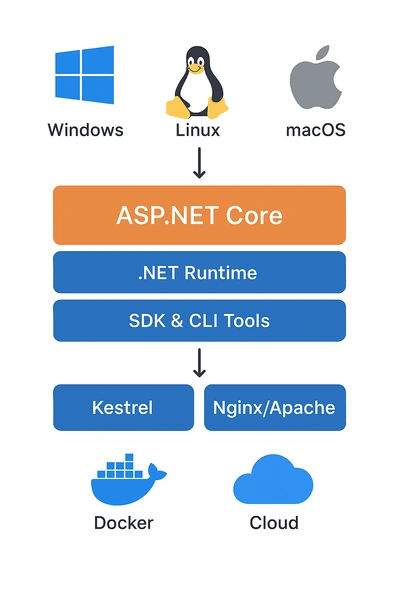
ASP.NET Core achieves platform independence through a layered architecture :
.NET Runtime: Executes code on different OSes.
.NET SDK: Provides build and deployment tools for all platforms.
Kestrel Web Server: A lightweight, cross-platform web server included by default.
Integration with Nginx/Apache: Enables hosting on Linux systems with reverse proxies.
Here’s a simple visual representation:
    +---------------------------+
|       ASP.NET Core        |
+---------------------------+
|     .NET Runtime Layer    |
+---------------------------+
|     SDK & CLI Tools       |
+---------------------------+
| Hosting: IIS | Nginx | Kestrel |
+---------------------------+
| Windows | Linux | macOS |
+---------------------------+
This structure ensures that your ASP.NET Core application can run smoothly on any OS that supports the .NET runtime.
3. Cross-Platform Command-Line Tools
One of the key enablers of ASP.NET Core’s cross-platform development is the .NET CLI (Command Line Interface). It allows developers to create, build, run, and publish applications directly from the terminal on any operating system.
Example Commands
Create a new ASP.NET Core Web App
dotnet new webapp -o MyWebApp
Run the application
    cd MyWebApp
dotnet run
Publish for Linux
dotnet publish -c Release -r linux-x64 --self-contained
These commands behave identically on Windows, macOS, or Linux , showcasing the framework’s uniformity.
4. Writing a Cross-Platform ASP.NET Core Application
Here’s an example of a simple ASP.NET Core Web API that runs seamlessly on any platform.
Program.cs
    using Microsoft.AspNetCore.Builder;
using Microsoft.Extensions.Hosting;

var builder = WebApplication.CreateBuilder(args);
var app = builder.Build();

app.MapGet("/", () => "Hello, ASP.NET Core Cross-Platform World!");

app.Run();
Run on Windows
dotnet run
Output:
Now listening on: http://localhost:5000
Run on Linux or macOS
Same command, same output.
You can test it by visiting: http://localhost:5000 in any browser.
This example demonstrates that no OS-specific changes are required. The same source code runs identically everywhere.
5. Cross-Platform Hosting and Deployment
ASP.NET Core applications can be hosted using multiple approaches:
a. Kestrel Web Server
Kestrel is a built-in, cross-platform web server that serves as the backbone for hosting ASP.NET Core apps. It’s fast, lightweight, and designed for both development and production.
Example appsettings.json configuration:
    {"Kestrel": {
    "Endpoints": {
      "Http": {
        "Url": "http://0.0.0.0:5000"
      }
    }}}
b. Reverse Proxy with Nginx (Linux)
You can host ASP.NET Core apps on Linux with Nginx as a reverse proxy to Kestrel.
Example Nginx Configuration:
    server {
    listen 80;
    server_name myapp.com;

    location / {
        proxy_pass         http://localhost:5000;
        proxy_http_version 1.1;
        proxy_set_header   Upgrade $http_upgrade;
        proxy_set_header   Connection keep-alive;
        proxy_set_header   Host $host;
        proxy_cache_bypass $http_upgrade;
    }
}
Join the conversation! Your thoughts help the community grow.