

Introduction
As organizations adopt cloud-native technologies, managing infrastructure across multiple cloud providers becomes increasingly complex. Teams often provision virtual machines, databases, Kubernetes clusters, storage systems, networking resources, and managed services using separate tools and workflows.
While Infrastructure as Code tools simplify provisioning, many organizations want a more Kubernetes-native approach that allows infrastructure to be managed using the same declarative patterns already used for applications.
This is where Crossplane comes in.
Crossplane is an open-source control plane framework that extends Kubernetes beyond container orchestration. It allows developers and platform teams to provision and manage cloud infrastructure using Kubernetes APIs.
Instead of switching between cloud consoles, scripts, and infrastructure tools, teams can define infrastructure resources as Kubernetes objects and manage everything through a unified control plane.
In this article, we'll explore what Crossplane is, how it works, and how organizations can use it to build cloud-native infrastructure platforms.
What Is Crossplane?
Crossplane is an open-source Kubernetes extension that enables infrastructure management through Kubernetes-style APIs.
It allows organizations to provision and manage resources such as:
Virtual machines
Databases
Kubernetes clusters
Storage services
Networking components
Messaging systems
Cloud-native services
Crossplane transforms Kubernetes into a universal control plane capable of managing both applications and infrastructure.
Developers interact with familiar Kubernetes manifests while Crossplane handles communication with cloud providers behind the scenes.
Why Traditional Infrastructure Management Becomes Difficult
Modern organizations often use multiple cloud services.
A typical application may require:
Kubernetes Cluster
Database
Load Balancer
Storage Account
DNS Configuration
Message Queue
Managing these resources manually introduces challenges:
Multiple management interfaces
Configuration inconsistencies
Limited automation
Difficult governance
Increased operational overhead
Even with Infrastructure as Code, developers often need separate workflows for infrastructure and application deployment.
Crossplane helps unify these workflows.
Understanding Crossplane Architecture
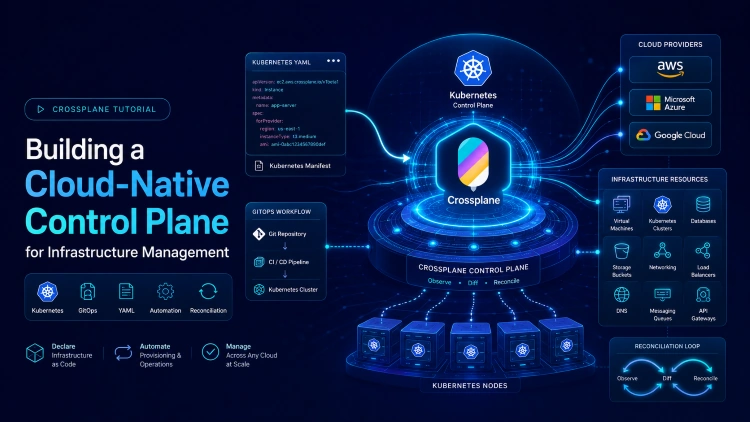
A simplified Crossplane architecture looks like this:
Developers
      |
      v
Kubernetes API
      |
      v
Crossplane
      |
      +---- AWS
      +---- Azure
      +---- Google Cloud
      +---- Other Providers
      |
      v
Infrastructure Resources
Crossplane acts as a bridge between Kubernetes and cloud providers.
Infrastructure resources are defined as Kubernetes objects and reconciled automatically.
Core Components of Crossplane
Providers
Providers enable Crossplane to communicate with external platforms.
Examples include:
AWS Provider
Azure Provider
Google Cloud Provider
Kubernetes Provider
GitHub Provider
Providers translate Kubernetes resource definitions into API calls for external services.
Managed Resources
Managed resources represent actual infrastructure components.
Examples:
Database Instance
Virtual Machine
Storage Bucket
Network
Each managed resource corresponds to a real cloud resource.
Composite Resources
Composite Resources allow platform teams to create higher-level abstractions.
For example:
Application Environment
    |
    +-- Database
    +-- Storage
    +-- Networking
Developers can request a complete environment without understanding the underlying infrastructure details.
Compositions
Compositions define how Composite Resources map to actual infrastructure components.
This enables reusable infrastructure blueprints across teams.
Installing Crossplane
Crossplane can be installed using Helm.
Example:
helm repo add crossplane-stable \
https://charts.crossplane.io/stable

helm install crossplane \
crossplane-stable/crossplane \
--namespace crossplane-system \
--create-namespace
Once installed, Crossplane extends the Kubernetes API with infrastructure management capabilities.
Configuring a Cloud Provider
To manage AWS resources, install the AWS provider.
Example:
apiVersion: pkg.crossplane.io/v1
kind: Provider
metadata:
  name: provider-aws
spec:
  package: xpkg.upbound.io/upbound/provider-aws:v1
Apply the configuration:
kubectl apply -f provider.yaml
Crossplane downloads and installs the provider automatically.
Creating a Storage Bucket
Suppose you want to provision an object storage bucket.
Example:
apiVersion: s3.aws.upbound.io/v1beta1
kind: Bucket
metadata:
  name: app-storage
spec:
  forProvider:
    region: us-east-1
Deploy it:
kubectl apply -f bucket.yaml
Crossplane creates the bucket within AWS.
Join the conversation! Your thoughts help the community grow.