

Introduction
In this article we will explore SharePoint functionality via Web Services. The goal of this article is to provide how to perform basic create, read, update, and delete (CRUD) operations on lists and list items with the SharePoint Web services.
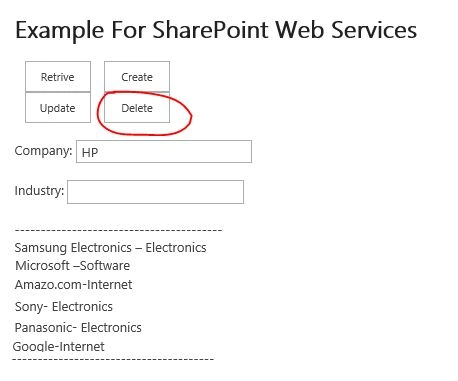
Now, I will demo all the operations on list items including retrieve, create, update and delete on list items.
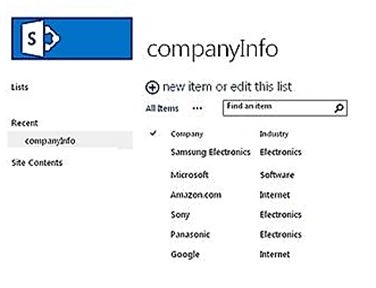
Retrieve the list items
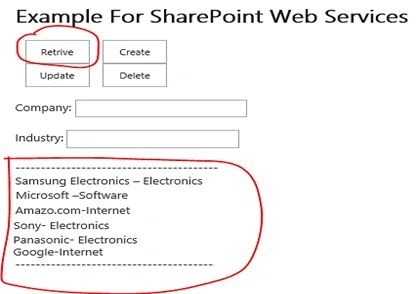
Here is the main code in detail:
function retriveListItem()
{
    var soapEnv = "<soapenv:Envelope xmlns:soapenv='http://schemas.xmlsoap.org/soap/envelope/'> \
<soapenv:Body> \
<GetListItems xmlns='http://schemas.microsoft.com/sharepoint/soap/'> \
<listName>companyInfo</listName> \
<viewFields> \
<ViewFields> \
<FieldRef Name='Company' /> \
<FieldRef Name='Industry' /> \
</ViewFields> \
</viewFields> \
</GetListItems> \
</soapenv:Body> \
</soapenv:Envelope>";
    $.ajax(
    {
        url: _spPageContextInfo.webAbsoluteUrl + "/apps/_vti_bin/Lists.asmx",
        type: "POST",
        dataType: "xml",
        data: soapEnv,
        complete: processResult,
        contentType: "text/xml; charset=\"utf-8\""
    });
}

function processResult(xData, status)
{
    var MainResult = "";
    $(xData.responseXML).find("z\\:row").each(function()
    {
        var companyName = $(this).attr("ows_Company");
        var Industry = $(this).attr("ows_Industry");
        MainResult += MainResult + companyName + "-" + Industry + "\n";
    });
    $('#ResultDiv').text(MainResult);
}
Create list item
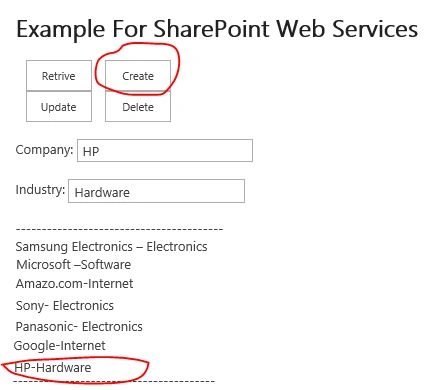
Here is the main code in detail:
function createListItem() {
    var batch =
        "<Batch OnError=\"Continue\"> \
    <Method ID=\"1\" Cmd=\"New\"> \
        <Field Name=\"Company\">" + $("#Company").val() + "</Field> \
         <Field Name=\"Industry\">" + $("#Industry").val() + "</Field> \
              </Method> \
ch>";

    var soapEnv =
        "<?xml version=\"1.0\" encoding=\"utf-8\"?> \
<soap:Envelope xmlns:xsi=\"http://www.w3.org/2001/XMLSchema-instance\" \
    xmlns:xsd=\"http://www.w3.org/2001/XMLSchema\" \
    xmlns:soap=\"http://schemas.xmlsoap.org/soap/envelope/\"> \
  <soap:Body> \
    <UpdateListItems xmlns=\"http://schemas.microsoft.com/sharepoint/soap/\"> \
      <listName>companyInfo</listName> \
      <updates> \
        " + batch + "</updates> \
    </UpdateListItems> \
  </soap:Body> \
</soap:Envelope>";

    $.ajax({
        url: _spPageContextInfo.webAbsoluteUrl+ "/apps/_vti_bin/Lists.asmx",
        beforeSend: function(xhr) {
            xhr.setRequestHeader("SOAPAction",
            "http://schemas.microsoft.com/sharepoint/soap/UpdateListItems");
        },
        type: "POST",
        dataType: "xml",
        data: soapEnv,
        complete: processResult,
        contentType: "text/xml; charset=utf-8"
    });
}

function processResult(xData, status) {
    retriveListItem();
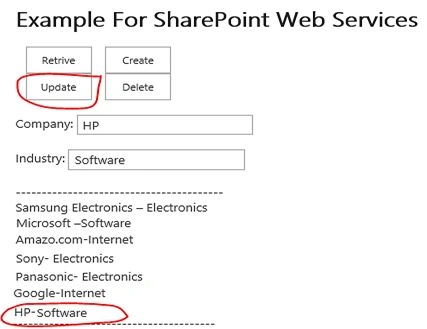
}
Jose CarrilloPosted Nov 25, 2019, 4:17 AM
Hello Sagar, could you please share your html code: [email protected]. Thank you !!
mayo RogerPosted Aug 26, 2019, 10:19 PM
Please Share your html code [email protected] . Thank you!
Rohit KabadiPosted May 11, 2019, 11:04 PM
Please send html snippet on email id :- [email protected]
Chinmoy PaluiPosted Apr 12, 2019, 5:16 PM
Please send me at [email protected] you so much.
Leo Angelo DaculloPosted Jan 22, 2019, 3:52 AM
Where is the snippet for the html?
Humayun Kabir MamunPosted Mar 8, 2016, 11:21 PM
Nice...
Santhakumar MunuswamyPosted Dec 30, 2015, 3:14 PM
Thanks for nice article