

In this article we will see how to perform CRUD (Select, Insert, Update and Delete) operations using ADO.NET Entity Framework in ASP.NET MVC. In Select Insert, Update And Delete With ASP.NET MVC we see how to perform CRUD operations using ADO.Net.
In Select Insert, Update And Delete With ASP.NET MVC we used the simple DataSet, DataTable, DataReader, DataAtapter, Command and Connection objects of ADO.Net which is not the prefered way to work with ASP.NET MVC. According to the MVC standard we must use the Entity model to work with ASP.NET MVC. In this article we will see how to use this entity model to create our MVC application and how easy it is to use.
Step 1
Create the database and create one table called Authors using the following script in your database.
Create Table Author
AuthorId Int Primary Key Identity(1,1),
)
Step 2
Now our database is ready; we can use our database table to perform CRUD operations on it. Next create a new project by selecting ASP.NET MVC3 Web Application.
Step 3
For this article we will use ADO.NET Entity Framework as a model for the application so create the model by right-clicking on the Models folder and selecting ADO.Net Entity Model from the dialog and select generate from database like below.
Next it will ask whether to generate a model
from the database or an empty model so select Generate From Database as in
below.
Next the wizard will ask for connection information so provide the connection
information and the name to entities as in the following diagram.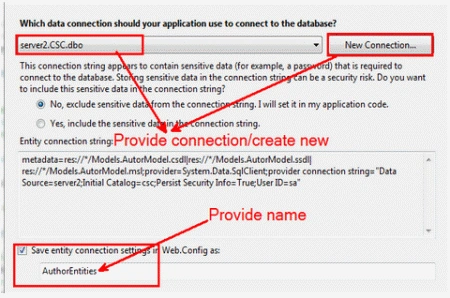
Next the wizard will ask to select objects so select our Author table from the
list and finish it.
Step 4
In steps above you see how easily our model is ready to work. Next we have to
add the controller so add one controller in the Controllers folder with the name
Home. In this home controller we have various actions to perform the CRUD
operation. To display all the records the first time, write the following action
in the home controller.
[HttpGet]
public ActionResult Index()
{
return View(_dboperations.Authors.ToList());
}
In the code above we return the view as a list of all Authors present in our
table. Here _dboperations is the instance name created on the top which is the
instance for our AuthorEntities of model. Next we can add our view very easily
as well so right-click in the index action and add the view like below.

In above screen check the checkbox "Create Strongly Typed View and select our
model(Author) from the dropdown below that we have one option Scaffolding select
the List from the dropdown and click on add. Now see the Index.aspx page which
is already designed we need not design on our own.
Step 5
Next we will create four more actions; one for creating a new record, the second
for edit and update, a third for displaying the details of a specific author and
a fourth for deleting the Author. So copy and paste the following actions in
your controller.
[HttpGet]
public ActionResult Edit(int id)
{
//Select
The Name And Location Of Given AuthorId
var authortoedit
= (from n in _dboperations.Authors where n.AuthorId
== id select n).First();
//Return
The View To Edit


Sudhir DehadePosted Apr 12, 2018, 12:27 PM
"_dboperations" Giving Error for this , When you created instance???
SUNIL GUTTAPosted Mar 11, 2014, 2:42 AM
hey fellas small query , In step-5 the method with int id parameter will receive the id from view depending upon which row edit button we clicked right . but how you are passing the id value from VIEW TO CONTROLLER METHOD .. explain please
Former memberPosted Aug 27, 2013, 4:27 AM
Nice article
anil babuPosted Jun 19, 2013, 6:11 AM
Thank you,How can i insert images also?Please help me
Pravesh SinghPosted May 3, 2013, 8:14 AM
This is a very nice article on "CRUD Operations Using Entity Framework in ASP.NET MVC". I have find out some other articles link from which I have learnt "CURD operations using Ajax Model Dialog in ASP.NET MVC!". I think this is very helpful for developers like me. http://www.mindstick.com/Articles/279bc324-5be3-4156-a9e9-dd91c971d462/?CRUD%20operation%20using%20Modal%20d http://www.dotnet-tricks.com/Tutorial/mvc/42R0171112-CRUD-Operations-using-jQuery-dialog-and-Entity-Framework---MVC-Razor.html
Shailendra ChauhanPosted Oct 26, 2012, 5:28 AM
very informative
Arun PottiPosted Oct 5, 2012, 9:14 AM
Good Work
Abhi KumarPosted Jan 26, 2012, 11:27 PM
Very useful article.
Dinkar ChavhanPosted Jan 26, 2012, 11:09 PM
do more example on MVC keep it up
Monika AroraPosted Jan 26, 2012, 11:02 PM
Hi Krishna. You have described your article very nicely.