

In my previous article "CRUD Operations Using Knockout in MVC Application - Part 1" we completed the work on the Model and Controller classes, this article will show the functionality of the View Class.
You can download the code for this application from here: "CRUD Operations Using Knockout".
Step 1. As in the previous article, I told you that I added a View class to the View Folder so I am working on the same class.
Our View Class is divided into two parts, the first part is the Knockout Coding and the second part consists of HTML controls declared and bound to the Controller and Model using Knockout. So, we will first work on the first part, in other words the Knockout part. First you need to add an external Knockout-2.2.0.JS and Knockout-2.2.0.debug.js file to your application then write this code:
<script src="~/Scripts/knockout-2.2.0.js"></script>

<script src="@Url.Content('~/Scripts/knockout-2.2.0.debug.js')" type="text/javascript"></script>

<script type="text/javascript">
    function formatCurrency(value) {
        return "$" + value.toFixed(2);
    }

    function ProductViewModel() {
        var self = this;

        self.Id = ko.observable("");
        self.Title = ko.observable("");
        self.Cost = ko.observable("");
        self.Class = ko.observable("");

        var Product = {
            Id: self.Id,
            Title: self.Title,
            Cost: self.Cost,
            Class: self.Class
        };

        self.Product = ko.observable();
        self.Products = ko.observableArray();

        $.ajax({
            url: '@Url.Action("GetAllProducts", "Product")',
            cache: false,
            type: 'GET',
            contentType: 'application/json; charset=utf-8',
            data: {},
            success: function (data) {
                self.Products(data);
            }
        });

        self.Total = ko.computed(function () {
            var sum = 0;
            var arr = self.Products();
            for (var i = 0; i < arr.length; i++) {
                sum += arr[i].Cost;
            }
            return sum;
        });

        self.create = function () {
            if (Product.Title() !== "" && Product.Cost() !== "" && Product.Class() !== "") {
                $.ajax({
                    url: '@Url.Action("AddProduct", "Product")',
                    cache: false,
                    type: 'POST',
                    contentType: 'application/json; charset=utf-8',
                    data: ko.toJSON(Product),
                    success: function (data) {
                        self.Products.push(data);
                        self.Title("");
                        self.Cost("");
                        self.Class("");
                    }
                }).fail(function (xhr, textStatus, err) {
                    alert(err);
                });
            } else {
                alert('Please Enter All the Values !!');
            }
        };

        self.delete = function (Product) {
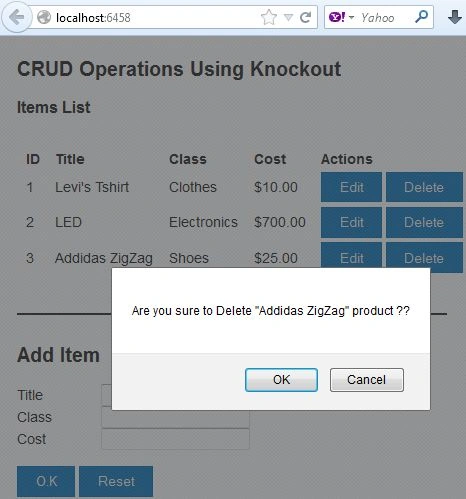
            if (confirm('Are you sure to Delete "' + Product.Title + '" product ??')) {
                var id = Product.Id;

                $.ajax({
                    url: '@Url.Action("AddProduct", "Product")',
                    cache: false,
                    type: 'POST',
                    contentType: 'application/json; charset=utf-8',
                    data: ko.toJSON(id),
                    success: function (data) {
                        self.Products.remove(Product);
                    }
                }).fail(function (xhr, textStatus, err) {
                    alert(err);
                });
            }
        };

        self.edit = function (Product) {
            self.Product(Product);
        };

        self.change = function () {
            var Product = self.Product();

            $.ajax({
                url: '@Url.Action("EditProduct", "Product")',
                cache: false,
                type: 'PUT',
                contentType: 'application/json; charset=utf-8',
                data: ko.toJSON(Product),
                success: function (data) {
                    self.Products.removeAll();
                    self.Products(data);
                    self.Product(null);
                    alert("Record Updated Successfully");
                }
            }).fail(function (xhr, textStatus, err) {
                alert(err);
            });
        };

        self.reset = function () {
            self.Title("");
            self.Cost("");
            self.Class("");
        };

        self.cancel = function () {
            self.Product(null);
        };
    }

    var viewModel = new ProductViewModel();
    ko.applyBindings(viewModel);
</script>
Here in the first function, I have added a $ sign with the cost and also the cost will be shown in the decimal place, up to two values.
Then I declared Observables for ID, Class, Cost, Title, and Product. An Observable Array named Products was also created.
A computed function is created that will show the sum of all the Price values of all the Products.
The Create function will work when the user makes a new entry by clicking on the "Add" button. First, all three Textboxes will be empty, then the user needs to enter some values into all three of these Textboxes, if any TextBox is found empty then an error message will be shown that will ask to enter some value in all the Textboxes, then these entries will be added to the Products Array.
The Delete function will work on the ID of the Product, it will delete all the entries at that ID, if this function can't find the ID specified then an error message will be shown.
The Change function will use the edit function to edit the values of the product based on the ID of that product.


Gowtham RajamanickamPosted Mar 27, 2015, 9:44 AM
simply superb..
Guler RemusPosted Jan 28, 2015, 6:14 AM
at Delete section you put this: self.delete = function (Product) {if (confirm('Are you sure to Delete "' + Product.Title + '" product ??')) { var id = Product.Id; $.ajax({ url: '@Url.Action("AddProduct", "Product")', cache: false, is it correct to call ActionResult AddProduct ?
Anubhav ChaudharyPosted Dec 12, 2013, 3:17 AM
http://www.c-sharpcorner.com/uploadfile/cd7c2e/implement-insert-update-and-delete-functionality/
Anubhav ChaudharyPosted Dec 12, 2013, 3:16 AM
If you don't want to use Knockout for creating the Grid then you should follow this Article:- http://www.c-sharpcorner.com/uploadfile/cd7c2e/implement-insert-update-and-delete-functionality/ Here Real Data from the DataBase is used for doing CRUD operations
Anubhav ChaudharyPosted Dec 12, 2013, 3:15 AM
This Article is like a Demo which shows that How Grid can be created and how CRUD operations will be performed, that's why HardCoded Data was used, Viewer need to make changes according to his requirements
Anubhav ChaudharyPosted Dec 12, 2013, 3:11 AM
Hey Pradeep, just check the First part of this Article, you will find that Data is not fetched from any database, data is Hard Coded. If data is Hard Coded then how will Binding will be performed?? If you want to update your data by using Binding then you need to add grid.Bind(Model.ClassName) in the starting of View
Pradeep PatelPosted Dec 12, 2013, 2:55 AM
there is an error in your code on data-bind
Pradeep PatelPosted Dec 12, 2013, 2:54 AM
<table id="products1" data-bind="visible: Products().length > 0"> data-bind is not supported in your code