What is Knockout
Knockout is a JavaScript library that helps you to create rich, responsive displays and editor user interfaces with a clean underlying data model. Read more here http://knockoutjs.com/.
Key Concepts
- Declarative Bindings
Easily associate DOM elements with model data using a concise, readable syntax.
- Automatic UI Refresh
When your data model's state changes, your UI updates automatically
- Dependency Tracking
Implicitly set up chains of relationships between model data, to transform and combine it.
- Templating
Quickly generate sophisticated, nested UIs as a function of your model data.
Prerequisites
Visual Studio 2017 is the prerequisite to work with this article.
Thus, let's just use the sections with which we can implement the functionality.
- Create ASP.NET MVC 5 Application.
- Adding Model.
- Scaffolding in MVC 5.
- View in MVC 5.
- Log in an Entity Framework.
Create ASP.NET MVC 5 Application
In this section, we'll create an ASP.NET Web Application with the MVC 5 Project Template. Use the procedure given below.
Step 1
Open Visual Studio 2017 and click "New Project".
Step 2
Select "Web" from the left pane and create ASP.NET Web application.
Step 3
Select the MVC Project template in the next ASP.NET wizard.
Visual Studio automatically creates the MVC 5 Application, adds some files and folders to the solution.
Working with Entity Framework
Step 1
Right click on Models folder, click Add New Item, select ADO.NET Entity Data Model from Data template and give a name.
Step 2
Select EF Designer from the database.
Step 3
Make a new connection and select a connection, if you already have a connection.
Step 4
Select tables, view, and stored procedures and click Finish.
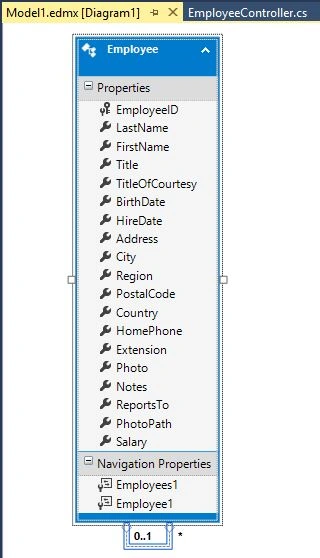
Change one little thing in context class to get rid of this error “A circular reference was detected while serializing an object of type 'System.Data.Entity.DynamicProxies.Employee”.
- public NORTHWNDEntities(): base("name=NORTHWNDEntities") {
- base.Configuration.ProxyCreationEnabled = false;
- }
Add a new controller on controller folder and give appropriate name.
EmployeeController
- using System;
- using System.Collections.Generic;
- using System.Data.Entity;
- using System.Linq;
- using System.Net;
- using System.Web;
- using System.Web.Mvc;
- using System.Web.Script.Serialization;
- using WebApplication1.Models;
- namespace WebApplication1.Controllers {
- public class EmployeeController: Controller {
- private readonly NORTHWNDEntities _db = new NORTHWNDEntities();
-
- public ActionResult Index() {
- return View();
- }
- public JsonResult ListEmployees() {
-
- return Json(from obj in _db.Employees select new {
- EmployeeID = obj.EmployeeID, FirstName = obj.FirstName, LastName = obj.LastName, Address = obj.Address
- }, JsonRequestBehavior.AllowGet);
- }
- public ActionResult Create() {
- return View();
- }
-
- [HttpPost]
- public string CreateEmployee(Employee employee) {
- if (!ModelState.IsValid) return "Model is invalid";
- _db.Employees.Add(employee);
- _db.SaveChanges();
- return "Cource is created";
- }
-
- public ActionResult Edit(int ? id) {
- if (id == null) return new HttpStatusCodeResult(HttpStatusCode.BadRequest);
- var employee = _db.Employees.Find(id);
- if (employee == null) return HttpNotFound();
- var serializer = new JavaScriptSerializer();
- ViewBag.SelectedEmployee = serializer.Serialize(employee);
- return View();
- }
-
- [HttpPost]
- public string Update(Employee employee) {
- if (!ModelState.IsValid) return "Invalid model";
- _db.Entry(employee).State = EntityState.Modified;
- _db.SaveChanges();
- return "Updated successfully";
- }
-
- public ActionResult Delete(int ? id) {
- if (id == null) return new HttpStatusCodeResult(HttpStatusCode.BadRequest);
- var employee = _db.Employees.Find(id);
- if (employee == null) return HttpNotFound();
- var serializer = new JavaScriptSerializer();
- ViewBag.SelectedEmployee = serializer.Serialize(employee);
- return View();
- }
-
- [HttpPost, ActionName("Delete")]
- public string Delete(Employee employee) {
- if (employee == null) return "Invalid data";
- var getEmployee = _db.Employees.Find(employee.EmployeeID);
- _db.Employees.Remove(getEmployee);
- _db.SaveChanges();
- return "Deleted successfully";
- }
- protected override void Dispose(bool disposing) {
- if (disposing) {
- _db.Dispose();
- }
- base.Dispose(disposing);
- }
- }
- }
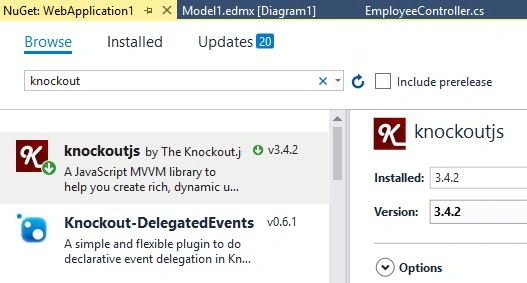
Install Knockoutjs using
Nuget Package Manager.
Image 2.
Add a new folder in Scripts folder “KOScripts” and add some JavaScript files.
KORead.js
- $(function () {
- ko.applyBindings(modelView);
- modelView.viewEmployees();
- });
- var modelView = {
- Employees: ko.observableArray([]),
- viewEmployees: function () {
- var thisObj = this;
- try {
- $.ajax({
- url: '/Employee/ListEmployees',
- type: 'GET',
- dataType: 'json',
- contentType: 'application/json',
- success: function (data) {
- thisObj.Employees(data);
- },
- error: function (err) {
- alert(err.status + " : " + err.statusText);
- }
- });
- } catch (e) {
- window.location.href = '/Employee/Index';
- }
- },
-
- EmployeeID: ko.observable(),
- FirstName: ko.observable(),
- LastName: ko.observable(),
- Address: ko.observable(),
- createEmployee: function () {
- try {
- $.ajax({
- url: '/Employee/CreateEmployee',
- type: 'POST',
- dataType: 'json',
- data: ko.toJSON(this),
- contentType: 'application/json',
- success: successCallback,
- error: errorCallback
- });
- } catch (e) {
- window.location.href = '/Employee/Index';
- }
- }
- }
- function successCallback(data) {
- window.location.href = '/Employee/Index/';
- }
- function errorCallback(err) {
- window.location.href = '/Employee/Index/';
- }
KOUpdate:
- var parsedSelectedEmployee = $.parseJSON(selectedEmployee);
- $(function () {
- ko.applyBindings(modelUpdate);
- });
- var modelUpdate = {
-
- EmployeeID: ko.observable(parsedSelectedEmployee.EmployeeID),
- FirstName: ko.observable(parsedSelectedEmployee.FirstName),
- LastName: ko.observable(parsedSelectedEmployee.LastName),
- Address: ko.observable(parsedSelectedEmployee.Address),
- updateEmployee: function () {
- try {
- $.ajax({
- url: '/Employee/Update',
- type: 'POST',
- dataType: 'json',
- data: ko.toJSON(this),
- contentType: 'application/json',
- success: successCallback,
- error: errorCallback
- });
- } catch (e) {
- window.location.href = '/Employee/Index/';
- }
- }
-
- }
- function successCallback(data) {
- window.location.href = '/Employee/Index/';
- }
- function errorCallback(err) {
- window.location.href = '/Employee/Index/';
- }
- var parsedSelectedEmployee = $.parseJSON(selectedEmployee);
- $(function () {
- ko.applyBindings(modelDelete);
- });
- var modelDelete = {
-
- EmployeeID: ko.observable(parsedSelectedEmployee.EmployeeID),
- FirstName: ko.observable(parsedSelectedEmployee.FirstName),
- LastName: ko.observable(parsedSelectedEmployee.LastName),
- Address: ko.observable(parsedSelectedEmployee.Address),
- deleteEmployee: function () {
- try {
- $.ajax({
- url: '/Employee/Delete',
- type: 'POST',
- dataType: 'json',
- data: ko.toJSON(this),
- contentType: 'application/json',
- success: successCallback,
- error: errorCallback
- });
- } catch (e) {
- window.location.href = '/Employee/Index/';
- }
- }
-
- }
- function successCallback(data) {
- window.location.href = '/Employee/Index/';
- }
- function errorCallback(err) {
- window.location.href = '/Employee/Index/';
- }
Add a new folder “Employee” in Views.
Index.cshtml
- @{
- ViewBag.Title = "Index";
- Layout = "~/Views/Shared/_Layout.cshtml";
- }
- <h2>Index</h2>
- <p>
- @Html.ActionLink("Create New", "Create")
- </p>
- <table class="table">
- <tr>
- <th>
- Employee ID
- </th>
- <th>
- First Name
- </th>
- <th>
- Last Name
- </th>
- <th>
- Address
- </th>
- <th></th>
- </tr>
- <tbody data-bind="foreach: Employees">
- <tr>
- <td data-bind="text: EmployeeID"></td>
- <td data-bind="text: FirstName"></td>
- <td data-bind="text: LastName"></td>
- <td data-bind="text: Address"></td>
- <td>
- <a data-bind="attr: { 'href': '@Url.Action("Edit", "Employee")/' + EmployeeID }" class="btn-link">Edit</a>
- <a data-bind="attr: { 'href': '@Url.Action("Delete", "Employee")/' + EmployeeID }" class="btn-link">Delete</a>
- </td>
- </tr>
- </tbody>
- </table>
- <script src="~/Scripts/jquery-1.10.2.min.js"></script>
- <script src="~/Scripts/knockout-3.4.2.js"></script>
- <script src="~/Scripts/KOScripts/KORead.js"></script>
- @ {
- ViewBag.Title = "Create";
- Layout = "~/Views/Shared/_Layout.cshtml";
- } < h2 > Create < /h2> < div class = "form-horizontal" > < h4 > Employee < /h4> < hr > < div class = "form-group" > < label class = "control-label col-md-2"
- for = "EmployeeID" > Employee ID < /label> < div class = "col-md-10" > < input class = "form-control text-box single-line"
- id = "EmployeeID"
- name = "EmployeeID"
- type = "text"
- value = ""
- data - bind = "value: EmployeeID" > < /div> < /div> < div class = "form-group" > < label class = "control-label col-md-2"
- for = "FirstName" > First Name < /label> < div class = "col-md-10" > < input class = "form-control text-box single-line"
- id = "FirstName"
- name = "FirstName"
- type = "text"
- value = ""
- data - bind = "value: FirstName" > < /div> < /div> < div class = "form-group" > < label class = "control-label col-md-2"
- for = "LastName" > Last Name < /label> < div class = "col-md-10" > < input class = "form-control text-box single-line"
- id = "LastName"
- name = "LastName"
- type = "text"
- value = ""
- data - bind = "value: LastName" > < /div> < /div> < div class = "form-group" > < label class = "control-label col-md-2"
- for = "Address" > Address < /label> < div class = "col-md-10" > < input class = "form-control text-box single-line"
- id = "Address"
- name = "Address"
- type = "text"
- value = ""
- data - bind = "value: Address" > < /div> < /div> < div class = "form-group" > < div class = "col-md-offset-2 col-md-10" > < input type = "button"
- data - bind = "click: createEmployee"
- value = "Create"
- class = "btn btn-default" > < /div> < /div> < /div> < div > @Html.ActionLink("Back to List", "") < /div> < script src = "~/Scripts/jquery-1.10.2.min.js" > < /script> < script src = "~/Scripts/knockout-3.4.2.js" > < /script> < script src = "~/Scripts/KOScripts/KORead.js" > < /script>
Edit.cshtml
- @ {
- ViewBag.Title = "Edit";
- Layout = "~/Views/Shared/_Layout.cshtml";
- } < h2 > Edit < /h2>
- @using(Html.BeginForm()) {
- @Html.AntiForgeryToken() < div class = "form-horizontal" > < h4 > Employee < /h4> < div class = "form-group" > < label class = "control-label col-md-2"
- for = "FirstName" > First Name < /label> < div class = "col-md-10" > < input class = "form-control text-box single-line"
- id = "FirstName"
- name = "FirstName"
- type = "text"
- value = ""
- data - bind = "value: FirstName" > < /div> < /div> < div class = "form-group" > < label class = "control-label col-md-2"
- for = "LastName" > Last Name < /label> < div class = "col-md-10" > < input class = "form-control text-box single-line"
- id = "LastName"
- name = "LastName"
- type = "text"
- value = ""
- data - bind = "value: LastName" > < /div> < /div> < div class = "form-group" > < label class = "control-label col-md-2"
- for = "Address" > Address < /label> < div class = "col-md-10" > < input class = "form-control text-box single-line"
- id = "Address"
- name = "Address"
- type = "text"
- value = ""
- data - bind = "value: Address" > < /div> < /div> < div class = "form-group" > < div class = "col-md-offset-2 col-md-10" > < input type = "button"
- data - bind = "click: updateEmployee"
- value = "Update"
- class = "btn btn-default" > < /div> < /div> < /div>
- } < script type = "text/javascript" >
- var selectedEmployee = '@Html.Raw(ViewBag.selectedEmployee)'; < /script> < div > @Html.ActionLink("Back to List", "") < /div> < script src = "~/Scripts/jquery-1.10.2.min.js" > < /script> < script src = "~/Scripts/knockout-3.4.2.js" > < /script> < script src = "~/Scripts/KOScripts/KOUpdate.js" > < /script>
Delete.cshtml
- @ {
- ViewBag.Title = "Delete";
- Layout = "~/Views/Shared/_Layout.cshtml";
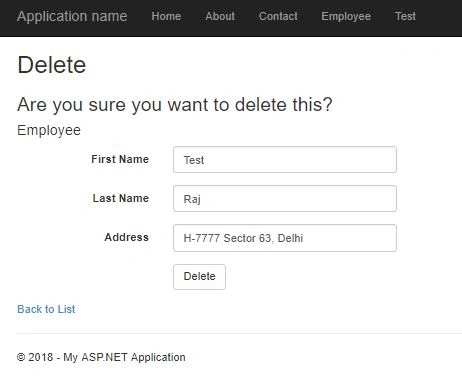
- } < h2 > Delete < /h2> < h3 > Are you sure you want to delete this ? < /h3>
- @using(Html.BeginForm()) {
- @Html.AntiForgeryToken() < div class = "form-horizontal" > < h4 > Employee < /h4> < div class = "form-group" > < label class = "control-label col-md-2"
- for = "FirstName" > First Name < /label> < div class = "col-md-10" > < input class = "form-control text-box single-line"
- id = "FirstName"
- name = "FirstName"
- type = "text"
- value = ""
- data - bind = "value: FirstName" > < /div> < /div> < div class = "form-group" > < label class = "control-label col-md-2"
- for = "LastName" > Last Name < /label> < div class = "col-md-10" > < input class = "form-control text-box single-line"
- id = "LastName"
- name = "LastName"
- type = "text"
- value = ""
- data - bind = "value: LastName" > < /div> < /div> < div class = "form-group" > < label class = "control-label col-md-2"
- for = "Address" > Address < /label> < div class = "col-md-10" > < input class = "form-control text-box single-line"
- id = "Address"
- name = "Address"
- type = "text"
- value = ""
- data - bind = "value: Address" > < /div> < /div> < div class = "form-group" > < div class = "col-md-offset-2 col-md-10" > < input type = "button"
- data - bind = "click: deleteEmployee"
- value = "Delete"
- class = "btn btn-default" > < /div> < /div> < /div>
- } < script type = "text/javascript" >
- var selectedEmployee = '@Html.Raw(ViewBag.selectedEmployee)'; < /script> < div > @Html.ActionLink("Back to List", "Read") < /div> < script src = "~/Scripts/jquery-1.10.2.min.js" > < /script> < script src = "~/Scripts/knockout-3.4.2.js" > < /script> < script src = "~/Scripts/KOScripts/KODelete.js" > < /script>
Add routing URL in RouteConfig.cs for Employee.
- public static void RegisterRoutes(RouteCollection routes) {
- routes.IgnoreRoute("{resource}.axd/{*pathInfo}");
- routes.MapRoute(name: "Default", url: "{controller}/{action}/{id}", defaults: new {
- controller = "Home", action = "Index", id = UrlParameter.Optional
- });
- routes.MapRoute(name: "Employee", url: "{controller}/{action}/{id}", defaults: new {
- controller = "Employee", action = "Index", id = UrlParameter.Optional
- });
- }
Now final step to add a tab in header, Go in Shared/_Layout.cshtml and add Employee tab.
- <div class="navbar-collapse collapse">
- <ul class="nav navbar-nav">
- <li>@Html.ActionLink("Home", "Index", "Home")</li>
- <li>@Html.ActionLink("About", "About", "Home")</li>
- <li>@Html.ActionLink("Contact", "Contact", "Home")</li>
- <li>@Html.ActionLink("Employee", "Index", "Employee")</li>
- </ul>
- </div>
Now, time to run the application to see output.
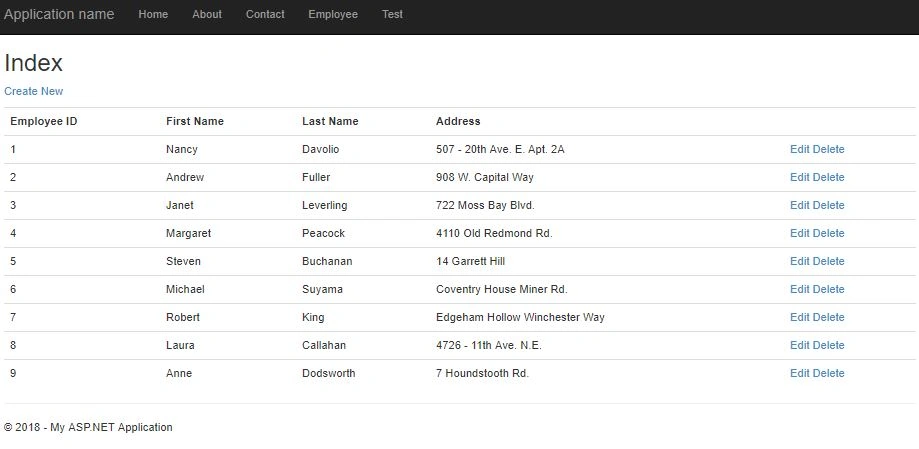
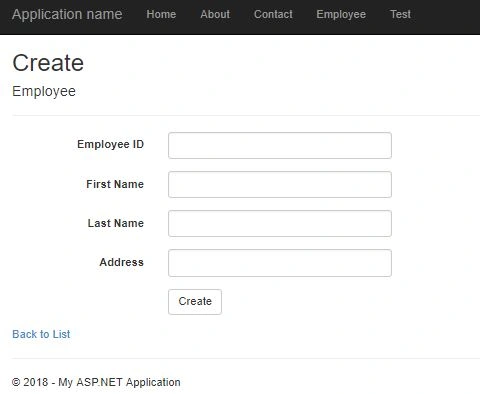
The index page has a list of employees, you can add new employee and edit and delete as well.
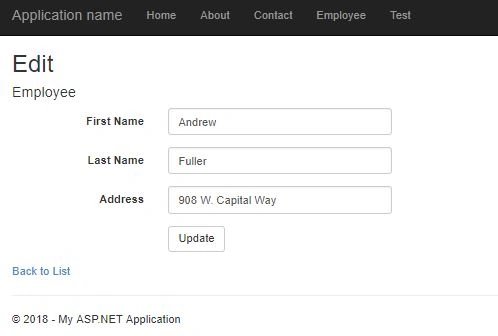
Now, click on any row and click Edit.
Click on delete link from the grid to delete any record.
Conclusion
In this article, we have learned how to implement CRUD operations using MVC with Knockout and Entity Framework. If you have any question or comment, drop me a line in the comments section.


Nalajala GaneshPosted Feb 15, 2022, 10:45 AM
Can u Provide the sql file
Saravanakumar SekaranPosted Apr 20, 2018, 1:46 AM
Very nice article !!!
Prasadh KumarPosted Apr 19, 2018, 11:25 PM
U have mentioned all but forgot main part Javascipt view model and apply bindings