

Microsoft recently released the updated SharePoint CSOM package version for SharePoint Online. Based on the updated version I'll walk through an example using Visual Studio.
Before getting into the example, we will see the key changes updated over that version, 16.1.3912.1204.
- Manage regional settings of a site
- Manage language settings of a site
- Manage auditing settings of a site
- Control advanced settings for document sets
- Support for future enhanced migration APIs
- Control sandbox solution settings at the site collection level
- Secondary contact in site collection level
- Sharing settings
- Microsoft.SharePoint.Client
- Microsoft.SharePoint.Client.Publishing
- Microsoft.SharePoint.Client.Search
- Microsoft.SharePoint.Client.UserProfiles
- Microsoft.SharePoint.Client.DocumentManagement
- Microsoft.SharePoint.Client.Tenant
- How to connect the Nuget Package from Visual Studio
- Attach the latest CSOM Package (16.1.3912.1204) as a reference to the project
- Do the code to use the new members in a new Visual Studio Project
- Open Visual Studio and create a new project. For this example I have selected Console Application.
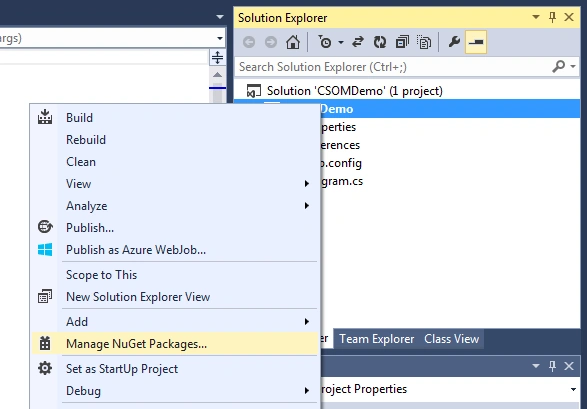
- After project creation, right-click the project name.
- From the properties popup, select Manage NuGet Packages.
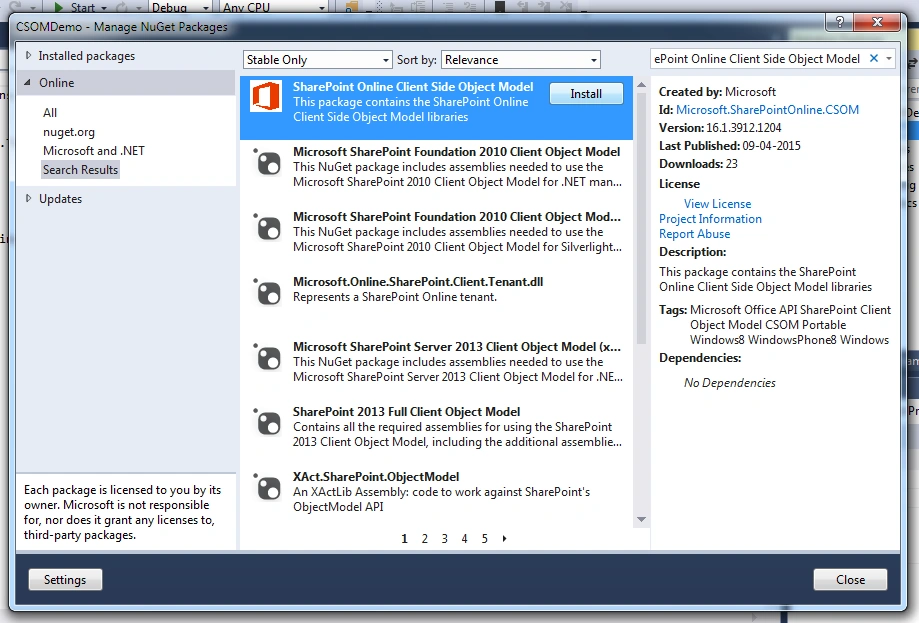
- In the dialog box, search for the SharePoint Online Object Model
Add the latest CSOM assemblies as references to the project - The search results show you the “SharePoint Online Object Model” package with the version 16.1.3912.1204 at the top. Click the Install button to download and install the package.
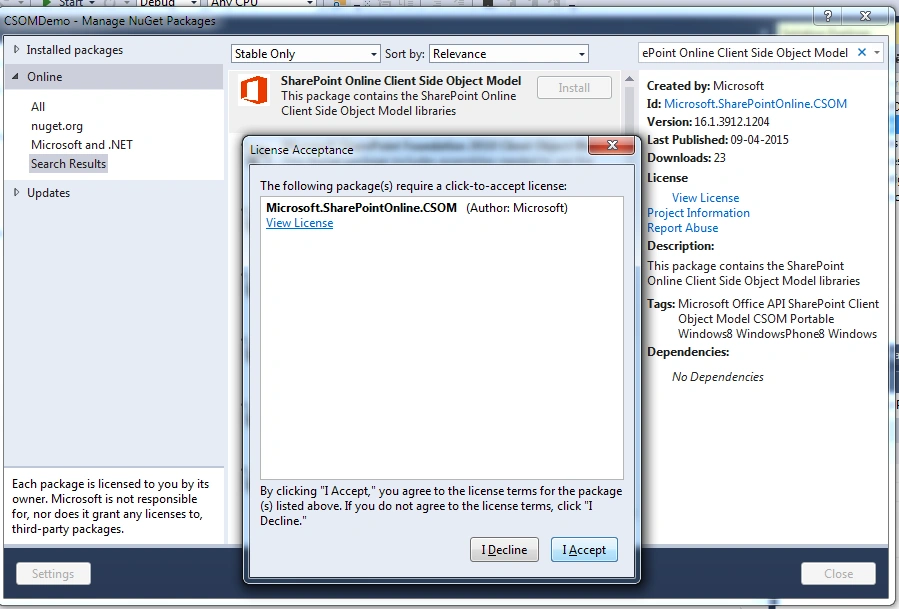
- Before installation, it asks for License acceptance, click the I Accept button to install into your machine.
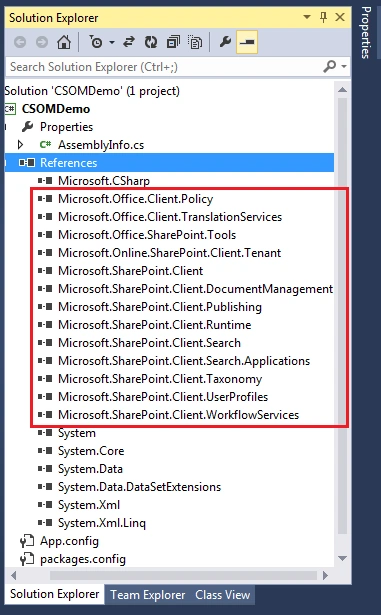
- After installation close the dialog box and the DLLs from the package are automatically added as a reference to the project.
- After the reference is added, I have used the some new properties and methods to show you an example.
The example program gets the current Time Zone settings from the given SharePoint site and update with a new Time zone.
Insert the following code in the console application and get the output as timezone changes for the site.
RegionalSettings, TimeZone and TimeZoneCollection are the new members updated in the CSOM pacakage for SharePoint Online.
Use this link SharePoint Time Zone Collection to determine the id for the appropriate global time zones.
- // Get access to source site
- using (var ctx = new ClientContext("https://myspworksin.sharepoint.com"))
- {
- //Provide count and pwd for connecting to the source
- var passWord = new SecureString();
- foreach (char c in "<mypassword>".ToCharArray()) passWord.AppendChar(c);
- ctx.Credentials = new SharePointOnlineCredentials("<office 365 mail id>", passWord);
- // Actual code for operations
- Web web = ctx.Web;
- RegionalSettings regSettings = web.RegionalSettings;
- ctx.Load(web);
- ctx.Load(regSettings); //To get regional settings properties
- Microsoft.SharePoint.Client.TimeZone currentTimeZone = regSettings.TimeZone;
- ctx.Load(currentTimeZone); //To get the TimeZone propeties for the current web region settings
- ctx.ExecuteQuery();
- //Get the current site TimeZone
- Console.WriteLine(string.Format("Connected to site with title of {0}", web.Title));
- Console.WriteLine("Current TimeZone Settings: " + currentTimeZone.Id.ToString() +" - "+ currentTimeZone.Description);
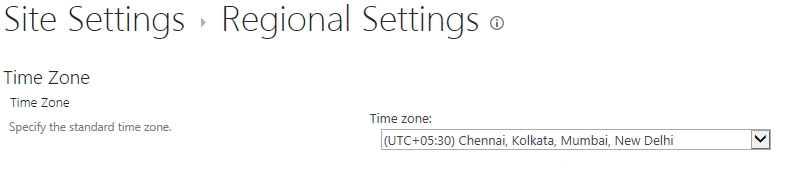
- //Update the TimeZone setting to (UTC+05:30) Chennai, Kolkata, Mumbai, New Delhi. TimeZone Id is 23
- TimeZoneCollection globalTimeZones = RegionalSettings.GetGlobalTimeZones(ctx);
- ctx.Load(globalTimeZones);
- ctx.ExecuteQuery();
- Microsoft.SharePoint.Client.TimeZone newTimeZone = globalTimeZones.GetById(23);
- regSettings.TimeZone = newTimeZone;
- regSettings.Update(); //Update New settings to the web
- ctx.ExecuteQuery();
- Console.WriteLine("New TimeZone settings are updated.");
- Console.ReadLine();
- }
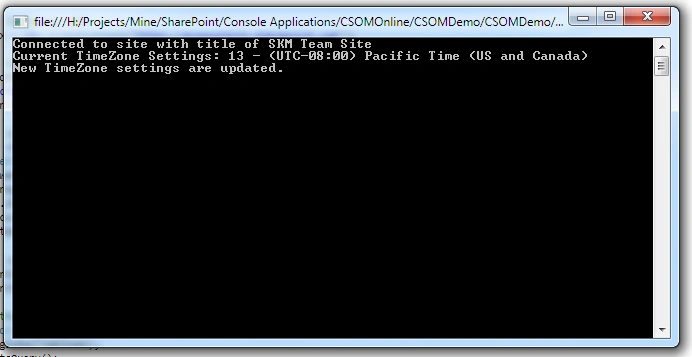
Browser Output
Dinesh GabhanePosted Nov 18, 2019, 3:56 AM
Nice Article
srilakshmi kambapuPosted Aug 24, 2015, 6:06 AM
I tried doing in the similar way. Iam getting below error. Could you please help me.'Field or property "GlobalTimeZones" does not exist'
SriramPosted Jul 6, 2015, 2:45 AM
Good.............
Shantha Kumar TPosted Apr 15, 2015, 5:00 AM
Thanks Santhakumar
Santhakumar MunuswamyPosted Apr 14, 2015, 11:01 PM
Good one
Shantha Kumar TPosted Apr 14, 2015, 8:31 PM
Thanks Karthik
Karthik Muthu KaruppanPosted Apr 14, 2015, 4:35 PM
Nice