

Sometimes we would like to have some custom debugger information in the Visual Studio debugger. The Visual Studio custom debugger information tool can help us to do this.
Before looking at the debugger tool let's look at what debugger information looks like without using the custom debugger tool.
I have an Employee class as in the following:
- namespace ConsoleApplication1
- {
- public class Employee
- {
- public string EmployeeName { get; set; }
- public float Salary { get; set; }
- public Employee(float salary, string name)
- {
- Salary = salary;
- EmployeeName = name;
- }
- }
- }
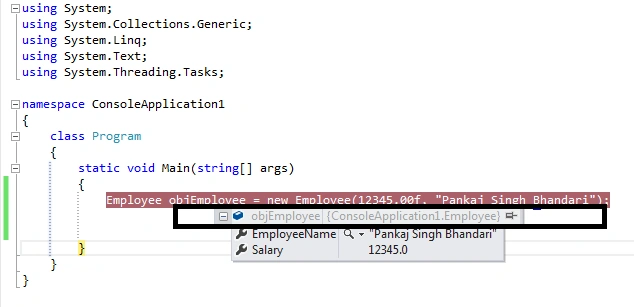
If I put a debugger and point at the debugger display information, then it shows something like the preceding, the namespace classname and expanding the preceding will show the member value of that class.
Now let's modify the employee class to show the custom debugger information.
- namespace ConsoleApplication1
- {
- [DebuggerDisplay("Employee with name {EmployeeName} and Salary {Salary}")]
- public class Employee
- {
- [DebuggerDisplay("My Name is {EmployeeName}")]
- public string EmployeeName { get; set; }
- [DebuggerDisplay("My salary is {Salary}")]
- public float Salary { get; set; }
- public Employee(float salary, string name)
- {
- Salary = salary;
- EmployeeName = name;
- }
- }
- }
The output will be as in the following:
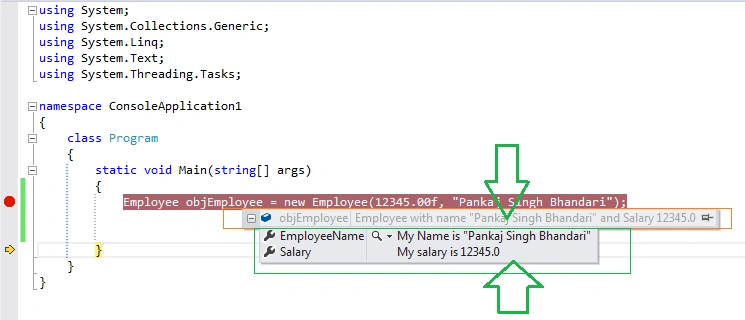
So we can see that instead of showing the plain value of the properties in the debugger window we are able to set and see the customized values of the properties.
Shaili DashoraPosted Feb 17, 2015, 12:21 PM
Nice one,this is new thing thanks for sharing
Sourabh SomaniPosted Feb 17, 2015, 11:04 AM
Pankaj Bhandari Good one. and thanks. Today I learn something new. I didn't know about this....
Pankaj BhandariPosted Feb 16, 2015, 10:11 PM
Yeah... me too just came across couple of days ago..... it looked worth sharing
Guest UserPosted Feb 16, 2015, 9:35 PM
Good one. I didnt know this attribute!