

In this web part there are 6 document id formats which you can choose and make it as a document id provider for the site collection. The following are the document id formats available in the web part.
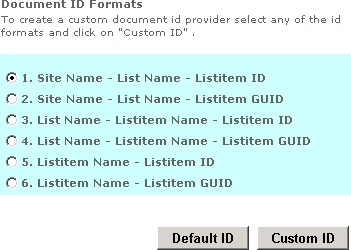
If you want to have the default OOTB document id click on "Default ID" button and upload the document. You could see the document id which looks like the following.

For custom document id provider select any one of the document id formats and click on "Custom ID" button to set the custom document id for the site collection with the selected format.
After setting the custom document id provider upload the document and check the document id.
Document ID formats:

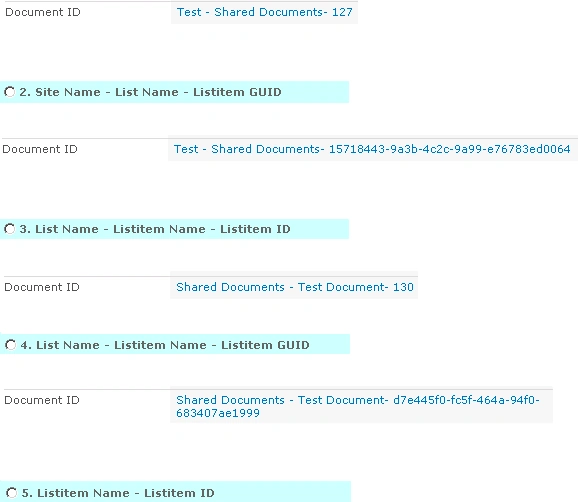
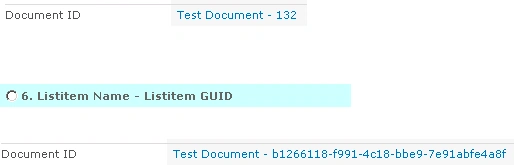
Note:
- Test => Site Name.
- Shared Documents => Library Name
- Test Document => Document Name
Custom Document Id provider web part
For deploying and installing the wsp file check this article
ravi akellaPosted Feb 4, 2013, 7:45 AM
hi
Amit OberoiPosted Apr 1, 2012, 1:43 PM
Hi Vijai, This looks to be an awesome thing.. could you please provide the source code for the same? As I am learning SharePoint and all the examples that I see and understand help me a lot... It would be great if you can mail me the source code or upload it here. Thanks! Amit
Tarek JajehPosted Mar 28, 2012, 6:54 AM
Hi, thats greate job, very helpfull would please share the source code with us if u don't mind :)
iyad hanounehPosted Apr 20, 2011, 2:28 AM
great i cant wait :)
iyad hanounehPosted Apr 19, 2011, 9:23 AM
hi, its a great idea to create such a web part, but i was wondering about the source code is it available for public?