

In SharePoint 2010 and 2013, we can write event receivers that are triggered on the occurrence of a specific event, such as when an item is added or deleted from a list or library and so on. For a complete list of possible event receivers, we can refer to the following link:
Table of SharePoint Events, Event Receivers, and Event Hosts
When we write an "–ing " type receiver where the handler is triggered before the event actually updates the SharePoint object, after performing the necessary check or actions of the handler, we have two options with the event; one to proceed with the update of the SharePoint object and another is to cancel it.
There are scenarios when we want to update/cancel an event and display a message to the user regarding the outcome. In most cases, a successful update may not warrant a message to be displayed to the user. But if the operation is cancelled, we may want to show a meaningful message to the user.
By default, if we merely cancel an event in the receiver such as the following, SharePoint throws an ugly error page to the user that may leave them confused.
public override void ItemDeleting(SPItemEventProperties properties)
{
base.ItemDeleting(properties);
try
{
StringBuilder strMessage = new StringBuilder();
using (SPSite oSite = new SPSite(properties.SiteId))
{
using (SPWeb oWeb = oSite.OpenWeb(properties.Web.ID))
{
SPList oProducts = oWeb.Lists.TryGetList("Products");
if (properties.List.ID == oProducts.ID)
{
if (properties.ListItem != null && properties.ListItem["Status"] != null && properties.ListItem["Status"].ToString().Equals("Sealed"))
{
properties.Cancel = true;
}
}
}
}
}
catch (Exception ex)
{
properties.Status = SPEventReceiverStatus.CancelWithError;
properties.Cancel = true;
}
}
Resulting error
Only a SharePoint-aware developer can understand this message that comes out of the box from SharePoint. To a business user, this makes little sense and might induce some panic. A more customized message indicating the root cause for cancelling the operation would make sense here.
This article details a method to show custom error messages when an event receiver cancels an operation.
Let's assume that we have a SharePoint list named "Products" with the following columns: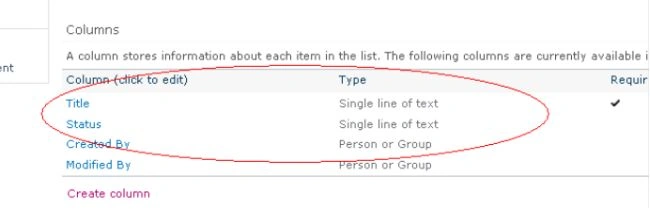
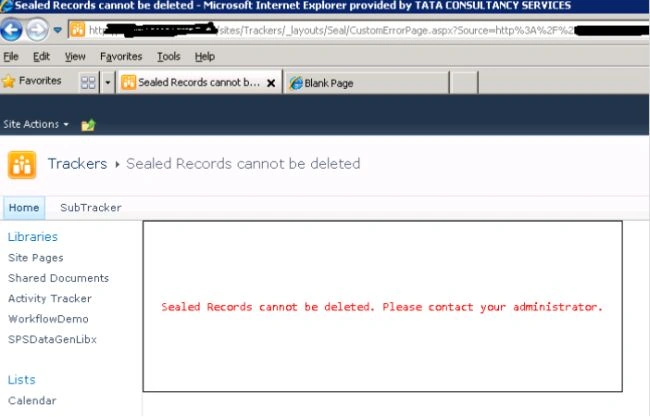
When a SharePoint user tries to delete an item with a specific value in a column, say "Sealed" in a "Status" column, then the deletion should not happen and the user must be shown a proper message indicating that a Sealed record cannot be deleted.
Here, we will first create an event receiver to implement this functionality.
In Visual Studio click on "Create a new project" and add a new event receiver for Custom List type and select the event as "An item is being deleted".
Visual Studio creates the skeleton receiver for us to work on. Add the following code to the event receiver.
public override void ItemDeleting(SPItemEventProperties properties)
{
base.ItemDeleting(properties);
try
{
StringBuilder strMessage = new StringBuilder();
using (SPSite oSite = new SPSite(properties.SiteId))
{
using (SPWeb oWeb = oSite.OpenWeb(properties.Web.ID))
{
SPList oProducts = oWeb.Lists.TryGetList("Products");
if (properties.List.ID == oProducts.ID)
{
if (properties.ListItem != null && properties.ListItem["Status"] != null && properties.ListItem["Status"].ToString().Equals("Sealed"))
{
properties.Cancel = true;
properties.Status = SPEventReceiverStatus.CancelWithRedirectUrl;
properties.RedirectUrl = oSite.Url + "/_layouts/Seal/CustomErrorPage.aspx";
}
}
}
}
}
catch (Exception ex)
{
properties.Status = SPEventReceiverStatus.CancelWithError;
properties.Cancel = true;
}
}
We observe that in the code, we are first checking if the list id is that of the list we are interested in and if the item's Status matches "Sealed". If so then we are cancelling the event and redirecting to an application page.
Hence, we should create this application page named "CustomErrorMessage.aspx", in the folder mapped to the "Layouts" folder and add the following code to the aspx of the application page:
Gowtham RajamanickamPosted Apr 21, 2015, 1:10 AM
good one
Mylsamy MuthusamyPosted Jan 31, 2014, 10:18 AM
Hi Ram, Are you deploying the solution as farm solution or sandboxed solution ?.
Rambabu CHPosted Dec 13, 2013, 7:27 AM
Its working fine in SP 2010,but in SP 2013 it display the error page.