

Today I came across one scenario in my project where I need to customize the default Boolean text (true/false) in Kendo Grid to some other meaningful name.
I am going to explain how to perform this customized operation from ASP.NET WEB API service response.
Please refer my previous article: Export grid data to excel in advance Kendo UI using MVC WEB API and Entity Framework where I have explained how to create a WEB API Service.
My SQL Table Values as shown in the following figure 1:
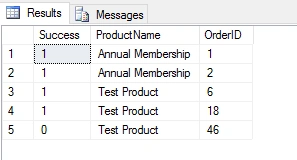
Figure 1
The JSON Response from the WEB API service:
- [{"Success":true,"ProductName":"AnnualMembership","OrderID":1},
- {"Success":true,"ProductName":"AnnualMembership","OrderID":2},
- {"Success":true,"ProductName":"TestProduct","OrderID":6},
- {"Success":true,"ProductName":"Test Product","OrderID":18}
- {"Success":false,"ProductName":"Test Product","OrderID":46}]
Create an HTML page in
your project
Design in HTML Page
- <!DOCTYPE html>
- <html>
- <head>
- <meta charset="utf-8">
- <title>Untitled</title>
- <link rel="stylesheet" href="http://kendo.cdn.telerik.com/2015.3.930/styles/kendo.common.min.css">
- <link rel="stylesheet" href="http://kendo.cdn.telerik.com/2015.3.930/styles/kendo.rtl.min.css">
- <link rel="stylesheet" href="http://kendo.cdn.telerik.com/2015.3.930/styles/kendo.default.min.css">
- <link rel="stylesheet" href="http://kendo.cdn.telerik.com/2015.3.930/styles/kendo.mobile.all.min.css">
- <script src="http://code.jquery.com/jquery-1.9.1.min.js"></script>
- <script src="http://kendo.cdn.telerik.com/2015.3.930/js/angular.min.js"></script>
- <script src="http://kendo.cdn.telerik.com/2015.3.930/js/jszip.min.js"></script>
- <script src="http://kendo.cdn.telerik.com/2015.3.930/js/kendo.all.min.js"></script>
- </head>
- <body>
- <div id="example" class="container-fluid">
- <div class="row">
- <span> Order History</span>
- </div>
- <div id="kGrid" data-role="grid"
- data-scrollable="true"
- data-columns="[
- { 'field':'ProductName', 'title':'Package Information', 'width':'25%' },
- { 'field':'OrderID', 'title':'OrderID', 'width':'13%'},
- { 'field':'Success', 'title':'Status', 'width':'13%'},
- ]"
- data-editable="false"
- data-filterable="true"
- data-pageable='true'
- data-bind="source: products,
- visible: isVisible"
- style="height: 350px; width: 94%">
- </div>
- </div>
- </div>
- </body>
- </html>
JavaScript with MVVM Model
- var viewModel = kendo.observable({
- isVisible: true,
- products: new kendo.data.DataSource({
- schema: {
- model: {
- id: "UserID",
- fields: {
- OrderID: { type: "number" },
- Success:{type:"boolean"},
- ProductName: { type: "string" }
- }
- }
- },
- serverFiltering: true,
- serverPaging: true,
- serverSorting: true,
- batch: true,
- transport: {
- read: {
- url: "/EventService/api/Registration/OrderHistory",
- dataType: "json"
- },
- parameterMap: function (options, operation) {
- if (operation !== "read" && options.models) {
- return { models: kendo.stringify(options.models) };
- }
- }
- }
- })
- });
- kendo.bind($("#example"), viewModel);
Result in Browser
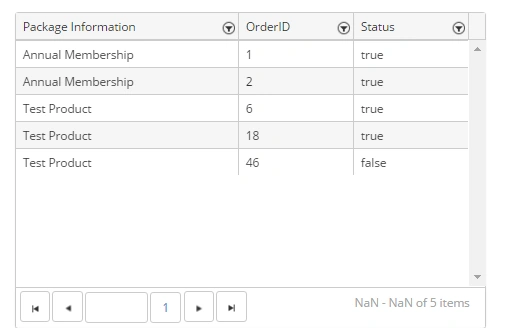
Figure 2
From the above image you can observe that for the Boolean field of the kendo grid is assigning 'true' for 1 and 'false' for 0.
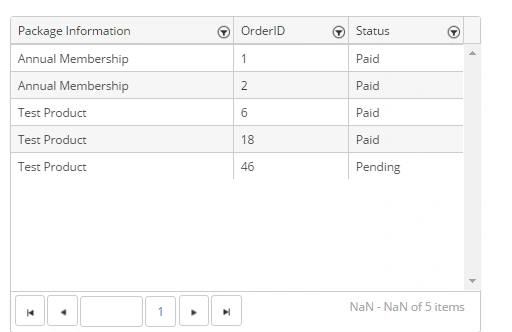
We can customizing it by using the template in the kendo Grid as shown below:
Arul RPosted Jan 17, 2016, 10:52 AM
Thanks for nice article
Priyaranjan K SPosted Oct 29, 2015, 12:49 PM
Thanks for the Share