

Introduction
A loader is something in a service based app for loading data from the server, it takes time to download heavy data such as audio, images and so on. For a better user experience developers show an activity view until the download completes.
The following is the procedure to create and use it in an application.
Step 1
Open XCode by double-clicking on it.
Step 2
Create a UIView class like the following.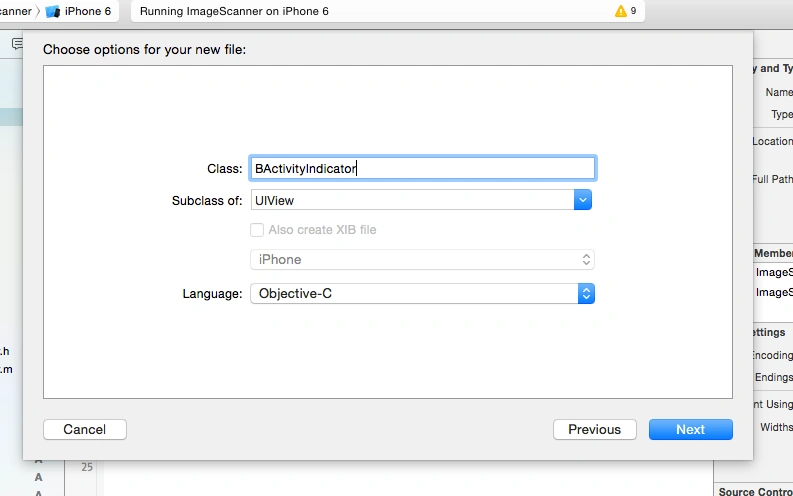
Step 3
Take User Interface View like the following: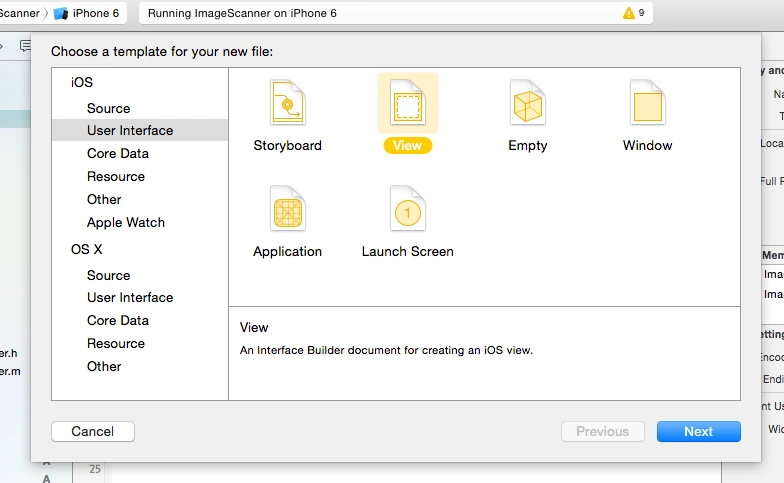
Step 4
Now here we will write the code in the UIView class Objective-C file.
BActivityIndicator.h
- #import < UIKit / UIKit.h >
- @interface BActivityIndicator: UIView {
- CGAffineTransform rotationTransform;
- }@property(weak, nonatomic) IBOutlet UILabel * pleaseWaitLabel;@property(weak, nonatomic) IBOutlet UIImageView * spinningImage;
- - (id) initWithView: (UIView * ) view;
- + (BActivityIndicator * ) showHUDAddedTo: (UIView * ) view animated: (BOOL) animated;
- + (BOOL) hideHUDForView: (UIView * ) view animated: (BOOL) animated;
- @end
- #import "BActivityIndicator.h"
- @implementation BActivityIndicator
- - (id) initWithFrame: (CGRect) frame {
- self = [super initWithFrame: frame];
- if (self) {
- self = [
- [
- [NSBundle mainBundle] loadNibNamed: @
- "BActivityIndicator"
- owner: self
- options: nil] lastObject];
- self.frame = frame;
- [self rotateLayerInfinite];
- self.pleaseWaitLabel.font = [UIFont fontWithName: @
- "RobotoCondensed-Regular"
- size: 14.0f];
- }
- return self;
- }
- - (id) initWithView: (UIView * ) view {
- // Let's check if the view is nil (this is a common error when using the windw initializer above)
- if (!view) {
- [NSException raise: @
- "MBProgressHUDViewIsNillException"
- format: @
- "The view used in the MBProgressHUD initializer is nil."];
- }
- id me = [self initWithFrame: CGRectMake(0, 0, [UIScreen mainScreen].bounds.size.width, [UIScreen mainScreen].bounds.size.height)];
- // We need to take care of rotation ourselfs if we're adding the HUD to a window
- if ([view isKindOfClass: [UIWindow class]]) {
- [self setTransformForCurrentOrientation: NO];
- }
- [
- [NSNotificationCenter defaultCenter] addObserver: self selector: @selector(deviceOrientationDidChange: )
- name: UIDeviceOrientationDidChangeNotification object: nil];
- return me;
- }
- - (void) rotateLayerInfinite {
- CABasicAnimation * rotation;
- rotation = [CABasicAnimation animationWithKeyPath: @
- "transform.rotation"];
- rotation.fromValue = [NSNumber numberWithFloat: 0];
- rotation.toValue = [NSNumber numberWithFloat: (2 * M_PI)];
- rotation.duration = 1.5f;
- rotation.repeatCount = HUGE_VALF;
- [_spinningImage.layer removeAllAnimations];
- [_spinningImage.layer addAnimation: rotation forKey: @
- "Spin"];
- }
- #pragma mark - #pragma mark Manual oritentation change
- #define RADIANS(degrees)((degrees * (float) M_PI) / 180.0f)
- - (void) deviceOrientationDidChange: (NSNotification * ) notification {
- if (!self.superview) {
- return;
- }
- if ([self.superview isKindOfClass: [UIWindow class]]) {
- [self setTransformForCurrentOrientation: YES];
- }
- }
- - (void) setTransformForCurrentOrientation: (BOOL) animated {
- UIInterfaceOrientation orientation = [UIApplication sharedApplication].statusBarOrientation;
- NSInteger degrees = 0;
- // Stay in sync with the superview
- if (self.superview) {
- self.bounds = self.superview.bounds;
- [self setNeedsDisplay];
- }
- if (UIInterfaceOrientationIsLandscape(orientation)) {
- if (orientation == UIInterfaceOrientationLandscapeLeft) {
- degrees = -90;
- } else {
- degrees = 90;
- }
- // Window coordinates differ!
- self.bounds = CGRectMake(0, 0, self.bounds.size.height, self.bounds.size.width);
- } else {
- if (orientation == UIInterfaceOrientationPortraitUpsideDown) {
- degrees = 180;
- } else {
- degrees = 0;
- }
- }
- rotationTransform = CGAffineTransformMakeRotation(RADIANS(degrees));
- if (animated) {
- [UIView beginAnimations: nil context: nil];
- }
- [self setTransform: rotationTransform];
- if (animated) {
- [UIView commitAnimations];
- }
- }
- + (BActivityIndicator * ) showHUDAddedTo: (UIView * ) view animated: (BOOL) animated {
- BActivityIndicator * hud = [
- [BActivityIndicator alloc] initWithView: view];
- [view addSubview: hud];
- return hud;
- }
- + (BOOL) hideHUDForView: (UIView * ) view animated: (BOOL) animated {
- UIView * viewToRemove = nil;
- for (UIView * v in [view subviews]) {
- if ([v isKindOfClass: [BActivityIndicator class]]) {
- viewToRemove = v;
- }
- }
- if (viewToRemove != nil) {
- [viewToRemove removeFromSuperview];
- return YES;
- } else {
- return NO;
- }
- }
- - (void) dealloc {
- [_spinningImage.layer removeAnimationForKey: @
- "Spin"];
- }
- @end
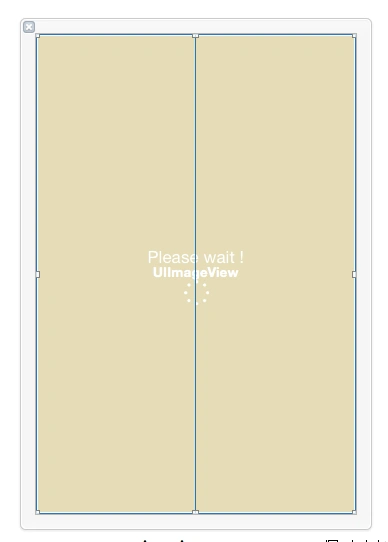
Step 7
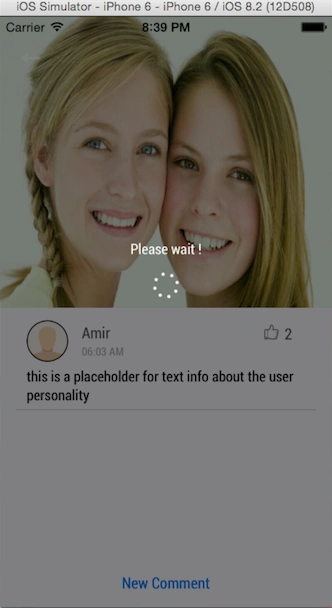
Now here I’ll explain how to call that class within a project.
In your common Utility Class you need to write these functions for calling it:
- #pragma mark - Activity Indicator + (void) startActivityIndicatorInView: (UIView * ) aView withMessage: (NSString * ) aMessage {
- // MBProgressHUD *_hud = [MBProgressHUD showHUDAddedTo:aView animated:YES];
- // _hud.dimBackground = YES;
- // _hud.labelText = aMessage;
- BActivityIndicator * _hud = [BActivityIndicator showHUDAddedTo: aView animated: YES];
- // _hud.pleaseWaitLabel.text = aMessage;
- }
- + (void) stopActivityIndicatorInView: (UIView * ) aView {
- // [MBProgressHUD hideHUDForView:aView animated:YES];
- [BActivityIndicator hideHUDForView: aView animated: YES];
- }
Vaikesh K PPosted Aug 25, 2015, 1:28 AM
Thanks for this article. :)
Rajeesh MenothPosted Aug 23, 2015, 2:44 AM
Good One
Gowtham KPosted Aug 22, 2015, 10:08 PM
Good one
Yashwanth MuthineniPosted Aug 22, 2015, 7:01 AM
Nice Share
Santhakumar MunuswamyPosted Aug 22, 2015, 6:32 AM
Good Article. Thanks for sharing
Chervine BhiwooPosted Aug 22, 2015, 1:58 AM
Great!
Nilesh JadavPosted Aug 22, 2015, 12:13 AM
Great Post sir
Karthikeyan KPosted Aug 21, 2015, 9:29 PM
Good one sir...