

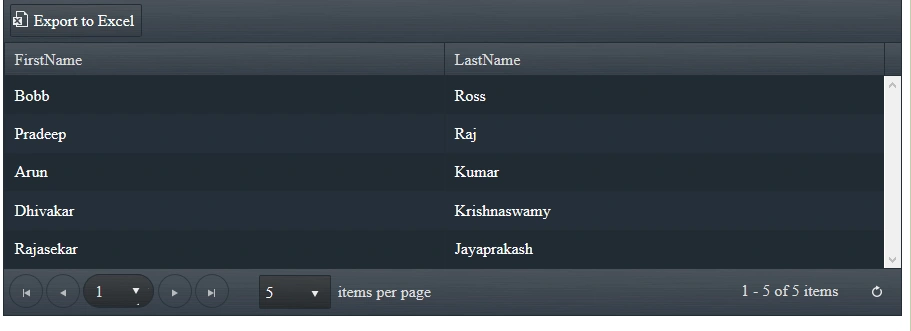
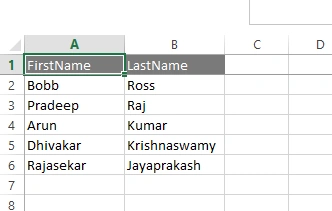
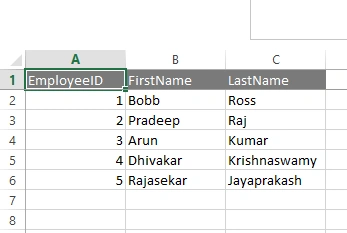
Today, I came across a scenario where I need to customize the inbuilt export to excel functionality in kendo grid while exporting the grid data, i.e where I need to get some of the column data which is hidden in grid while downloading it as excel, which can easily done using show/hide column and bind function of kendo grid.
Let we see how to implement it using ASP.NET Web API as follows,
- Creating an ASP.NET Web API application.
- Creating a Controller.
- Test the API
- Using a kendo grid with MVVM pattern
- Customizing the Export to Excel functionality in kendo grid using ASP.NET Web API.
Creating an Empty ASP.NET Web API Project
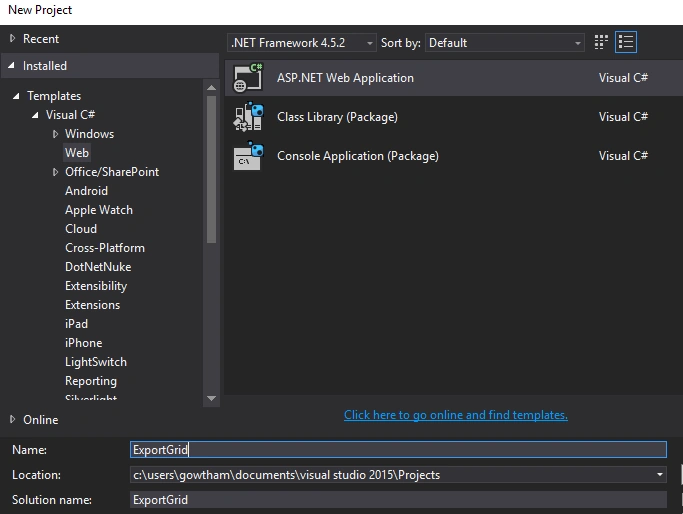
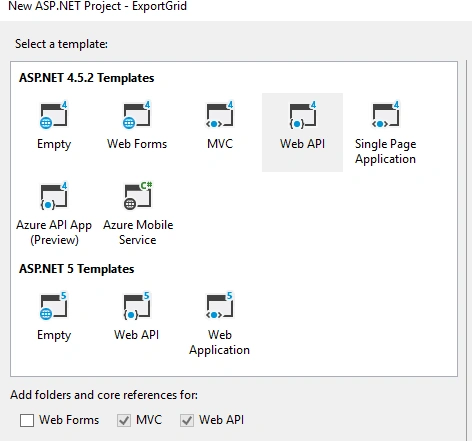
Create a simple empty WEB API project as in the following figure:
Creating a Model Class
Right click on the model folder and add a new class, in my case I named it Employee.cs:
Code in Employee.cs
- public class Employee
- {
- public Employee(int EmployeeID, string FirstName, string LastName)
- {
- this.EmployeeID = EmployeeID;
- this.FirstName = FirstName;
- this.LastName = LastName;
- }
- public int EmployeeID { get; set; }
- public string FirstName { get; set; }
- public string LastName { get; set; }
- }
Creating a Controller
Right click on the Controller folder and add a new controller, in my case I named it EmployeeDetailsController.cs:
Code in EmployeeDetailsController.cs
- [RoutePrefix("api/EmployeeList")]
- public class EmployeeDetailsController : ApiController
- {
- [HttpGet]
- [Route("List")]
- public HttpResponseMessage EmployeeList()
- {
- try
- {
- List<Employee> _emp = new List<Employee>();
- _emp.Add(new Employee(1, "Bobb", "Ross"));
- _emp.Add(new Employee(2, "Pradeep", "Raj"));
- _emp.Add(new Employee(3, "Arun", "Kumar"));
- _emp.Add(new Employee(4, "Dhivakar", "Krishnaswamy"));
- _emp.Add(new Employee(5, "Rajasekar", "Jayaprakash"));
- return Request.CreateResponse(HttpStatusCode.OK, _emp, Configuration.Formatters.JsonFormatter);
- }
- catch (Exception ex)
- {
- return Request.CreateResponse(HttpStatusCode.OK, ex.Message, Configuration.Formatters.JsonFormatter);
- }
- }
- }
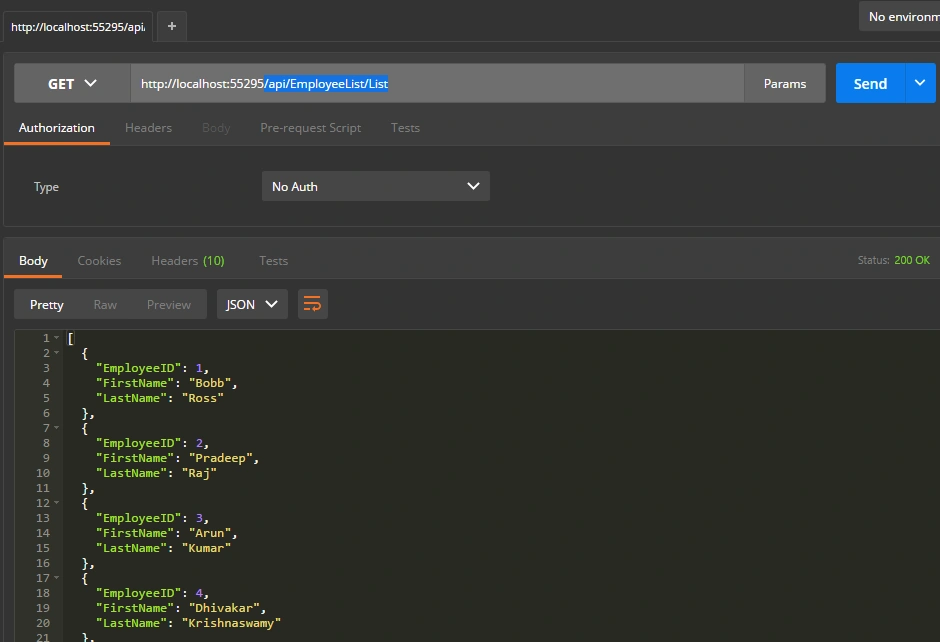
The above controller employee action will return an employee list as a response
Test the API using the POSTMAN/Fiddler as in the following figure :
API End Point: /api/EmployeeList/List
Type: GET
Using a Kendo Grid with MVVM pattern
Creating a HTML page
Create a new HTML page in the project.
Design:
- <!DOCTYPE html>
- <html>
- <head>
- <title></title>
- <meta charset="utf-8" />
- <link rel="stylesheet" href="http://kendo.cdn.telerik.com/2016.1.412/styles/kendo.common.min.css">
- <link rel="stylesheet" href="http://kendo.cdn.telerik.com/2016.1.412/styles/kendo.rtl.min.css">
- <link rel="stylesheet" href="http://kendo.cdn.telerik.com/2016.1.412/styles/kendo.default.min.css">
- <link rel="stylesheet" href="http://kendo.cdn.telerik.com/2016.1.412/styles/kendo.mobile.all.min.css">
- <script src="http://code.jquery.com/jquery-1.9.1.min.js"></script>
- <script src="http://kendo.cdn.telerik.com/2016.1.412/js/angular.min.js"></script>
- <script src="http://kendo.cdn.telerik.com/2016.1.412/js/jszip.min.js"></script>
- <script src="http://kendo.cdn.telerik.com/2016.1.412/js/kendo.all.min.js"></script>
- <script src="Scripts/ViewModel/Core.js"></script>
- <script src="Scripts/ViewModel/Data.js"></script>
- <script src="Scripts/ViewModel/ViewModel.js"></script>
- </head>
- <body>
- <div class="col-lg-12">
- <div id="Main" class="main"></div>
- </div>
- <script type="text/x-kendo-template" id="Layout-temp">
- <div class="col-lg-12">
- <div id="content"></div>
- </div>
- </script>
- <script type="text/x-kendo-template" id="Dashboard-temp">
- <div class="row margin-t10">
- <div class="col-lg-12">
- <div data-role="grid" id="EmployeeGrid"
- data-sortable="true"
- data-scrollable="true"
- data-toolbar="['excel']"
- data-excel='{allPages:"true"}'
- data-resizable="true"
- data-pageable="{refresh: true, pageSizes: [25, 50, 100, 200]}"
- data-columns="[
- { 'field': 'EmployeeID','width':'100px','hidden':true},
- { 'field': 'FirstName','width':'100px'},
- { 'field': 'LastName','width':'100px' }
- ]"
- data-bind="source:Gridlist,events:{dataBound: onDataBound}" />
- </div>
- </div>
- </script>
- </body>
- </html>
Alice NguyenPosted Dec 14, 2018, 12:50 AM
The best tutorial I've seen. Thank you.
Bhuvanesh MohankumarPosted May 12, 2016, 2:15 PM
Good one..
Michael GriffithsPosted Apr 23, 2016, 5:54 PM
Nice
Vignesh ManiPosted Apr 22, 2016, 5:32 PM
Good
Gowtham KPosted Apr 22, 2016, 12:50 PM
Thanks a lot for your feedback friends:)
Kuppurasu NagarajPosted Apr 22, 2016, 11:52 AM
Nice Sharing..
Debasis SahaPosted Apr 22, 2016, 10:18 AM
Good One..
Gowtham RajamanickamPosted Apr 22, 2016, 4:29 AM
very good
Rahul Kumar SaxenaPosted Apr 22, 2016, 1:27 AM
Good one
Muhammad Aqib ShehzadPosted Apr 22, 2016, 1:17 AM
nice sharing dear
Rupali ShindePosted Apr 22, 2016, 1:05 AM
thanks for sharing information about Kendo Export functionality.