

A comprehensive exploration of integrating Dapper with ASP.NET Core Web API on .NET 10 LTS to build high‑performance, SQL‑driven applications — covering setup, repository patterns, and real‑world use cases.
Dapper is a micro‑ORM that delivers raw SQL speed with the simplicity developers love. In this article, we’ll dive deep into how Dapper works with ASP.NET Core 10 Web API, explore repository patterns, compare it with Entity Framework Core, and share lessons learned from enterprise‑scale projects. Whether you’re optimizing microservices or building recruiter‑friendly portfolio applications, this guide will help you master Dapper’s strengths in a practical, hands‑on way.
Author's Note:
I enjoy exploring the balance between performance and simplicity in modern .NET applications. Writing this article was not just about showcasing Dapper, but also about sharing practical lessons that can help others to see the value of clean, scalable architecture. My goal is to keep learning, iterating, and building solutions that combine technical rigor with creative presentation.
Tech Stack and Tools
ASP.NET Core 10 (LTS)
Dapper (Micro-ORM) [ Nuget: Dapper (ORM) ]
SQL Server
Visual Studio 2026 Comunity
SQL Server Management Studio (SSMS)
Postman (API Testing tool)
What is Dapper?
Dapper is a high-performance micro-ORM (Object Relational Mapper) for .NET developed by the team at Stack Overflow. Unlike full ORMs such as Entity Framework Core , Dapper focuses on speed and simplicity , allowing developers to execute raw SQL queries while still mapping results directly to strongly typed objects.
Because Dapper is built as a thin extension layer on top of ADO.NET, it introduces very little overhead. This makes it an excellent choice for applications where performance, control over SQL, and lightweight architecture are important.
Key characteristics of Dapper include:
Extremely fast data access
Minimal abstraction over SQL
Lightweight library
Works directly with
IDbConnectionSupports parameterized queries
Automatic object mapping
For applications such as high-traffic APIs, microservices, financial systems, and reporting platforms, Dapper often becomes a preferred alternative to heavier ORMs.
Why Use Dapper with ASP.NET Core Web API?
ASP.NET Core Web API is designed for building high-performance RESTful services , and Dapper aligns perfectly with this philosophy.
When integrated with ASP.NET Core 10 , Dapper provides several advantages:
1. Performance
Dapper is one of the fastest ORMs in the .NET ecosystem because it avoids heavy tracking and complex query translation.
2. Full Control Over SQL
Developers write explicit SQL queries , allowing complete control over performance tuning, indexing strategies, and database optimizations.
3. Lightweight Architecture
Dapper introduces minimal dependencies , making it ideal for microservices and modular APIs .
4. Easy Integration
Since it works with IDbConnection , integrating Dapper into ASP.NET Core dependency injection is straightforward.
5. Perfect for Read-Heavy Systems
Systems such as analytics dashboards, reporting APIs, and recruiter demo projects benefit greatly from Dapper's speed.
Installing Dapper
Dapper can be installed using NuGet Package Manager or the .NET CLI .
Using .NET CLI
dotnet add package Dapper Using NuGet Package Manager
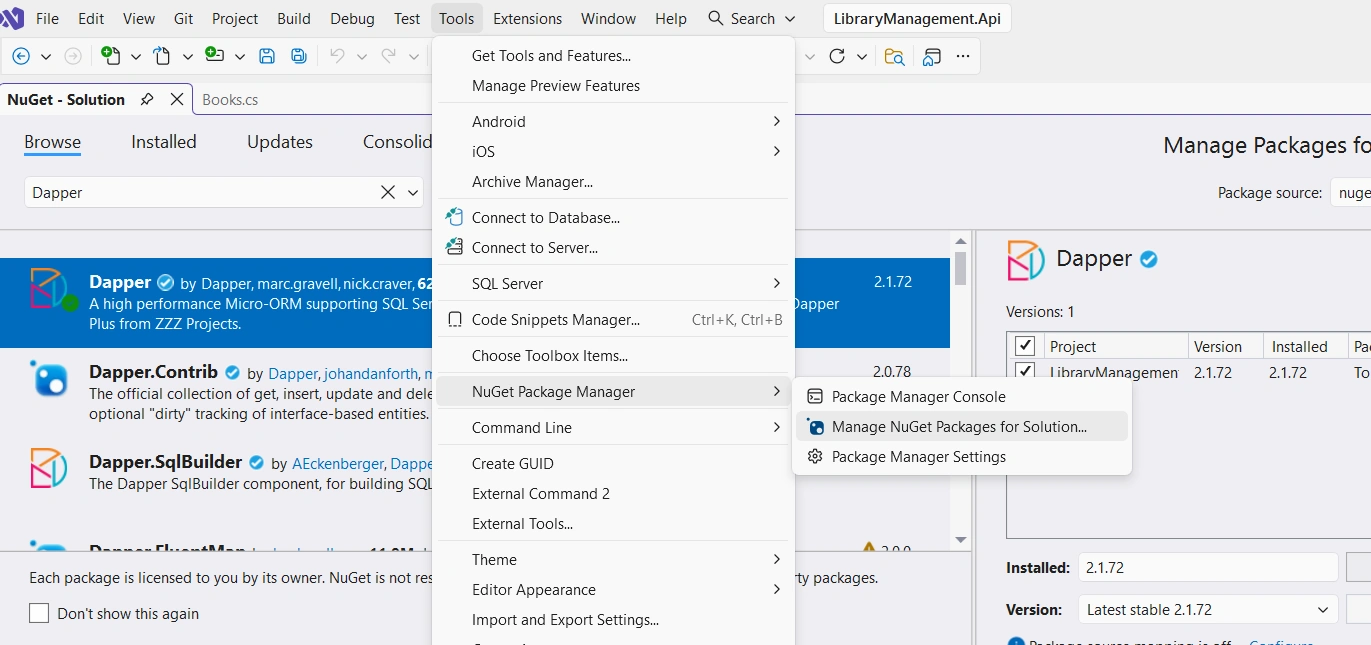
From Visual Studio 2026, from its menu bar:
Tools → Nuget Package Manager → Manage Nuget packages for Solution
Search for:
=> Dapper
Official package: Dapper
After installation, Dapper extends IDbConnection with helpful methods such as:
QueryQueryAsyncExecuteExecuteAsyncQueryFirstQuerySingle
Understanding Dapper Core Methods
One of the key design principles behind Dapper is that it extends the IDbConnection interface rather than replacing it. This means developers continue working with familiar ADO.NET database connections while gaining powerful object-mapping capabilities.
Dapper adds several extension methods to IDbConnection that simplify executing SQL queries and mapping results to strongly typed objects.
In practice, you typically:
Open a database connection
Execute SQL using a Dapper method
Map the results to a C# model
Example:
using var connection = new SqlConnection(connectionString);

var products = await connection.QueryAsync<Product>(
    "SELECT * FROM Products");
Here, the QueryAsync method is a Dapper extension method applied to IDbConnection.
Commonly Used Dapper Methods
The following table summarizes the most commonly used methods provided by Dapper.
| Method | Return Type | Description | Typical Use Case |
|---|---|---|---|
| Query<T>() | IEnumerable<T> | Executes a SQL query and maps the result to a collection of objects. | Retrieving multiple rows from a table |
| QueryAsync<T>() | Task<IEnumerable<T>> | Asynchronous version of Query<T>(). | Recommended for Web APIs to avoid blocking threads |
| QueryFirst<T>() | T | Returns the first row of the result set. Throws an exception if no rows are returned. | When at least one record must exist |
| QueryFirstOrDefault<T>() | T | Returns the first row or default value if none exist. | Fetching optional data |
| QuerySingle<T>() | T | Expects exactly one row. Throws an exception if more or fewer rows are returned. | Unique record lookups |
| QuerySingleOrDefault<T>() | T | Returns one record or default if none exist. | Fetching unique records that may not exist |
| Execute() | int | Executes a command and returns the number of affected rows. | INSERT, UPDATE, DELETE operations |
| ExecuteAsync() | Task<int> | Asynchronous version of Execute(). | Recommended for API-based applications |
| QueryMultiple() | SqlMapper.GridReader | Executes multiple SQL queries in a single command. | Loading multiple result sets in one round trip |
| ExecuteScalar<T>() | T | Returns a single value from the database. | Aggregations like COUNT, SUM |
Example: Retrieving Multiple Records
The Query<T> method is one of the most commonly used methods in Dapper.
var sql = "SELECT * FROM Products";

var products = connection.Query<Product>(sql);
Dapper automatically maps the column names from the SQL result set to the properties of the Product class.
Example model:
public class Product
{
    public int Id { get; set; }
    public string Name { get; set; }
    public decimal Price { get; set; }
}
Example: Executing Insert, Update, or Delete
For commands that modify data, Dapper provides the Execute method.
var sql = "UPDATE Products SET Price = @Price WHERE Id = @Id";

var rowsAffected = connection.Execute(sql, new
{
    Id = 1,
    Price = 120
});
The method returns the number of rows affected, which is useful for verifying database operations.
Using Parameterized Queries
Dapper supports parameterized queries, which help prevent SQL injection and improve query safety.
var sql = "SELECT * FROM Products WHERE Id = @Id";

var product = connection.QueryFirstOrDefault<Product>(
    sql,
    new { Id = 1 }
);
Here:
@Idis the SQL parameternew { Id = 1 }is an anonymous object passed to Dapper
Dapper automatically maps object properties to SQL parameters.
Async Methods in Web APIs
When building ASP.NET Core Web APIs, it is recommended to use the asynchronous versions of Dapper methods.
Example:
var products = await connection.QueryAsync<Product>(
    "SELECT * FROM Products"
);
Benefits include:
Better scalability
Non-blocking I/O
Improved API performance under load
Why These Methods Matter
Understanding these core methods is essential because almost every Dapper-based application relies on them for data access operations.
In real-world projects, developers typically combine these methods with patterns such as:
Repository Pattern
Unit of Work
Service Layer
In the next section, we will explore how to structure an ASP.NET Core 10 Web API project using Dapper with a clean and scalable architecture.
Visual Diagram

[ Generated Image using Copilot, and verified the layer implementation ]
Explanation of the Diagram
HTTP Request → Controller
The client sends a request, which is received by the Controller.Controller → DTO (Data Transfer Object)
The Controller maps incoming data into DTOs for validation and transfer.DTO → Service Layer
The Service Layer applies business logic, orchestrating repository calls.Service Layer → Repository (+ Dapper)
The Repository executes SQL queries using Dapper, ensuring fast and efficient data access.Repository → SQL Server
Queries are executed against the SQL Server database.Dependency Injection
Ensures that the Repository and DB connection are injected cleanly into the system.SQL Server → HTTP Response
Results are mapped back through the layers, transformed into DTOs, and returned as an HTTP Response to the client.
The following image shows the implementation of Dapper in backend with ASP.NET Core ( .NET 10 LTS)
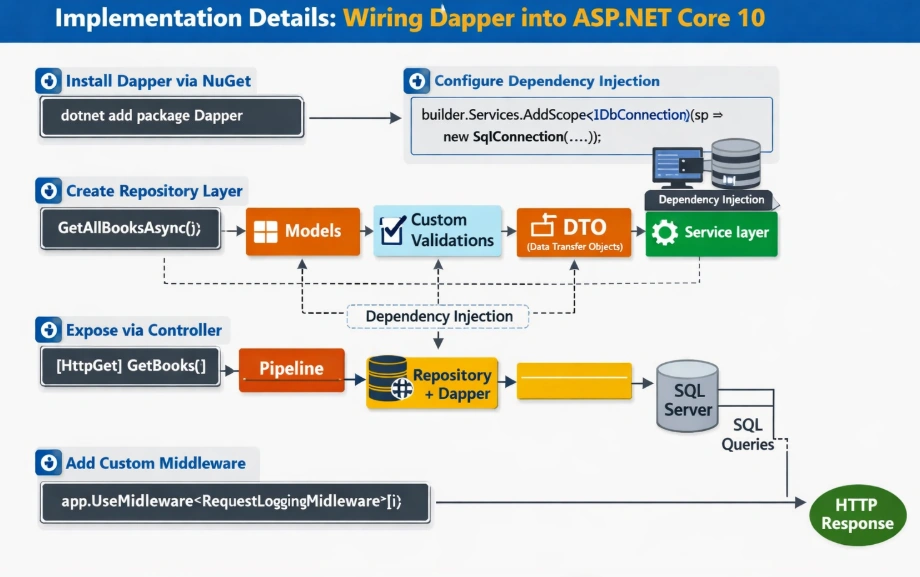
[ Generated Image using Copilot: Image is verified, some texts in the image is smugy, if it is unclear let me know ]
Advanced Dapper Features
While Dapper is known for its simplicity and speed, it also provides several powerful features that enable developers to handle complex database operations efficiently. In production systems such as enterprise APIs, reporting services, and microservices, these advanced capabilities allow developers to reduce database round trips, manage transactions safely, and map complex relational data structures.
This section explores some of the most important advanced Dapper features used in real-world ASP.NET Core applications.
Using QueryMultiple (Handling Multiple Result Sets)
In some cases, a single API request requires multiple datasets from the database. Instead of making several queries and opening multiple connections, Dapper allows executing multiple SQL queries in a single round trip using QueryMultiple.
This improves performance and reduces database load.
Example Scenario
Imagine an API that needs to retrieve:
A product
Its related reviews
Its category
Instead of executing three separate queries, we can fetch them all together.
Example
using var connection = new SqlConnection(connectionString);

string sql = @"
SELECT * FROM Products WHERE Id = @Id;
SELECT * FROM Reviews WHERE ProductId = @Id;
SELECT * FROM Categories WHERE Id =
    (SELECT CategoryId FROM Products WHERE Id = @Id);
";

using var multi = await connection.QueryMultipleAsync(sql, new { Id = 1 });

var product = await multi.ReadFirstOrDefaultAsync<Product>();
var reviews = (await multi.ReadAsync<Review>()).ToList();
var category = await multi.ReadFirstOrDefaultAsync<Category>();
Benefits
Reduces multiple database calls
Improves API response time
Efficient for dashboard or aggregate APIs
Multi-Mapping (Handling JOIN Queries)
Relational databases often return joined data from multiple tables. Dapper provides multi-mapping capabilities that allow mapping joined results into multiple objects.
This is particularly useful when working with one-to-one or one-to-many relationships.
Example Scenario
Suppose we want to retrieve a Product along with its Category.
SQL Query:
SELECT p.Id, p.Name, p.Price,
       c.Id, c.CategoryName
FROM Products p
INNER JOIN Categories c
ON p.CategoryId = c.Id
Dapper Multi-Mapping Example
var sql = @"SELECT p.Id, p.Name, p.Price,
                   c.Id, c.CategoryName
            FROM Products p
            INNER JOIN Categories c
            ON p.CategoryId = c.Id";

var products = await connection.QueryAsync<Product, Category, Product>(
    sql,
    (product, category) =>
    {
        product.Category = category;
        return product;
    },
    splitOn: "Id"
);
Explanation
| Parameter | Description |
|---|---|
Product, Category | Types being mapped |
| Mapping function | Defines how objects are combined |
splitOn | Specifies where the mapping should split the columns |
This allows developers to map relational data into clean object models.
Working with Transactions
Transactions are critical for ensuring data consistency and reliability, especially when multiple database operations must succeed or fail together.
Dapper supports transactions through the standard ADO.NET IDbTransaction interface.
Example: Using a Transaction
using var connection = new SqlConnection(connectionString);

await connection.OpenAsync();

using var transaction = connection.BeginTransaction();

try
{
    var orderSql = "INSERT INTO Orders (CustomerId, OrderDate) VALUES (@CustomerId, @OrderDate)";
    var itemSql = "INSERT INTO OrderItems (OrderId, ProductId, Quantity) VALUES (@OrderId, @ProductId, @Quantity)";

    var orderId = await connection.ExecuteAsync(orderSql,
        new { CustomerId = 1, OrderDate = DateTime.UtcNow },
        transaction);

    await connection.ExecuteAsync(itemSql,
        new { OrderId = orderId, ProductId = 5, Quantity = 2 },
        transaction);

    transaction.Commit();
}
catch
{
    transaction.Rollback();
    throw;
}
Why Transactions Matter
Transactions ensure that:
Multiple operations behave as a single unit
Data remains consistent
Partial updates are prevented
This is essential for operations like:
Order processing
Payment systems
Inventory updates
Using Stored Procedures
Many enterprise systems rely heavily on stored procedures for security, performance, and centralized business logic.
Dapper supports stored procedures by specifying the CommandType.
Example
var parameters = new
{
    ProductName = "Laptop",
    Price = 1500
};

await connection.ExecuteAsync(
    "sp_CreateProduct",
    parameters,
    commandType: CommandType.StoredProcedure
);
Retrieving Data from a Stored Procedure
var products = await connection.QueryAsync<Product>(
    "sp_GetProducts",
    commandType: CommandType.StoredProcedure
);
Advantages of Stored Procedures
Centralized SQL logic
Improved database security
Potential performance improvements
Easier database-level maintenance
Bulk Operations with Dapper
Dapper itself does not include built-in bulk operations like Entity Framework extensions. However, developers commonly combine Dapper with tools such as:
SqlBulkCopyDapper Plus(third-party library)Custom batching techniques
Example Using SqlBulkCopy
using var bulkCopy = new SqlBulkCopy(connection);

bulkCopy.DestinationTableName = "Products";

var table = new DataTable();
table.Columns.Add("Name", typeof(string));
table.Columns.Add("Price", typeof(decimal));

table.Rows.Add("Laptop", 1500);
table.Rows.Add("Monitor", 300);

await bulkCopy.WriteToServerAsync(table);
Benefits
Extremely fast data insertion
Ideal for ETL processes
Suitable for large datasets
Bulk operations are particularly useful in:
Data migration
Import/export services
Analytics pipelines
When to Use These Advanced Features
| Feature | Best Use Case |
|---|---|
| QueryMultiple | Fetch multiple datasets in one request |
| Multi-Mapping | Mapping JOIN results |
| Transactions | Ensuring data consistency |
| Stored Procedures | Enterprise database logic |
| Bulk Operations | High-volume data processing |
These capabilities demonstrate why Dapper is widely used in high-performance backend systems, where developers need fine-grained control over SQL while maintaining clean application code.
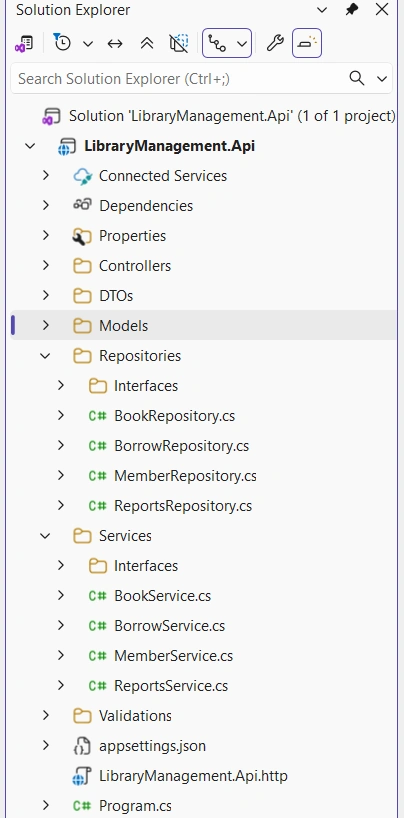
I have attached some screenshots of my project template to understand the workflow of ASP.NET Core Web API ( .NET 10 ) with SQL Server with Dapper integration to understand how the HTTP request works through the
ControllertoDatabaseSQL Injection using "Dapper" .
Project Architecture
Install Nuget Libraries/Packages
You need to install two packages:
Dapper
Microsoft.Data.SqlClient
Why You Need Microsoft.Data.SqlClient with Dapper
While Dapper handles object mapping and SQL execution, it doesn’t include a database driver. That’s where Microsoft.Data.SqlClient comes in — it’s the official ADO.NET provider for SQL Server.
What Each Library Does
| Library | Role in the Stack |
|---|---|
| Dapper | Maps SQL query results to C# objects (micro‑ORM) |
| Microsoft.Data.SqlClient | Connects to SQL Server and executes raw SQL (ADO.NET driver) |
Why It’s Required
Dapper works by extending
IDbConnection— but it needs a concrete implementation likeSqlConnection.SqlConnectionis provided by Microsoft.Data.SqlClient, not by Dapper itself.Without this package, your app won’t be able to connect to SQL Server or execute queries.
You can install in two ways:
i. Using CLI
ii. Using Visual Studio 2026 Nuget package manager console GUI.
Using CLI
dotnet add package Microsoft.Data.SqlClientdotnet add package Dapper
Using GUI
i. Dapper
ii. Microsoft.Data.SqlClient
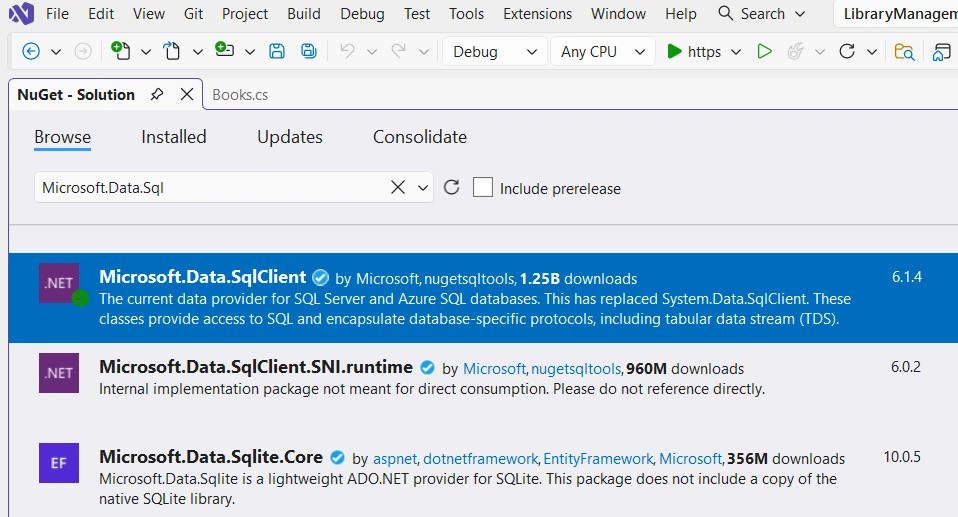
After install the packages using CLI or GUI, verify under your project Dependencies:
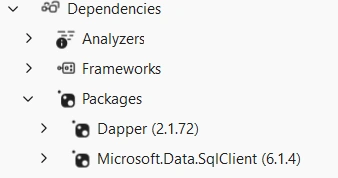
The installed packages will show under your project Dependencies → Packages.
Code Structure
Controller class:
using LibraryManagement.Api.DTOs;
using LibraryManagement.Api.Services.Interfaces;
using Microsoft.AspNetCore.Mvc;

namespace LibraryManagement.Api.Controllers;


[ApiController]
[Route("api/[controller]")]
public class BooksController : ControllerBase
{
    private readonly IBookService _bookService;

    public BooksController(IBookService bookService)
    {
        _bookService = bookService;
    }

    // GET: api/books
    [HttpGet]
    public async Task<ActionResult<IEnumerable<BooksDto>>> GetAll()
    {
        var books = await _bookService.GetAllAsync();
        return Ok(books);
    }

    // GET: api/books/{id}
    [HttpGet("{id}")]
    public async Task<ActionResult<BooksDto>> GetById(int id)
    {
        var book = await _bookService.GetByIdAsync(id);
        if (book == null)
            return NotFound(new { Message = "Book not found" });

        return Ok(book);
    }

    // POST: api/books
    [HttpPost]
    public async Task<ActionResult> Create([FromBody] CreateBookRequest request)
    {
        if (!ModelState.IsValid)
            return BadRequest(ModelState);

        var result = await _bookService.AddAsync(request);
        if (result > 0)
            return CreatedAtAction(nameof(GetById), new { id = result }, request);

        return BadRequest(new { Message = "Failed to create book" });
    }

    // PUT: api/books/{id}
    [HttpPut("{id}")]
    public async Task<ActionResult> Update(int id, [FromBody] BooksDto bookDto)
    {
        if (id != bookDto.BookId)
            return BadRequest(new { Message = "Book ID mismatch" });

        var result = await _bookService.UpdateAsync(bookDto);
        if (result > 0)
            return NoContent();

        return NotFound(new { Message = "Book not found" });
    }

    // DELETE: api/books/{id}
    [HttpDelete("{id}")]
    public async Task<ActionResult> Delete(int id)
    {
        var result = await _bookService.DeleteAsync(id);
        if (result > 0)
            return NoContent();

        return NotFound(new { Message = "Book not found" });
    }
}
DTOs:
using LibraryManagement.Api.Validations;
using System.ComponentModel.DataAnnotations;

namespace LibraryManagement.Api.DTOs;

public class CreateBookRequest
{
    [Required(ErrorMessage = "Title is required")]
    [StringLength(200, ErrorMessage = "Title cannot exceed 200 characters")]
    public string Title { get; set; } = "";
    [Required(ErrorMessage = "Author is required")]
    [StringLength(100, ErrorMessage = "Author cannot exceed 100 characters")]
    public string Author { get; set; } = "";
    [Required(ErrorMessage = "ISBN is required")]
    [StringLength(50, ErrorMessage = "ISBN cannot exceed 50 characters")]
    public string ISBN { get; set; } = "";
    [CustomValidation(typeof(PublishYearValidation), nameof(PublishYearValidation.ValidatePublishedYear))]
    public int PublishedYear { get; set; }
    [StringLength(50, ErrorMessage = "Category cannot exceed 50 characters")]
    public string Category { get; set; } = "";
    [Range(0, int.MaxValue, ErrorMessage = "Copies must be non-negative")]
    public int CopiesAvailable { get; set; }
}

public class BooksDto
{
    [Key]
    public int BookId { get; set; }
    [Required]
    [StringLength(200)]
    public string Title { get; set; } = "";
    [Required]
    [StringLength(100)]
    public string Author { get; set; } = "";
    [Required]
    [StringLength(50)]
    public string Category { get; set; } = "";
    [Range(0, int.MaxValue)]
    public int CopiesAvailable { get; set; }
}
Service Interface
IBookService:
using LibraryManagement.Api.DTOs;

namespace LibraryManagement.Api.Services.Interfaces;


public interface IBookService
{
    Task<IEnumerable<BooksDto>> GetAllAsync();
    Task<BooksDto?> GetByIdAsync(int id);
    Task<int> AddAsync(CreateBookRequest request);
    Task<int> UpdateAsync(BooksDto bookDto);
    Task<int> DeleteAsync(int id);
}
Service Class
BookService:
using LibraryManagement.Api.DTOs;
using LibraryManagement.Api.Models;
using LibraryManagement.Api.Repositories.Interfaces;
using LibraryManagement.Api.Services.Interfaces;

namespace LibraryManagement.Api.Services;


public class BookService : IBookService
{
    private readonly IBookRepository _bookRepository;

    public BookService(IBookRepository bookRepository)
    {
        _bookRepository = bookRepository;
    }


    public async Task<IEnumerable<BooksDto>> GetAllAsync()
    {
        var books = await _bookRepository.GetAllAsync();
        return books.Select(b => new BooksDto {
            BookId = b.BookId,
            Title = b.Title,
            Author = b.Author,
            Category = b.Category,
            CopiesAvailable = b.CopiesAvailable
        });
    }

    public async Task<BooksDto?> GetByIdAsync(int id)
    {
        var book = await _bookRepository.GetByIdAsync(id);
        if (book == null) return null;

        return new BooksDto {
            BookId = book.BookId,
            Title = book.Title,
            Author = book.Author,
            Category = book.Category,
            CopiesAvailable = book.CopiesAvailable
        };
    }

    public async Task<int> AddAsync(CreateBookRequest request)
    {
        var book = new Books {
            Title = request.Title,
            Author = request.Author,
            ISBN = request.ISBN,
            PublishedYear = request.PublishedYear,
            Category = request.Category,
            CopiesAvailable = request.CopiesAvailable
        };

        return await _bookRepository.AddAsync(book);
    }

    public async Task<int> UpdateAsync(BooksDto bookDto)
    {
        var book = new Books
        {
            BookId = bookDto.BookId,
            Title = bookDto.Title,
            Author = bookDto.Author,
            Category = bookDto.Category,
            CopiesAvailable = bookDto.CopiesAvailable
        };

        return await _bookRepository.UpdateAsync(book);
    }

    public async Task<int> DeleteAsync(int id)
    {
        return await _bookRepository.DeleteAsync(id);
    }
}
Repository Interface
IBookRepository:
using LibraryManagement.Api.Models;
using System.Data;

namespace LibraryManagement.Api.Repositories.Interfaces;

public interface IBookRepository
{
    Task<IEnumerable<Books>> GetAllAsync();
    Task<Books> GetByIdAsync(int id);
    Task<Books?> GetByIdAsync(int id, IDbTransaction? transaction = null);
    Task<int> AddAsync(Books book);
    Task<int> UpdateAsync(Books book);
    Task<int> UpdateAsync(Books book, IDbTransaction? transaction = null);
    Task<int> DeleteAsync(int id);
    Task<IEnumerable<Books>> SearchAsync(string title, string author, string category);
}
Repository Class
In this class where SQL Injection is written that is SQL Query for SQL Server Syntax
BookRepository:
using Dapper;
using LibraryManagement.Api.Models;
using LibraryManagement.Api.Repositories.Interfaces;
using System.Data;

namespace LibraryManagement.Api.Repositories;


public class BookRepository : IBookRepository
{
    private readonly IDbConnection _db;

    public BookRepository(IDbConnection db)
    {
        _db = db;
    }


    public async Task<IEnumerable<Books>> GetAllAsync()
    {
        var sql = "SELECT * FROM dbo.Books";
        return await _db.QueryAsync<Books>(sql);
    }

    public async Task<Books> GetByIdAsync(int id)
    {
        var sql = "SELECT * FROM dbo.Books WHERE BookId = @Id";
        return (await _db.QueryFirstOrDefaultAsync<Books>(sql, new { Id = id }))!;
    }

    public async Task<Books?> GetByIdAsync(int bookId, IDbTransaction? transaction = null)
    {
        var sql = @"SELECT BookId, Title, Author, Category, CopiesAvailable
                FROM Books
                WHERE BookId = @BookId";

        return await _db.QueryFirstOrDefaultAsync<Books>(
            sql,
            new { BookId = bookId },
            transaction: transaction
        );
    }


    public async Task<int> AddAsync(Books book)
    {
        var sql = @"INSERT INTO Books (Title, Author, ISBN, PublishedYear, Category, CopiesAvailable)
                    VALUES (@Title, @Author, @ISBN, @PublishedYear, @Category, @CopiesAvailable)";
        return await _db.ExecuteAsync(sql, book);
    }

    public async Task<int> UpdateAsync(Books book)
    {
        var sql = @"UPDATE Books
                    SET Title=@Title, Author=@Author, ISBN=@ISBN, PublishedYear=@PublishedYear,
                        Category=@Category, CopiesAvailable=@CopiesAvailable
                    WHERE BookId=@BookId";
        return await _db.ExecuteAsync(sql, book);
    }

    public async Task<int> UpdateAsync(Books book, IDbTransaction? transaction = null)
    {
        var sql = @"UPDATE Books
                SET Title=@Title, Author=@Author, Category=@Category, CopiesAvailable=@CopiesAvailable
                WHERE BookId=@BookId";
        return await _db.ExecuteAsync(sql, book, transaction: transaction);
    }


    public async Task<int> DeleteAsync(int id)
    {
        var sql = "DELETE FROM Books WHERE BookId=@Id";
        return await _db.ExecuteAsync(sql, new { Id = id });
    }

    public async Task<IEnumerable<Books>> SearchAsync(string title, string author, string category)
    {
        var sql = @"SELECT * FROM Books
                    WHERE (@Title IS NULL OR Title LIKE '%' + @Title + '%')
                      AND (@Author IS NULL OR Author LIKE '%' + @Author + '%')
                      AND (@Category IS NULL OR Category LIKE '%' + @Category + '%')";
        return await _db.QueryAsync<Books>(sql, new { Title = title, Author = author, Category = category });
    }
}
appsettings.json
Used SQL Server Developer Edition, so passed the Computer name in the Server section, if you use SQL Server Express Edition then you have to pass \\SQLServerExpress like this.
{
  "Logging": {
    "LogLevel": {
      "Default": "Information",
      "Microsoft.AspNetCore": "Warning"
    }
  },
  "AllowedHosts": "*",
  "ConnectionStrings": {
    "_DatabaseName_": "Server=ThisComputer;Database=_DbName_;Trusted_Connection=True;TrustServerCertificate=True;"
  }
}
In Program.cs :
var builder = WebApplication.CreateBuilder(args);

// Add services to the container.

builder.Services.AddControllers();


// Dependency Injection
// repository
builder.Services.AddScoped<IBookRepository, BookRepository>();

// services
builder.Services.AddScoped<IBookService, BookService>();

// Configure IDbConnection for DI
builder.Services.AddScoped<IDbConnection>(sp => {
    var connectionString = builder.Configuration.GetConnectionString("_DatabaseName_");
    var conn = new SqlConnection(connectionString);
    conn.Open();
    return conn;
});

var app = builder.Build();

// Configure the HTTP request pipeline.

app.UseHttpsRedirection();

app.UseAuthorization();

app.MapControllers();

app.Run();
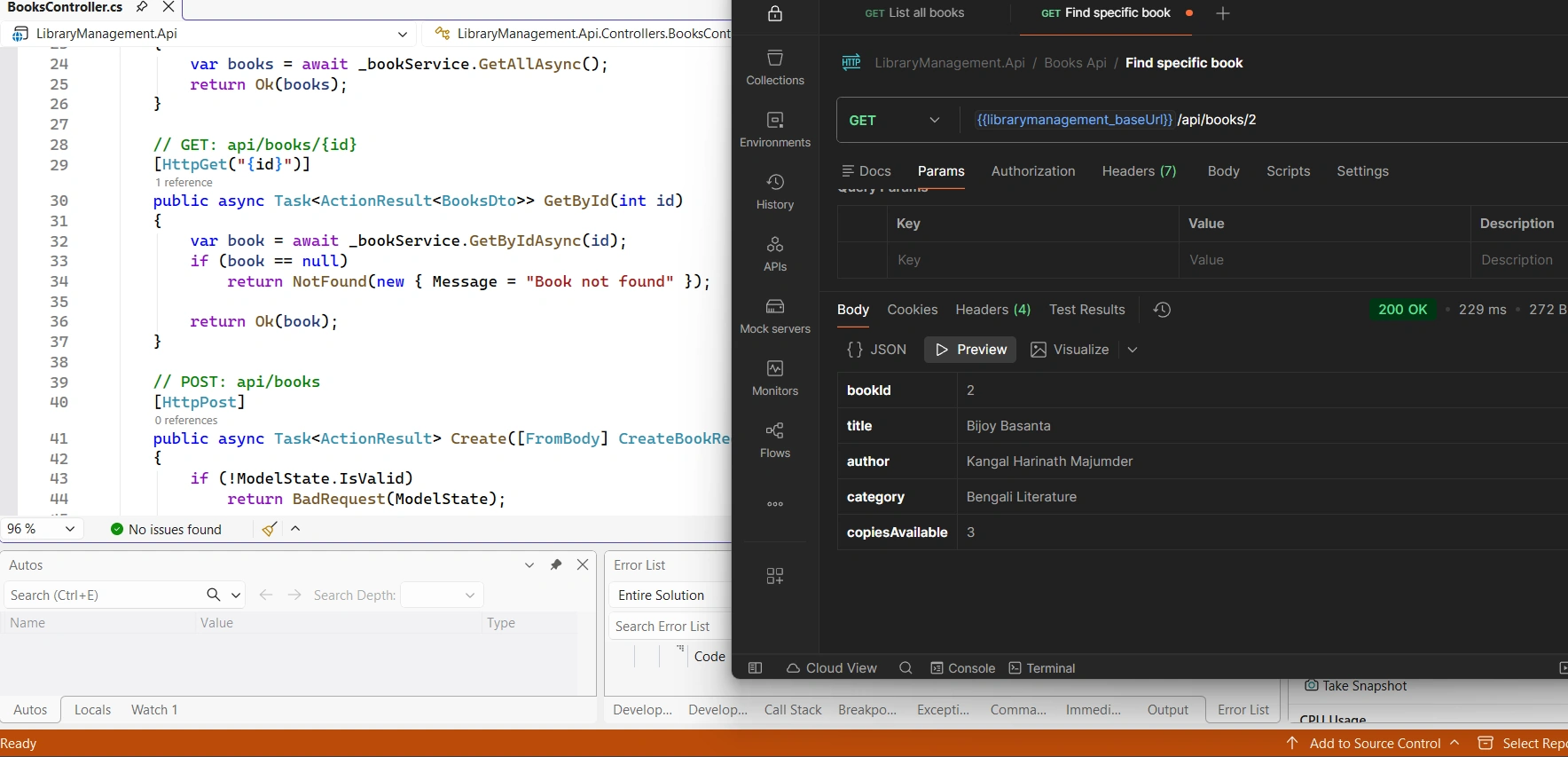
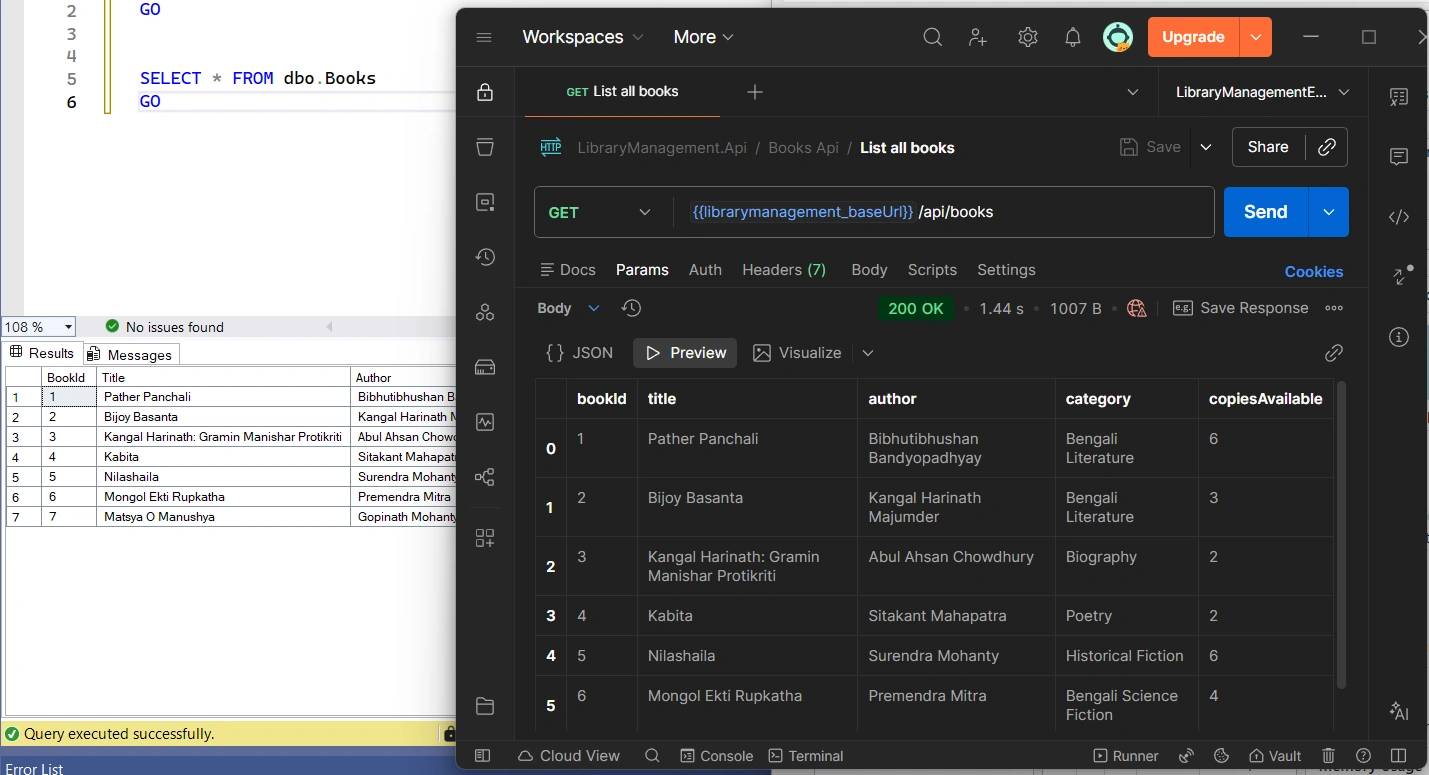
Testing APIs with Postman:
Key Takeaways
Through this ASP.NET Core 10 Web API project, we explored how Dapper can be used to build high-performance, SQL-driven applications while keeping the architecture clean and maintainable.
In this article, we covered:
Understanding what Dapper is and why it is considered a high-performance micro-ORM
Core Dapper methods such as
Query,Execute, andQueryAsyncAdvanced features including:
QueryMultipleMulti-Mapping for JOIN queries
Database transactions
Stored procedures
Bulk data operations
Integrating Dapper with ASP.NET Core 10 Web API
Implementing a repository-based data access layer
Testing API endpoints using tools such as Postman
By combining these techniques, we created a backend architecture that is lightweight, efficient, and highly scalable.
Best Practices When Using Dapper
While Dapper is simple, following good practices ensures that applications remain secure, scalable, and maintainable.
Use Parameterized Queries
Always use parameters to prevent SQL injection attacks.
Prefer Async Methods
Use asynchronous methods like:
QueryAsyncExecuteAsync
This improves scalability in ASP.NET Core APIs.
Organize SQL Queries
Keep SQL queries organized using:
Repository classes
Query files
Stored procedures when appropriate
Manage Connections Efficiently
Use using statements or connection factories to ensure connections are properly closed.
Keep Business Logic Out of Repositories
Repositories should focus only on data access, while business logic should live in service layers.
Simple Visual Chart benchmark result:
[==================================================================]
Performance Comparison (Lower is Better)
Query Execution Time
Dapper ██████████████ 12 ms
EF Core (NoTracking)████████████████████████ 25 ms
EF Core (Tracking) ████████████████████████████████████ 40 ms
[==================================================================]
Dapper continues to be one of the most powerful and efficient tools in the .NET ecosystem for database access. By providing near-raw SQL performance with minimal abstraction, it enables developers to build high-throughput APIs and data-intensive applications without sacrificing code clarity.
When combined with ASP.NET Core 10 Web API, Dapper offers a flexible approach to designing modern backend services that are both fast and maintainable.
This project demonstrated how developers can leverage Dapper’s capabilities—from basic queries to advanced features such as multi-mapping, transactions, and bulk operations—to build real-world applications.
As the .NET ecosystem continues to evolve, mastering tools like Dapper can help developers create systems that are both performant and architecturally clean.
Building this project was a great opportunity to explore how performance-focused data access can be implemented in modern .NET applications. Dapper proves that sometimes the simplest tools—when used thoughtfully—can deliver the most powerful results.
Keep Learning and Building
Modern backend development is constantly evolving, and tools like Dapper help developers build fast, efficient, and scalable APIs. If you’re passionate about learning more about ASP.NET Core, database performance, and clean architecture, keep experimenting with real projects and sharing your knowledge with the developer community.
Thanks for reading, and happy coding!
How are you currently using Dapper in your projects — standalone or alongside EF Core?
Happy Learning!
Join the conversation! Your thoughts help the community grow.