Introduction
Blazor is a .NET web framework that can run in any browser. We can create a Blazor application using C#/Razor and HTML. Blazor application runs in the browser on a real.NET runtime (Mono) via WebAssembly. It enables full-stack web development with consistency, stability, and productivity of .NET. Normally, it works with the latest browser that supports WebAssembly and it works in older browsers by falling back to asm.js-based .Net runtime.
In my
previous article, I have explained about Blazor and the prerequisites that are required to get started with Blazor. In this article, I will explain about Data Binding with Blazor.
Note: It is an experimental .NET web framework project, so many changes are going on. As a result, some portion of this article may become invalid in the future.
Data binding is one of the most powerful features of software development technologies. Data binding is the connection bridge between View and the business logic (View Model) of the application. The following are the ways of doing data banding with Blazor.
- One-way Data Binding
- Two-way Data Binding
- Event Binding
One-way Data Binding
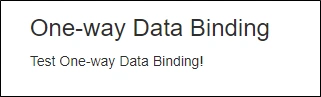
One-way data binding is also known as an interpolation in other frameworks, such as Angular. It is very similar to Razor and also it will be quite straightforward. In one-way binding, we need to pass property or variable name along with @ i.e. @Name (here Name is either the property or variable). In the following example, I have done one-way binding with variable currentTask.
- @page "/databindingExample"
- <h3>One-way Data Binding</h3>
-
- <p>
- @currentTask
- </p>
-
- @functions {
- string currentTask = "Test One-way Data Binding!";
- }
Output
Two-way Data Binding
Blazor now supports two-way binding. This can be achieved by using the "bind" attribute. The current version of Blazor supports the following types for two-way binding.
- string
- int
- DateTime
- Enum
- bool
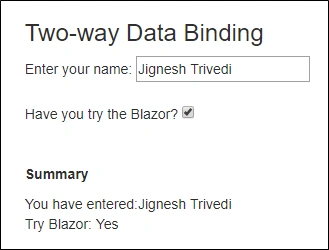
If we want other types such as decimal, we need to provide getter/setter from supported type. In the following example, I have demonstrated an example of string and bool type for two-way binding.
- @page "/databindingExample"
- <h3>Two-way Data Binding</h3>
-
- Enter your name: <input type="text" bind=@Name /><br />
- <br />
- Have you try the Blazor? <input type="checkbox" bind="IsTry" /><br />
- <br />
- <br />
-
- <p><b>Summary</b></p>
- You have entered:@Name <br />
- Try Blazor: @(IsTry ? "Yes" : "No")
-
- @functions {
- public string Name { get; set; }
- public bool IsTry { get; set; }
- }
Output
Event Binding
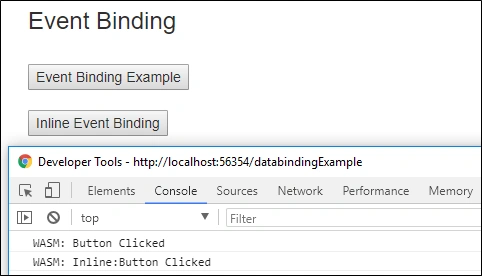
The current version of Blazor, event binding is very limited. Currently, it only supports onclick and on change event. It is under development, so many more event support in the new version. Event binding is done by using function name along with @ i.e. @ButtonClicked (here ButtonClicked is function name).
In the following example, I have bound the click event with a button.
- @page "/databindingExample"
-
- <h3>Event Binding</h3>
- <br />
- <button onclick=@ButtonClicked>Event Binding Example</button>
- <br />
- <br />
- <button onclick=@(() => Console.WriteLine("Inline:Button Clicked"))>Inline Event Binding</button>
-
- @functions {
- void ButtonClicked()
- {
- Console.WriteLine("Button Clicked");
- }
- }
Output
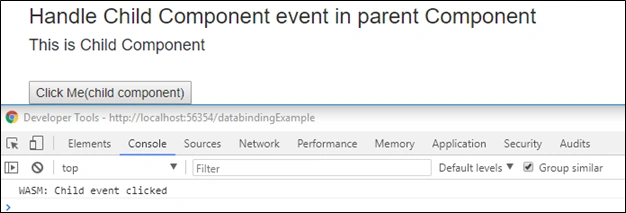
We can also handle the child component event into a parent component. It can offer the callback that the parent component can use to react to an event. In the following example, I have created child component with button and handle child component button event to parent component on OnSomeEvent.
ChildComponent.cshtml
- <h4>This is Child Component</h4>
- <br />
- <button onclick=@OnClick>Click Me(child component)</button>
-
- @functions {
- public Action OnSomeEvent { get; set; }
-
- private void OnClick()
- {
- OnSomeEvent?.Invoke();
- }
- }
Parent Compoent
- @page "/databindingExample"
-
- <h3>Handle Child Component event in parent Component</h3>
- <ChildComponent OnSomeEvent=@ChildEventClicked />
-
- @functions {
- void ChildEventClicked()
- {
- Console.WriteLine("Child event clicked");
- }
- }
Output
Manually Trigger UI Refresh
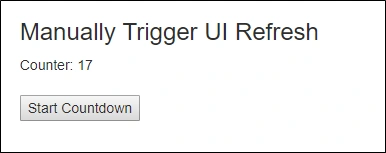
Blazor automatically detects the necessary UI changes in many scenarios such as button click. However, In some scenarios, we need to trigger UI refresh manually. To do this, BlazorComponent provides the method "StateHasChanged" method". In the following example, I have updated the value of currentCount variable in the timer event. It is not detected by the Blazor hence we need to call StateHasChanged method tho refresh UI with correct currentCount value.
Example
- @page "/databindingExample"
-
- @using System.Threading;
-
- <h3>Manually Trigger UI Refresh</h3>
-
- Counter: @CurrentCount
- <br />
- <br />
- <button onclick=@Countdown>Start Countdown</button>
- @functions {
- void Countdown()
- {
- var timer = new Timer(TimeCallBack, null, 1000, 1000);
-
- }
-
- void TimeCallBack(object state)
- {
- if (CurrentCount > 0)
- {
- CurrentCount--;
-
-
- this.StateHasChanged();
- }
- }
- }
Output
Summary
The Blazor provides one-way and two-way data binding that is similar to modern client frameworks, such Angular. It provides event binding with very limited events but support for more events is added in the new version.
You can view or download the source code from the GitHub link
here.


Vishal ChoudharyPosted Jun 13, 2022, 5:55 AM
How can we bind image with a data model lets say i have user data as follows(class userdata public stringusername{get;set;} and public iformfile image {get;set;}) how willl i bind this on blazor
BM BMPosted Feb 21, 2021, 8:12 AM
Writing code into html? Is that correct?
Muthukumar KannanPosted Feb 5, 2019, 10:39 PM
Hi , how can i connect the **data source** in asp.net blazor using models?
Haytham Ben SlimanePosted Oct 7, 2018, 10:06 AM
Hi , can we do the same thing as in Angular with two way data binding that means if I type something in th text box it updates automatically in a <p> Tag ???
Prakash ChasiyaPosted May 28, 2018, 6:44 AM
Great. Thanks for sharing.
Naresh SinghalPosted May 7, 2018, 5:45 AM
Fantastic Sir !!! Keep it up....
Tridip BhattacharjeePosted May 7, 2018, 2:58 AM
How to generate object oriented js code by blazor because now we can write class, ctor etc in js. is it possible in blazor or not ?
Tridip BhattacharjeePosted May 7, 2018, 2:57 AM
@functions { public string Name { get; set; } public bool IsTry { get; set; } } What @functions denote in blazor ? in js any class will be created for the above code or just declare two variable called Name and IsTry in js ?
Tridip BhattacharjeePosted May 7, 2018, 2:55 AM
New Timer(TimeCallBack, null, 1000, 1000); last 3 argument details i need from right side. what kind of values are these. thanks
Tridip BhattacharjeePosted May 7, 2018, 2:53 AM
Where default value stored in @CurrentCount when program start? what value will be stored in @CurrentCount initially?
Tridip BhattacharjeePosted May 7, 2018, 2:52 AM
What is the line for @page "/databindingExample" ? if i do not mention this line then what will happen?
Tridip BhattacharjeePosted May 7, 2018, 2:51 AM
Very nice one sir. i have few question which i will ask here one by one post. thanks
Manoj KallaPosted May 7, 2018, 2:49 AM
Thank you for very good article...