

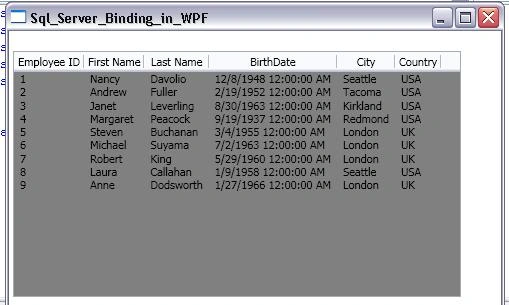
In this article, I am going to explain how to extract data from database and how to show data on a page using WPF ListView control.
I am using Northwind database, you can use whatever you want, and only you have to change is the connection string, your SQL string, and the binding properties in XAML code.
Here is the. xaml code:
- <Grid x:Name="Grid1">
- <ListView Name="ListViewEmployeeDetails" Margin="4,20,40,100" ItemTemplate="{DynamicResource EmployeeTemplate}" ItemsSource="{Binding Path=Table}">
- <ListView.Background>
- <LinearGradientBrush>
- <GradientStop Color="Gray" Offset="0"/>
- </LinearGradientBrush>
- </ListView.Background>
- <ListView.View>
- <GridView>
- <GridViewColumn Header="Employee ID" DisplayMemberBinding="{Binding Path=EmployeeID}"/>
- <GridViewColumn Header="First Name" DisplayMemberBinding="{Binding Path=FirstName}"/>
- <GridViewColumn Header="Last Name" DisplayMemberBinding="{Binding Path=LastName}"/>
- <GridViewColumn Header="BirthDate" DisplayMemberBinding="{Binding Path=BirthDate}"/>
- <GridViewColumn Header="City" DisplayMemberBinding="{Binding Path=City}"/>
- <GridViewColumn Header="Country" DisplayMemberBinding="{Binding Path=Country}"/>
- </GridView>
- </ListView.View>
- </ListView>
- </Grid>
Randy StewartPosted Mar 3, 2009, 4:57 PM
I am trying to do something similiar. How would you pull data from another table that is linked to each employee and display it underneath each employee record? Thanks