

Introduction
Today our article is about data validation in Metro style applications. We hope you have learned much more about validation in ASP.Net applications, where we can use direct server validation controls like Range Validator, Required Field Validator and so on. But in a Metro style application there are no such types of validation controls.
Validation is the process of ensuring the validity of data before applying an action to it. Here we will take a form which contains TextBoxes for UserName, Email ID and age. On button click, we will check all TextBoxes value and show a message if the value is not valid.
Step 1 : First of all you will create a new Metro style application. Let us see the description with images of how you will create it.
- Open Visual Studio 2011
- File -> New -> Project
- Choose Template -> Visual C# -> Metro style application
- Rename the application
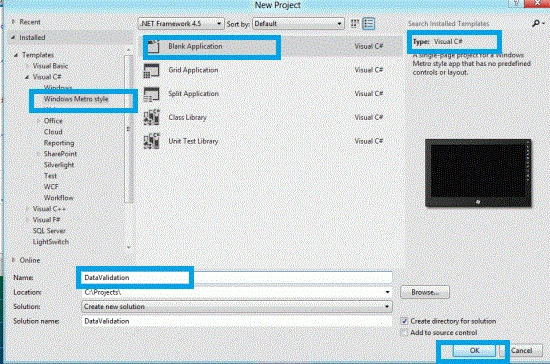
Step 2 : In the Solution Explorer there are two files that we will primarily work with; BlankPage.xaml and BlankPage.xaml.cs files.

Step 3 : The BlankPage.xaml file is as in the following code:
Code :
<Page
x:Class="DataValidation.BlankPage"
xmlns="http://schemas.microsoft.com/winfx/2006/xaml/presentation"
xmlns:x="http://schemas.microsoft.com/winfx/2006/xaml"
xmlns:local="using:DataValidation"
xmlns:d="http://schemas.microsoft.com/expression/blend/2008"
xmlns:mc="http://schemas.openxmlformats.org/markup-compatibility/2006"
mc:Ignorable="d">
<Grid x:Name="LayoutRoot">
<Grid.RowDefinitions>
<RowDefinition Height="0.112*"/>
<RowDefinition Height="0.081*"/>
<RowDefinition Height="0.058*"/>
<RowDefinition Height="0.054*"/>
<RowDefinition Height="0.052*"/>
<RowDefinition Height="0.056*"/>
<RowDefinition Height="0.056*"/>
<RowDefinition Height="0.529*"/>
</Grid.RowDefinitions>
<Grid.ColumnDefinitions>
<ColumnDefinition Width="0.333*"/>
<ColumnDefinition Width="0.022*"/>
<ColumnDefinition Width="0.312*"/>
<ColumnDefinition Width="0.333*"/>
</Grid.ColumnDefinitions>
<Grid.Background>
<LinearGradientBrush EndPoint="0.5,1" StartPoint="0.5,0">
<GradientStop Color="Blue" Offset="1"/>
<GradientStop Color="Green"/>
</LinearGradientBrush>
</Grid.Background>
<TextBlock Text="User Name" FontSize="20" TextWrapping="Wrap" Margin="0" Grid.Row="2" HorizontalAlignment="Right" VerticalAlignment="Center"/>
<TextBlock x:Name="namvalidate" FontSize="20" Foreground="Red" TextWrapping="Wrap" Margin="0" Grid.Column="3" Grid.Row="2" HorizontalAlignment="Left" VerticalAlignment="Center" Visibility="Collapsed"/>
<TextBlock HorizontalAlignment="Right" FontSize="20" Margin="0" VerticalAlignment="Center" Grid.Row="3" Text="Email ID" TextWrapping="Wrap"/>
<TextBlock x:Name="emailvalidate" FontSize="20" Foreground="Red" TextWrapping="Wrap" Margin="0" Grid.Column="3" Grid.Row="3" HorizontalAlignment="Left" VerticalAlignment="Center" Visibility="Collapsed"/>
<TextBlock HorizontalAlignment="Right" FontSize="20" Margin="0" VerticalAlignment="Center" Grid.Row="4" Text="word" TextWrapping="Wrap"/>
<TextBlock HorizontalAlignment="Right" Margin="0" FontSize="20" VerticalAlignment="Center" Grid.Row="5" Text="Age" TextWrapping="Wrap"/>
<TextBlock x:Name="agevalidate" FontSize="20" Foreground="Red" TextWrapping="Wrap" Margin="0" Grid.Column="3" Grid.Row="5" HorizontalAlignment="Left" VerticalAlignment="Center" Visibility="Collapsed"/>
<TextBox x:Name="txtUserName" TextWrapping="Wrap" Margin="0" Grid.Column="2" Grid.Row="2" d:LayoutOverrides="Height" VerticalAlignment="Center">
<TextBox.Text>
<Binding Mode="TwoWay" Path="UserName" />
</TextBox.Text>
</TextBox>
<TextBox x:Name="txtEmailID" Margin="0" VerticalAlignment="Center" Grid.Column="2" Grid.Row="3" TextWrapping="Wrap">
<TextBox.Text>
<Binding Mode="TwoWay" Path="EmailID" />
</TextBox.Text>
</TextBox>
<wordBox x:Name="txtConf" Margin="0" VerticalAlignment="Center" Grid.Column="2" Grid.Row="4">
<wordBox.word>
<Binding Mode="TwoWay" Path="word" />
</wordBox.word>
</wordBox>
<TextBox x:Name="txtAge" Margin="0" VerticalAlignment="Center" Grid.Column="2" Grid.Row="5" TextWrapping="Wrap">
<TextBox.Text>
<Binding Mode="TwoWay" Path="Age" />
</TextBox.Text>
</TextBox>
<Button Click="Button_Click_1" Grid.Column="2" Grid.Row="6" Content="Save Data" Background="Red" HorizontalAlignment="Center"></Button>
</Grid>
</Page>


Join the conversation! Your thoughts help the community grow.