

Description
It formats date to a string based format.
Date Format
Year - Year can be like in 3 formats yyyy,yy,y
- yyyy - It represents year in '4-digit' format. (e.g. AD 1 => 0001, AD 2013 =>2013)
- yy - It represents year in '2-digit' format. (e.g. AD 2005 => 05)
- y - It represents year in '1-digit' format. (AD 1 => 1)
Month - Month can be like in 4 formats MMMM, MMM, MM, M.
- MMMM - It represents month in full name (e.g. January-December).
- MMM - It represents month in abbreviated name (e.g. Jan-Dec).
- MM - The month, from 01 through 12.
- M - The The month, from 1 through 12.
Date - Date can be like in 2 formats dd, d.
- dd - The day of the month, from 01 through 31.
- d - The day of the month, from 1 through 31.
Week - Week can be like in 2 formats EEEE, EEE.
- EEEE - The full name of the day of the week (e.g. Sunday-Saturday).
- EEE - The abbreviated name of the day of the week (e.g. Sun-Sat).
Time Format
Hour - Hour can be like in 4 formats HH, H, hh, h.
- HH - The hour, using a 24-hour clock from 00 to 23.
- H -The hour, using a 24-hour clock from 0 to 23.
- hh - The hour, using a 12-hour clock from 01 to 12.
- h - The hour, using a 12-hour clock from 1 to 12.
Minute - Minute can be like in 2 formats mm, m
- mm - The minute, from 00 through 59.
- m - The minute, from 0 through 59.
Second - Second can be like in 2 formats ss, s
- ss - The second, from 00 through 59.
- s - The second, from 0 through 59.
Millisecond - Milliseconds can be represent by ',sss' or '.sss' (e.g. 000-999)
Designations - AM (ante-meridiem) and PM (post-meridiem) can be represent by 'a'.
There are some predefine "localizable formats" to define Date and Time.
- Medium - equivalent to 'MMM d, y h:mm:ss a' for en_US locale (e.g. Oep 8, 2013 12:05:08 pm)
short: equivalent to 'M/d/yy h:mm a' for en_US locale (e.g. 8/10/13 12:05 pm)
- FullDate - equivalent to 'EEEE, MMMM d,y' for en_US locale (e.g. Friday, October 8, 2013)
- LongDate - equivalent to 'MMMM d, y' for en_US locale (e.g. October 8, 2013)
- MediumDate - equivalent to 'MMM d, y' for en_US locale (e.g. Oct 8, 2010)
- ShortDate - equivalent to 'M/d/yy' for en_US locale (e.g. 8/10/10)
- MediumTime - equivalent to 'h:mm:ss a' for en_US locale (e.g. 12:05:08 pm)
- ShortTime - equivalent to 'h:mm a' for en_US locale (e.g. 12:05 pm)
How to use date filter in AngularJS
- <!doctype html>
- <html ng-app>
- <head>
- <script src="http://code.angularjs.org/1.2.5/angular.min.js"></script>
- </head>
- <body>
- <span ng-non-bindable>{{1288323623006 | date:'medium'}}</span>: {{1288323623006
- | date:'medium'}}<br>
- <span ng-non-bindable>{{1288323623006 | date:'yyyy-MM-dd HH:mm:ss Z'}}</span>: {{1288323623006
- | date:'yyyy-MM-dd HH:mm:ss Z'}}<br>
- <span ng-non-bindable>{{1288323623006 | date:'MM/dd/yyyy @ h:mma'}}</span>: {{'1288323623006'
- | date:'MM/dd/yyyy @ h:mma'}}<br>
- </body>
- </html>
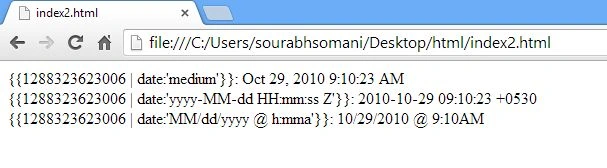
Output
Gowtham RajamanickamPosted Apr 20, 2015, 3:13 PM
good