

OOP in C# is not just about classes and objects; it is about modeling real world systems, enforcing architecture, and enabling team based development . Before learning about OOP, we should first understand why it is needed.
Object-Oriented Programming in C# is the art of turning a messy, real-world campus into a digital architecture where every Object has a purpose, every Class provides a blueprint, and the Four Pillars act as the foundation for secure, scalable, and reusable software.
Why Do We Need OOP in C#?
Imagine we are building a College Management System using only simple variables and functions (procedural programming).
The "Data Mess" Problem
To store 1,000 students, we would need 1,000 separate arrays for names, 1,000 for IDs, and 1,000 for grades. If we want to change how a grade is calculated, we would have to find every single place in the code where that calculation occurs.
The "Security" Problem
In a simple script, any part of the program could accidentally change a student's GPA to 5.0. There is no proper control or protection mechanism to prevent this.
The "Redundancy" Problem
Suppose we have Students, Professors, and Janitors. They all have common information, such as names and addresses. In procedural programming, we would have to write the UpdateAddress logic three different times.
The Solution: OOP
Object-Oriented Programming (OOP) solves these problems by grouping data (such as Name and ID) and behavior (such as Register or AttendClass) into a single unit called a Class.
What is OOP (Object-Oriented Programming)?
Object-Oriented Programming (OOP) is a programming paradigm where software is designed using objects that represent real-world entities . In OOP, we combine data (properties) and behavior (methods/functions) into a single unit called a class .
OOP makes software more structured, reusable, maintainable, and scalable , which is essential for large applications like a College Management System . To understand OOP clearly, it can be broken down into four major sections , each building upon the previous:
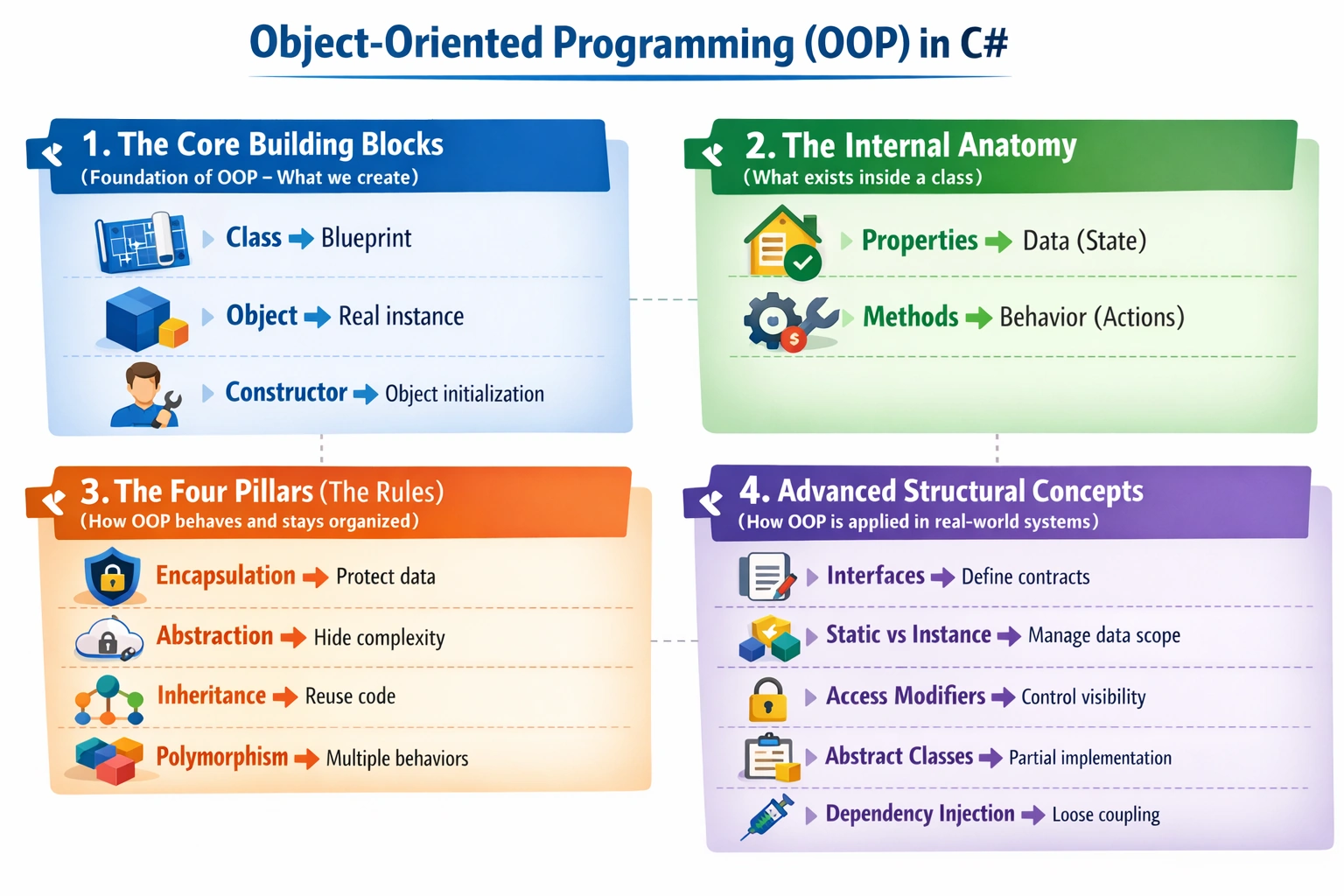
1. The Core Building Blocks
These are the physical elements written in the code.
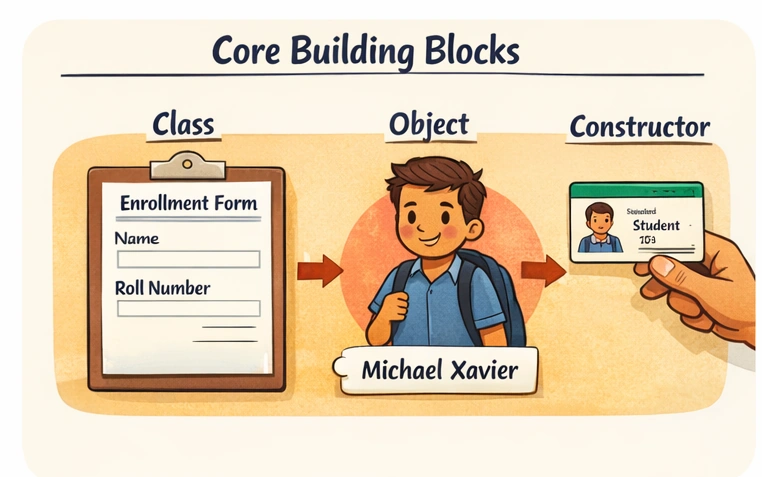
Class
A class is a blueprint or template that defines the structure of an object but does not hold data itself.
Example: A blank Enrollment Form representing a "Student" with fields like Name, Roll Number, and Department.
    class Student
{
    public string Name;
    public int RollNumber;
    public string Department;
}
Object
An object is an instance of a class , representing an actual entity with real data.
Example: A student named Michael Xavier who fills the Enrollment Form.
    Student s1 = new Student();
s1.Name = "Michael Xavier";
s1.RollNumber = 101;
s1.Department = "Computer Science";
Constructor
A constructor is a special method used to initialize an object the moment it is created. It sets starting values automatically.
Example: During the admission process , a student is assigned an ID immediately upon joining.
    class Student
{
    public string Name;
    public int RollNumber;

    // Constructor
    public Student(string name, int rollNumber)
    {
        Name = name;
        RollNumber = rollNumber;
    }
}

// Creating object with constructor
Student s2 = new Student("Arun", 102);
2. The Internal Anatomy
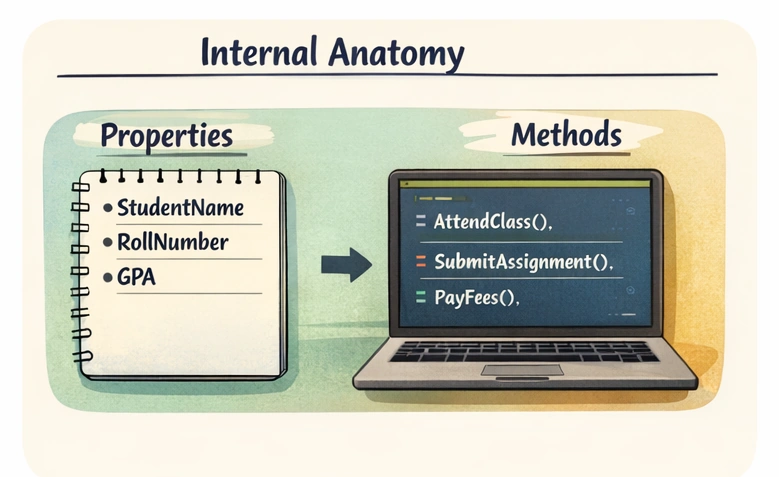
These are the members that live inside a class .
Properties (Fields/Attributes)
Properties hold data about the object .
Example: A student's Name, RollNumber, GPA .
    class Student
{
    public string Name;      // Property
    public int RollNumber;   // Property
    public double GPA;       // Property
}
Methods (Functions/Behaviors)
Methods define actions or behaviors that an object can perform.
Example: AttendClass() , SubmitAssignment() , PayFees()
    class Student
{
    public void AttendClass()
    {
        Console.WriteLine("Student is attending class.");
    }

    public void SubmitAssignment()
    {
        Console.WriteLine("Assignment submitted.");
    }
}
3. The Four Pillars (The Rules)
These are the fundamental principles that govern how classes interact and maintain order in OOP. These pillars are:
Encapsulation
Abstraction
Inheritance
Polymorphism
In a College Management System , these concepts help structure entities like Student, Professor, Course, and Administration in a clean and maintainable way.
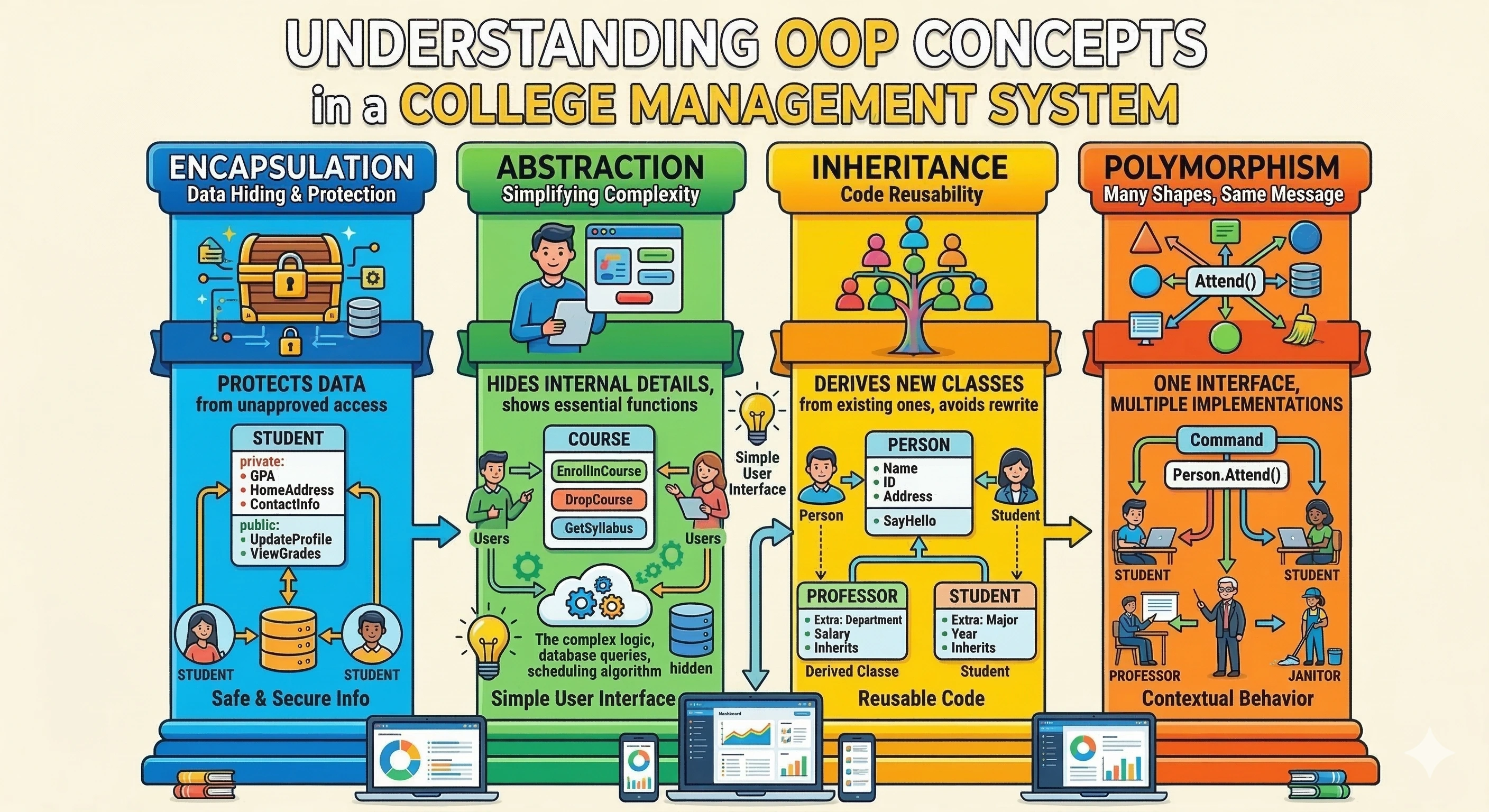
1. Encapsulation
Encapsulation is the practice of bundling data and methods together inside a class and restricting direct access to some of the object's data . This ensures data protection and controlled access . In C#, encapsulation is achieved using access modifiers such as:
privatepublicprotected
Example (College System)
In a college system , a student's GPA, contact information, and address should not be modified directly by every part of the program. Only authorized operations such as UpdateProfile() or ViewGrades() should access this information.
This protects the data from unauthorized changes .
Syntax
class Student
{
    private double GPA; // hidden data
    public void SetGPA(double gpa)
    {
        if (gpa >= 0 && gpa <= 4)
        {
            GPA = gpa;
        }
    }
    public double GetGPA()
    {
        return GPA;
    }
}
2. Abstraction
Abstraction is the process of hiding complex implementation details and exposing only the necessary features to the user. This allows users to interact with the system without knowing how it works internally. In C#, abstraction is implemented using:
abstract classinterface
“Encapsulation hides data to protect it, while abstraction hides complexity to simplify it.”
“Encapsulation is about security of data, abstraction is about simplicity of usage.”
Example (College System):
A student clicks Enroll Course in the portal. Behind the scenes the system performs:
database queries
scheduling algorithms
backend validation
But the user only sees: "Course enrolled successfully" . This is abstraction.
Syntax
abstract class CourseService
{
    public abstract void EnrollCourse();
}
class StudentCourse : CourseService
{
    public override void EnrollCourse()
    {
        Console.WriteLine("Student enrolled in course");
    }
}
3. Inheritance
Inheritance allows one class to reuse the properties and methods of another class. This promotes code reuse and hierarchical relationships. In C#, inheritance uses the : symbol and multiple inheritance of classes is not allowed. This is by design to avoid complexity and ambiguity. Multiple inheritance means a class can inherit from more than one parent class. Instead of multiple inheritance of classes, C# allows a class to implement multiple interfaces. Interfaces define a contract of methods/properties without implementing code. A class can implement any number of interfaces.
Example (College System):
A Student and Professor share common attributes:
Name
ID
Address
Instead of rewriting these properties, they are inherited from the Person class. This avoids duplicate code and improves maintainability.
Syntax
class Person
{
    public string Name;
    public int Id;

    public void SayHello()
    {
        Console.WriteLine("Hello");
    }
}
class Student : Person
{
    public string Major;
}
class Professor : Person
{
    public string Department;
}
4. Polymorphism
Polymorphism means "many forms". In programming, it allows an entity like a method or object to behave differently based on context. In C#, there are two main types of polymorphism:
Compile-time (Static) Polymorphism -Method Overloading
Run-time (Dynamic) Polymorphism -Method Overriding
1. Method Overloading (Compile-time Polymorphism)
Method overloading is when multiple methods have the same name but differ in:
Number of parameters
Type of parameters
The compiler decides which method to call at compile time based on arguments.
2.Method Overriding (Run-time Polymorphism)
Method overriding is when a child class provides a new implementation for a method already defined in the parent class.
The method to call is decided at runtime depending on the object type.
Rules in C#:
Parent method must be
virtualand child method must useoverridekeyword
Example (College System):
In the image, The method Attend() is used by different roles:
Student attends class
Professor attends meeting
Janitor attends maintenance task
Same method name but different behavior.
Syntax:
// Parent class
public class Staff
{
    public virtual void Work()
    {
        Console.WriteLine("Staff is working in general tasks");
    }
}
// Child class
public class Teacher : Staff
{
    public override void Work()
    {
        Console.WriteLine("Teacher is teaching students");
    }
}
// Another child class
public class Librarian : Staff
{
    public override void Work()
    {
        Console.WriteLine("Librarian is organizing books");
    }
}
4. Advanced Structural Concepts (Extensions of OOP)
These are built on top of OOP principles to solve real-world problems:
Interfaces
Static vs Instance
Access Modifiers
Abstract Class
Dependency Injection
These define how OOP is applied in real systems.
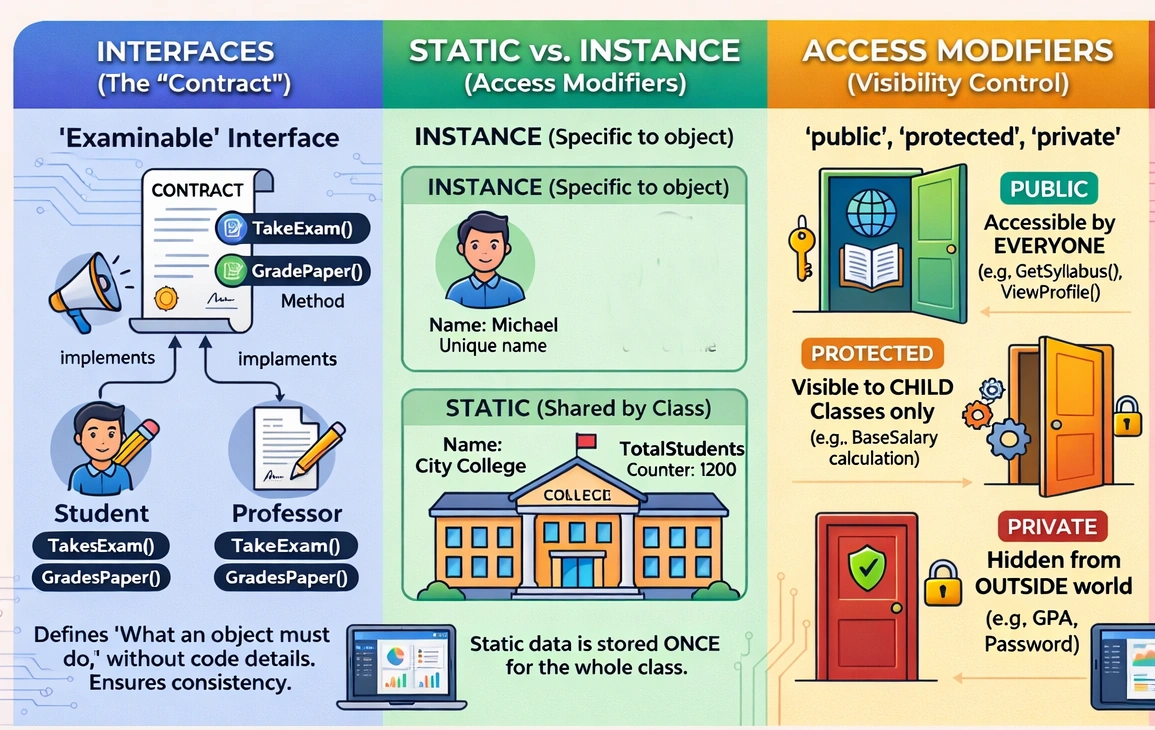
1. Interfaces (The “Contract”)
An interface defines a set of rules (methods) that a class must implement, without providing the implementation. In a college system, both Student and Professor must perform exam-related actions:
TakeExam()GradePaper()
Instead of writing separate logic rules, we define a common contract.
Syntax
interface IExam
{
    void TakeExam();
    void GradePaper();
}

class Student : IExam
{
    public void TakeExam()
    {
        Console.WriteLine("Student taking exam");
    }
    public void GradePaper()
    {
        Console.WriteLine("Student cannot grade, but implemented");
    }
}

class Professor : IExam
{
    public void TakeExam()
    {
        Console.WriteLine("Professor conducts exam");
    }
    public void GradePaper()
    {
        Console.WriteLine("Professor grading papers");
    }
}
2. Static vs Instance
Instance: Belongs to the Object. Every time you use the
newkeyword, a separate copy of these variables is created in memory.Static: Belongs to the Class. There is only one copy in memory, no matter how many objects you create. It is shared by everyone.
In a College Management System, each student has a unique name like Michael or Xavier, which is instance data stored separately for every object.
All students belong to the same college, such as “Oxford,” which is static data shared across all objects.
For 1,000 students, there will be 1,000 individual names in memory (instance).
But there will be only one shared college name in memory (static), ensuring efficiency.
Syntax
class Student
{
    public string Name; // Instance

    public static int TotalStudents = 0; // Static

    public Student(string name)
    {
        Name = name;
        TotalStudents++;
    }
}

// Usage
Student s1 = new Student("Michael");
Student s2 = new Student("Xavier");

Console.WriteLine(Student.TotalStudents); // 2
3. Access Modifiers (Visibility Control)
Access Modifiers define who can access data and methods in a class.
They are used to protect sensitive data, control visibility, and maintain proper structure in applications like a College Management System.
For example:
Student Name visible to everyone
Student GPA is restricted
Internal academic details is limited to specific classes
Types of Access Modifiers
| Modifier | Description | College Example |
|---|---|---|
| public | Accessible from anywhere | Student Name visible in portal |
| private | Accessible only within the same class | GPA hidden from outside |
| protected | Accessible within class and derived (child) classes | Academic data for GraduateStudent |
| internal | Accessible within the same assembly/project | Used inside college system modules |
| protected internal | Accessible within assembly + derived classes | Shared across modules with inheritance |
| private protected | Accessible within class + derived classes in same assembly | Highly restricted internal logic |
Syntax
class Student
{
    public string Name;        // Accessible everywhere
    private double GPA;        // Only inside this class
    protected int InternalId;  // Accessible in derived classes

    public void SetGPA(double gpa)
    {
        GPA = gpa;
    }
}

class GraduateStudent : Student
{
    public void ShowDetails()
    {
        // Console.WriteLine(GPA);  Not allowed (private)
        Console.WriteLine(InternalId); //  Allowed (protected)
    }
}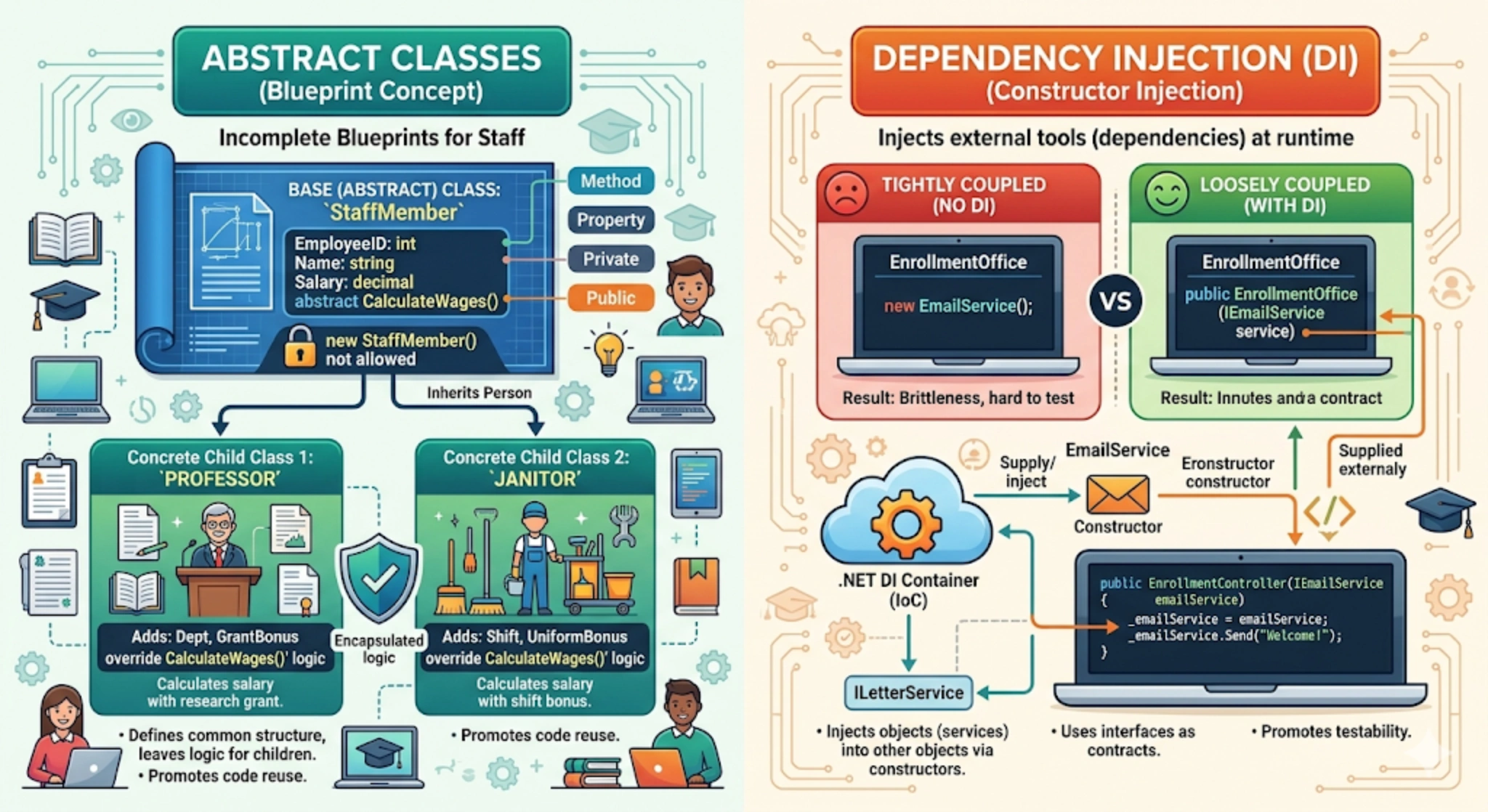
4. Abstract Classes – “Blueprint Concept”
An abstract class is a class that cannot be instantiated and is used as a base blueprint for other classes. It defines common structure + forces child classes to implement specific behavior. It can contain:
Abstract methods (no implementation)
Concrete methods (with implementation)
In this image:
StaffMemberis Abstract class (blueprint)Cannot create directly:
new StaffMember()It defines common fields:
EmployeeId
Name
Salary
And a method:
CalculateWages() → abstractChild classes:
Professor → calculates salary with research grant
Janitor → calculates salary with shift bonus
Same structure but, different logic.
Syntax
abstract class StaffMember
{
    public int EmployeeId;
    public string Name;
    public decimal Salary;

    public abstract void CalculateWages(); // no implementation
}

class Professor : StaffMember
{
    public override void CalculateWages()
    {
        Console.WriteLine("Salary with research grant");
    }
}

class Janitor : StaffMember
{
    public override void CalculateWages()
    {
        Console.WriteLine("Salary with shift bonus");
    }
}
5. Dependency Injection (DI) – “Loose Coupling”
Dependency Injection is commonly used to implement SOLID principles, particularly the Dependency Inversion Principle (DIP). For a deeper understanding, refer to the article Understanding SOLID Principles with simple Console App in .NET
Dependency Injection (DI) is a design pattern where objects receive their dependencies from outside, instead of creating them inside.It Focus on Loose coupling & testability. In this image:
Without DI (Tightly Coupled):
EnrollmentOffice → directly creates EmailServiceProblem is Hard to test and Hard to replace
Syntax
class EnrollmentOffice
{
    private EmailService _emailService = new EmailService();

    public void SendEmail()
    {
        _emailService.Send("Welcome");
    }
}
With DI (Loosely Coupled):
EnrollmentOffice → receives IEmailService from outsideNow, Easy to change email service and Easy to test
Syntax
interface IEmailService
{
    void Send(string message);
}

class EmailService : IEmailService
{
    public void Send(string message)
    {
        Console.WriteLine(message);
    }
}

class EnrollmentOffice
{
    private IEmailService _emailService;

    public EnrollmentOffice(IEmailService emailService)
    {
        _emailService = emailService;
    }

    public void SendEmail()
    {
        _emailService.Send("Welcome");
    }
}
Conclusion
OOP in C# provides a structured way to build applications by modeling real-world entities using classes and objects. The four pillars: Encapsulation, Abstraction, Inheritance, and Polymorphism ensure code is secure, reusable, and flexible. Advanced concepts like interfaces, access modifiers, and static vs instance make systems scalable and maintainable. Without OOP, large applications become complex and difficult to manage. Overall, OOP in C# is a design approach that helps build clean, efficient, and real world ready software systems.
Join the conversation! Your thoughts help the community grow.