

Here are the steps,
Step 1: Create a basic project MVC with Controller, Model and View.

Step 2: Include required query libraries.
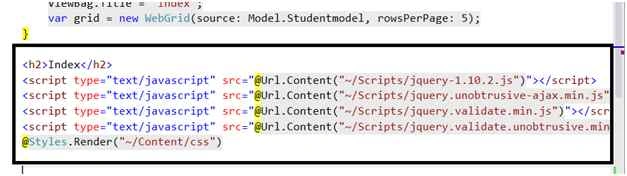
Step 3: Add grid with required column and also mention the Controller and Action to be called on button click. Add the button as well and also add Confirmation message.
Step 2: Include required query libraries.
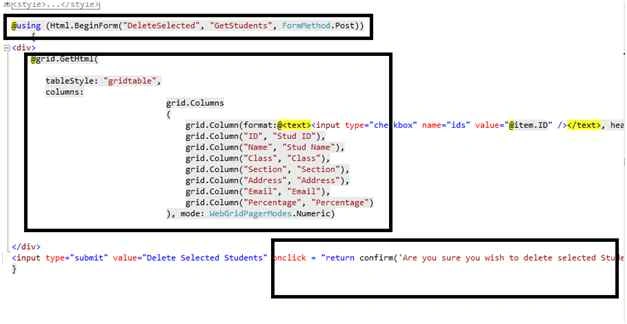
Step 3: Add grid with required column and also mention the Controller and Action to be called on button click. Add the button as well and also add Confirmation message.
- @using (Html.BeginForm("DeleteSelected", "GetStudents", FormMethod.Post))
- {
- <div>
- @grid.GetHtml(
- tableStyle: "gridtable",
- columns:
- grid.Columns
- (
- grid.Column(format:@<text><input type="checkbox" name="ids" value="@item.ID" /></text>, header: "Select"),
- grid.Column("ID", "Stud ID"),
- grid.Column("Name", "Stud Name"),
- grid.Column("Class", "Class"),
- grid.Column("Section", "Section"),
- grid.Column("Address", "Address"),
- grid.Column("Email", "Email"),
- grid.Column("Percentage", "Percentage")
- ), mode: WebGridPagerModes.Numeric)
- </div>
- <input type="submit" value="Delete Selected Students" onclick = "return confirm('Are you sure you wish to delete selected Students?');" />
- }

Humayun Kabir MamunPosted Dec 28, 2015, 1:41 AM
Nice...
Sibeesh VenuPosted Dec 26, 2015, 10:48 AM
Nice Share
Gowtham KPosted Dec 26, 2015, 9:10 AM
Good One, Thanks for sharing it
Banketeshvar NarayanPosted Dec 26, 2015, 5:58 AM
Nice Share
Santhakumar MunuswamyPosted Dec 23, 2015, 3:46 PM
Thanks for nice article
Ankur MistryPosted Dec 20, 2015, 12:16 PM
Helpful stuff
Sabyasachi MishraPosted Dec 20, 2015, 11:53 AM
Nice one
Ajay GandhiPosted Dec 20, 2015, 8:25 AM
Thanks everyone
Humayun Kabir MamunPosted Dec 20, 2015, 1:32 AM
Nice...
Rakesh KalluriPosted Dec 19, 2015, 7:55 AM
Good Share
Raja TPosted Dec 19, 2015, 7:30 AM
Nice, Thanks for sharing
Upendra Pratap ShahiPosted Dec 19, 2015, 4:42 AM
nice one
Shridhar SharmaPosted Dec 19, 2015, 1:46 AM
nice share sir.