
Introduction
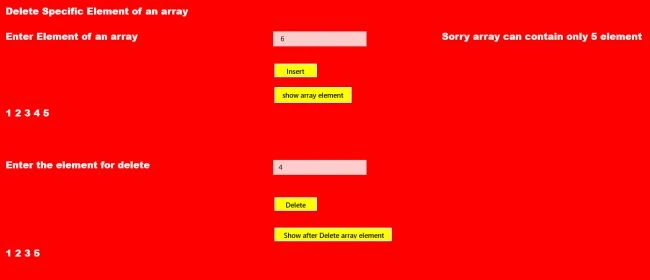
In this article I explain how to delete a specific element of an array. In this article I have an array from the end user that is limited in size to only 5 elements in the array. Then the user enters the number to be deleted from the array. Then see the remaining array elements after deleting the specified element of the array.
Use the following procedure to create it.
Step 1
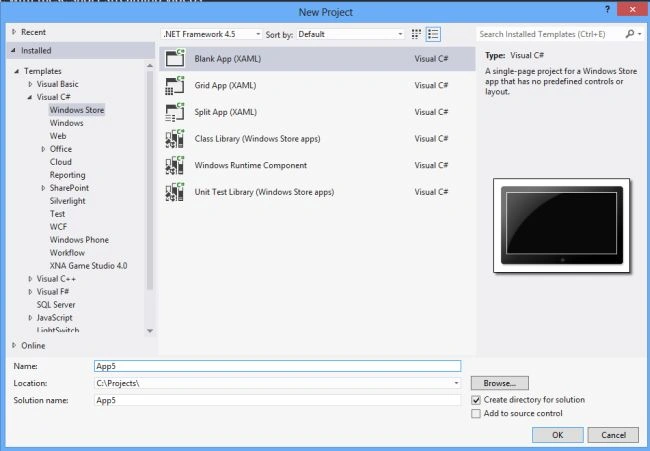
First of all you must create a new Windows Store Application.
- Open Visual Studio 2012
- "File" -> "New" -> "Project..."
- Choose "Template" -> "Visual C#" -> "Window Store app"
- Choose "Blank App (XAML)" then rename the application
Step 2
Write the following XAML code in "Mainpage.Xaml" (that is available in Solution Explorer):
<Page
x:Class="delete_specific_element_from_array.MainPage"
xmlns="http://schemas.microsoft.com/winfx/2006/xaml/presentation"
xmlns:x="http://schemas.microsoft.com/winfx/2006/xaml"
xmlns:local="using:delete_specific_element_from_array"
xmlns:d="http://schemas.microsoft.com/expression/blend/2008"
xmlns:mc="http://schemas.openxmlformats.org/markup-compatibility/2006"
mc:Ignorable="d">
<Grid Background="red">
<Grid.RowDefinitions>
<RowDefinition Height="72*"/>
<RowDefinition Height="38*"/>
<RowDefinition Height="42*"/>
<RowDefinition Height="35*"/>
<RowDefinition Height="40*"/>
<RowDefinition Height="79*"/>
<RowDefinition Height="43*"/>
<RowDefinition Height="48*"/>
<RowDefinition Height="43*"/>
<RowDefinition Height="328*"/>
</Grid.RowDefinitions>
<Grid.ColumnDefinitions>
<ColumnDefinition Width="248*"/>
<ColumnDefinition Width="407*"/>
<ColumnDefinition Width="257*"/>
<ColumnDefinition Width="454*"/>
</Grid.ColumnDefinitions>
<TextBlock Text="Delete Specific Element of an array" FontFamily="Arial" Grid.Column="1" Grid.Row="1" Foreground="White" FontSize="20" FontWeight="ExtraBold" ></TextBlock>
<TextBlock Text="Enter Element of an array" FontFamily="Arial" Grid.Column="1" Grid.Row="2" Foreground="White" FontSize="20" FontWeight="ExtraBold" ></TextBlock>
<TextBox x:Name="textbox1" Grid.Column="2" Grid.Row="2" Width="200" HorizontalAlignment="Left" VerticalAlignment="Top" Height="32"></TextBox>
<Button x:Name="button1" Content="Insert" Grid.Column="2" Grid.Row="3" Background="Yellow" Foreground="Black" Width="97" Height="35" Click="button1_Click" ></Button>
<TextBlock x:Name="text1" FontFamily="Arial" Grid.Column="3" Grid.Row="2" FontSize="20" FontWeight="ExtraBold" ></TextBlock>
<Button x:Name="button2" Content="show array element" Background="Yellow" Foreground="Black" Grid.Column="2" Grid.Row="4" Height="40" Width="171" Click="button2_Click"/>
Join the conversation! Your thoughts help the community grow.