

Introduction
Welcome to the "Demonstrating Backbone.js" article series. This article demonstrates how to use Backbone.js in a sample application. This article starts with the concept of Backbone.js and various components of it. Previous articles have provided an introduction to views and the implementation of routers and collections. You can get them from the following:
- Demonstrating Backbone.js: Implement View
- Demonstrating Backbone.js: Implement View Part 1
- Demonstrating Backbone.js: Implement View Part 2
- Demonstrating Backbone.js: Implement View Part 3
- Demonstrating Backbone.js: Implement View Part 4
- Demonstrating Backbone.js :Implement View Part 5
- Demonstrating Backbone.js :Implement Routers Part 1
- Demonstrating Backbone.js :Implement Collections Part 2
- Demonstrating Backbone.js :Implement Collections Part 3
- Demonstrating Backbone.js :Implement Collections Part 4
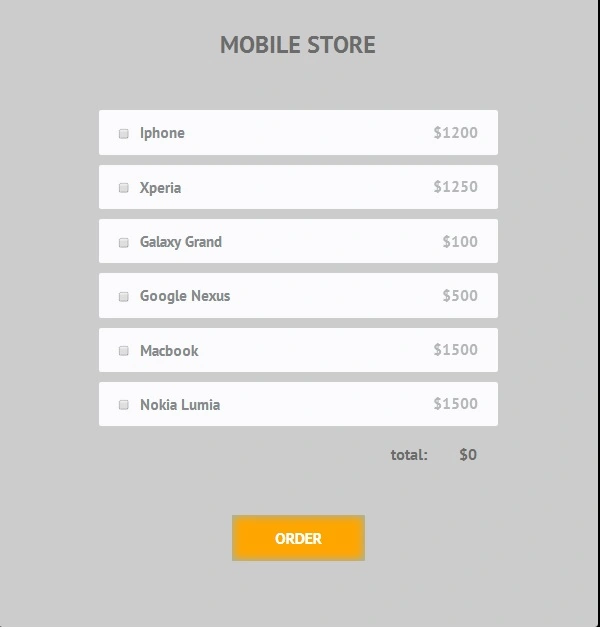
In this article we will see how to use Backbone.js in a simple store application that displays products.
Here we will use a Google web fonts style sheet and customized style sheet.
google.css
- @font-face {
- font-family: 'PT Sans';
- font-style: normal;
- font-weight: 400;
- src: local('PT Sans'), local('PTSans-Regular'), url(http://themes.googleusercontent.com/static/fonts/ptsans/v5/LKf8nhXsWg5ybwEGXk8UBQ.woff) format('woff');
- }
- @font-face {
- font-family: 'PT Sans';
- font-style: normal;
- font-weight: 700;
- src: local('PT Sans Bold'), local('PTSans-Bold'), url(http://themes.googleusercontent.com/static/fonts/ptsans/v5/0XxGQsSc1g4rdRdjJKZrNBsxEYwM7FgeyaSgU71cLG0.woff) format('woff');
- }
Style.css
- /*-------------------------
- Simple reset
- --------------------------*/
- *{
- margin:0;
- padding:0;
- }
- /*-------------------------
- General Styles
- --------------------------*/
- html{
- background-color:#000000;
- }
- body{
- font:15px/1.3 Arial, sans-serif;
- color: #4f4f4f;
- }
- a, a:visited {
- outline:none;
- color:#389dc1;
- }
- a:hover{
- text-decoration:none;
- }
- /*----------------------------
- The main content element
- -----------------------------*/
- #main{
- padding:100px;
- background-color:#ccc;
- box-shadow:0 0 1px #ccc;
- width:700px;
- margin:100px auto;
- border-radius:6px;
- font:bold 24px/1 'PT Sans', sans-serif;
- color:#6b6b6b;
- }
- #main h1{
- font-size:36px;
- text-align: center;
- text-transform: uppercase;
- padding: 0 0 80px;
- }
- #products{
- list-style:none;
- margin:0 auto;
- width:600px;
- }
- #products li{
- background-color: #fbfbfc;
- box-shadow:0 1px 1px #eee;
- font-size:22px;
- color: #85898b;
- padding:22px 30px;
- margin-bottom:15px;
- border-radius:4px;
- cursor:pointer;
- }
- #products li span{
- float:right;
- opacity:0.6;
- }
- #products li input[type=checkbox]{
- border:1px solid #ccc;
- box-shadow:1px 1px 1px #ccc;
- margin-right:10px;
- width:16px;
- height:16px;
- display:inline-block;
- vertical-align: middle;
- }
- #total{
- font-size:24px;
- text-align:right;
- width:570px;
- margin:30px auto 0;
- padding-right:30px;
- }
- #total span{
- display:inline-block;
- min-width:70px;
- }
- #order{
- font:inherit;
- font-size:24px;
- cursor:pointer;
- border:none;
- display:block;
- background-color:#FFA500;
- color:#fff;
- text-transform:uppercase;
- width:200px;
- margin:80px auto 0;
- text-align:center;
- padding:22px 0;
- border-radius: 3px;
- box-shadow:0 1px 1px #ddd, 0 0 20px #84b8e0 inset;
- }
- #order:hover{
- opacity: 0.9;
- }
Join the conversation! Your thoughts help the community grow.