

Introduction
ASP.NET Core is designed around the principle of modularity and maintainability. One of the key architectural patterns that makes this possible is Dependency Injection (DI) . DI is a technique where dependencies (services or components required by a class) are provided to it, rather than the class creating them itself.
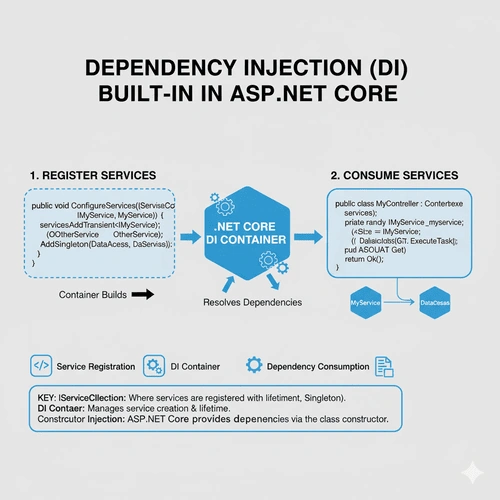
ASP.NET Core provides a built-in dependency injection container that allows developers to register, configure, and inject dependencies easily, promoting loose coupling, testability, and maintainability in applications.
What is Dependency Injection?
Dependency Injection is a design pattern that enables an object to receive its dependencies from an external source rather than creating them directly.
This pattern helps:
Reduce tight coupling between classes.
Promote code reusability and testability.
Centralize configuration and service management.
Example without Dependency Injection
    public class EmailService
{
    public void Send(string to, string message)
    {
        Console.WriteLine($"Sending Email to {to}: {message}");
    }
}

public class NotificationController
{
    private EmailService _emailService = new EmailService();

    public void Notify(string user, string message)
    {
        _emailService.Send(user, message);
    }
}
In this case, NotificationController is tightly coupled with EmailService . If you want to replace EmailService with a SmsService , you would have to modify the controller’s code — which violates the Open/Closed Principle of SOLID design.
Dependency Injection in ASP.NET Core
ASP.NET Core solves this problem by building DI directly into the framework . You can register services and manage their lifetimes in the service container provided by the framework.
Built-In Service Container
The built-in container is lightweight yet powerful. It supports three main lifetimes for services:
Transient – Created each time they are requested.
Scoped – Created once per request.
Singleton – Created once for the lifetime of the application.
How Dependency Injection Works in ASP.NET Core
Step 1. Register Services in Program.cs
You define which classes should be available for injection inside the service container using the IServiceCollection interface.
    var builder = WebApplication.CreateBuilder(args);

// Register services
builder.Services.AddTransient<IEmailService, EmailService>();
builder.Services.AddScoped<ILogService, LogService>();
builder.Services.AddSingleton<IConfigService, ConfigService>();

var app = builder.Build();
app.MapControllers();
app.Run();
Here:
AddTransient()creates a new instance every time.AddScoped()creates one instance per web request.AddSingleton()creates one instance throughout the app lifecycle.
Step 2. Inject Dependencies into Controllers or Classes
You can inject these services directly into your controllers or other classes via constructor injection.
    public interface IEmailService
{
    void Send(string to, string message);
}

public class EmailService : IEmailService
{
    public void Send(string to, string message)
    {
        Console.WriteLine($"Email sent to {to}: {message}");
    }
}

public class NotificationController : ControllerBase
{
    private readonly IEmailService _emailService;

    // Constructor Injection
    public NotificationController(IEmailService emailService)
    {
        _emailService = emailService;
    }

    [HttpGet("notify")]
    public IActionResult Notify(string user, string message)
    {
        _emailService.Send(user, message);
        return Ok("Notification Sent!");
    }
}
ASP.NET Core automatically resolves dependencies from the service container when creating controller instances.
Step 3. Using Dependency Injection in Non-Controller Classes
DI isn’t limited to controllers. You can inject dependencies anywhere, such as in custom middleware or background services.
Example: Using DI in Middleware
Join the conversation! Your thoughts help the community grow.