

I have seen many articles about Dependency Injection in MVC and C# and thought to write an article about using Dependency Injection in ASP.NET MVC5.
Dependency Injection (DI) in MVC
Dependency Injection is an implementation of "Inversion of Control". Inversion of Control (IoC) says that the objects do not create other objects on which they rely to do their work; instead, they get the objects that they need from an outside source (for example, an XML configuration file).
So now, let’s implement the same.
- Add a new ASP.NET MVC project.
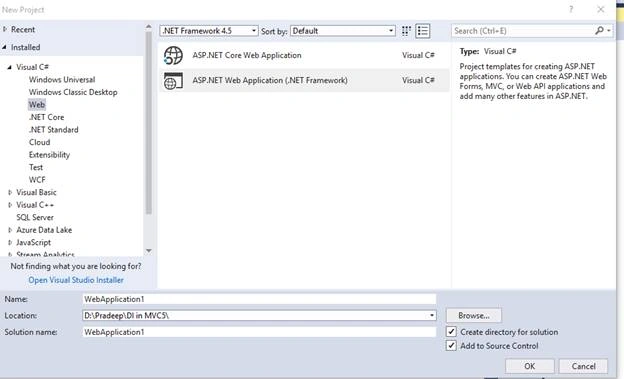
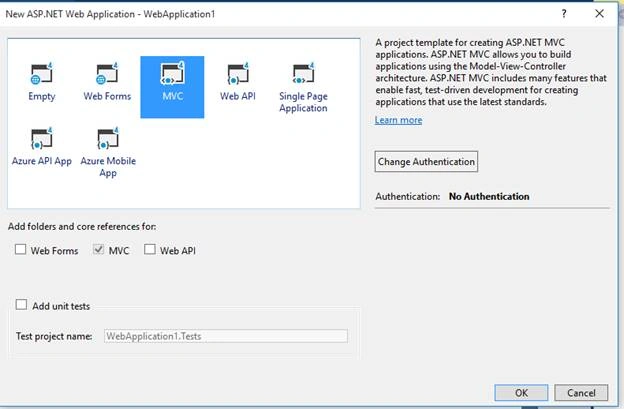
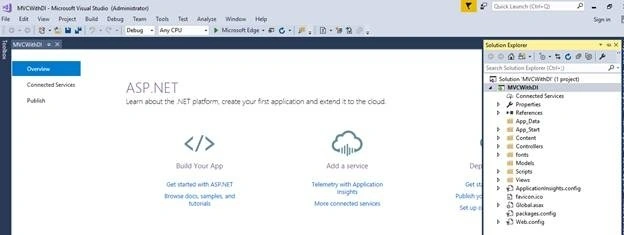
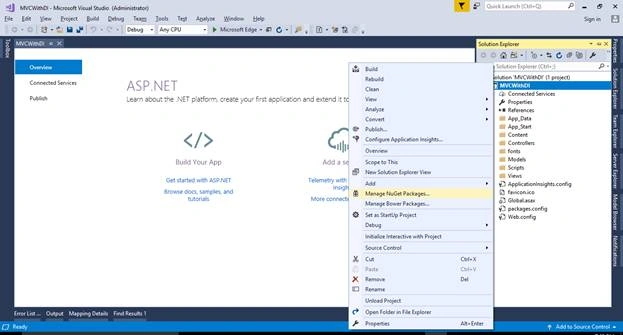
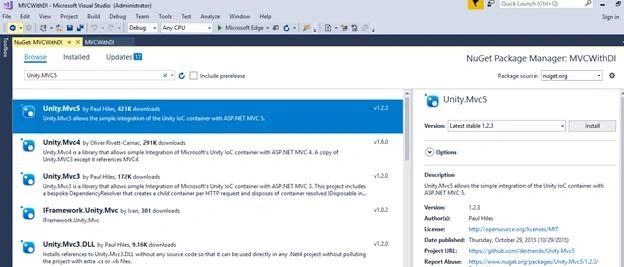
- No, install the "Unity.Mvc5" Container using NuGet Package Manager, as shown below.
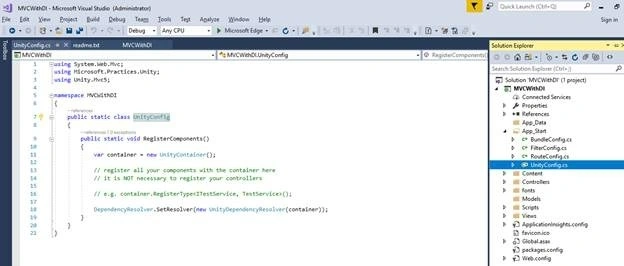
- When it is installed successfully, you will find the following two references added to your project and a UnityConfig.cs class file in App-Start folder.
- Now, let’s create the repository that will be accessed by the Controller.
- Add a folder named Repository.
- Add an interface IUserMasterRepository.
interface IUserMasterRepository
{
    IEnumerable<UserMaster> GetAll();
    UserMaster Get(int id);
    UserMaster Add(UserMaster item);
    bool Update(UserMaster item);
    bool Delete(int id);
}
- Now, add the repository which has your data access code.
public class UserMasterRepository : IUserMasterRepository
{
    private List<UserMaster> users = new List<UserMaster>();
    private int Id = 1;

    public UserMasterRepository()
    {
        // Add products for the Demonstration
        Add(new UserMaster { Name = "User1", EmailID = "[email protected]", MobileNo = "1234567890" });
        Add(new UserMaster { Name = "User2", EmailID = "[email protected]", MobileNo = "1234567890" });
        Add(new UserMaster { Name = "User3", EmailID = "[email protected]", MobileNo = "1234567890" });
    }

    public UserMaster Add(UserMaster item)
    {
        if (item == null)
        {
            throw new ArgumentNullException("item");
        }

        item.ID = Id++;
        users.Add(item);
        return item;
    }

    public bool Delete(int id)
    {
        users.RemoveAll(p => p.ID == id);
        return true;
    }

    public UserMaster Get(int id)
    {
        return users.FirstOrDefault(x => x.ID == id);
    }

    public IEnumerable<UserMaster> GetAll()
    {
        return users;
    }

    public bool Update(UserMaster item)
    {
        if (item == null)
        {
            throw new ArgumentNullException("item");
        }

        int index = users.FindIndex(p => p.ID == item.ID);
        if (index == -1)
        {
            return false;
        }
        users.RemoveAt(index);
        users.Add(item);
        return true;
    }
}
Note. Here, we have used a repository. You can use services which will consume your Repository.
- Now, register this repository to container in UnityConfig.cs.
public static void RegisterComponents() { var container = new UnityContainer(); container.RegisterType<IUserMasterRepository, UserMasterRepository>(); DependencyResolver.SetResolver(new UnityDependencyResolver(container)); } - Add UnityConfiguration in AppStart method of Global.asax
protected void Application_Start() { AreaRegistration.RegisterAllAreas(); FilterConfig.RegisterGlobalFilters(GlobalFilters.Filters); RouteConfig.RegisterRoutes(RouteTable.Routes); BundleConfig.RegisterBundles(BundleTable.Bundles); UnityConfig.RegisterComponents(); } - Inject the Dependency in Controller.
- Create UserController
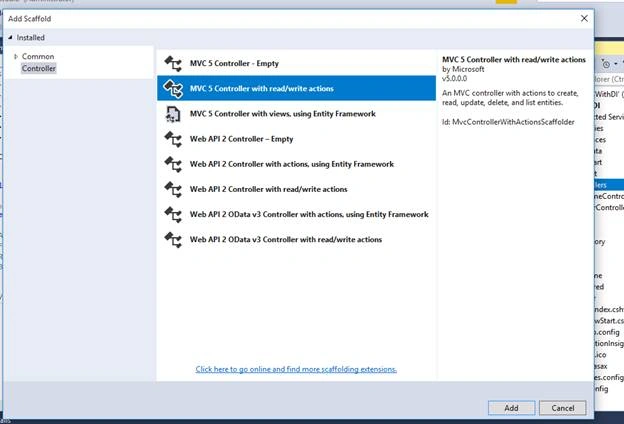
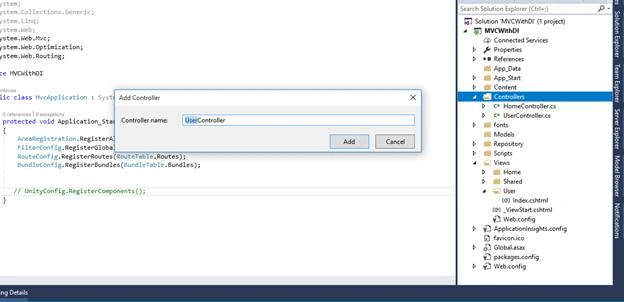
- Now, in the below code, we have created a constructor of UserContoller, injected the UserMasterRepository, and accessed it in Index action.
public class UserController : Controller
{
    readonly IUserMasterRepository userRepository;

    public UserController(IUserMasterRepository repository)
    {
        this.userRepository = repository;
    }

    // GET: User
    public ActionResult Index()
    {
        var data = userRepository.GetAll();
        return View(data);
    }
}
- Create UserController
- Add a View for the same.
- Add User folder in Views folder.
- Add Index View.
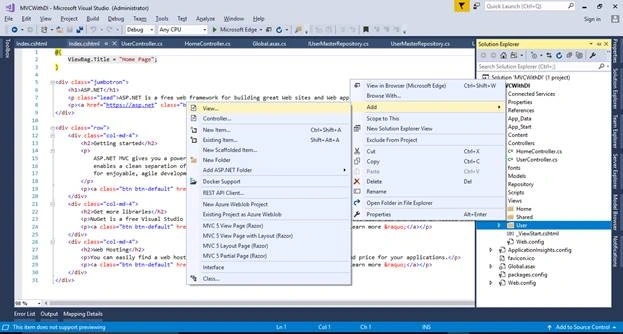
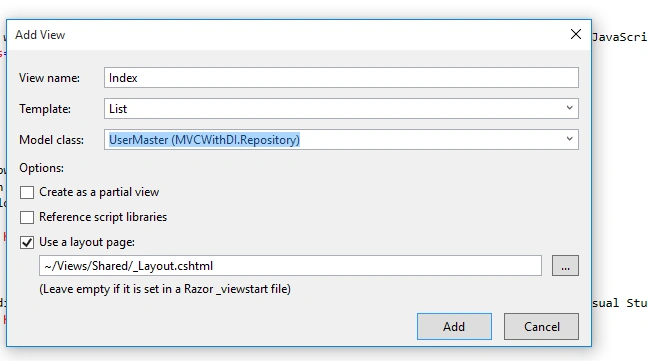
Below is the code which needs to be written in Index View file.
@model IEnumerable<MVCWithDI.Repository.UserMaster>

@{
    ViewBag.Title = "Users";
    Layout = "~/Views/Shared/_Layout.cshtml";
}

<h2>Index</h2>

<p>
    @Html.ActionLink("Create New", "Create")
</p>

<table class="table">
    <tr>
        <th>
            @Html.DisplayNameFor(model => model.Name)
        </th>
        <th>
            @Html.DisplayNameFor(model => model.EmailID)
        </th>
        <th>
            @Html.DisplayNameFor(model => model.MobileNo)
        </th>
        <th></th>
    </tr>

@foreach (var item in Model) {
    <tr>
        <td>
            @Html.DisplayFor(modelItem => item.Name)
        </td>
        <td>
            @Html.DisplayFor(modelItem => item.EmailID)
        </td>
        <td>
            @Html.DisplayFor(modelItem => item.MobileNo)
        </td>
        <td>
            @Html.ActionLink("Edit", "Edit", new { id=item.ID }) |
            @Html.ActionLink("Details", "Details", new { id=item.ID }) |
            @Html.ActionLink("Delete", "Delete", new { id=item.ID })
        </td>
    </tr>
}

</table>
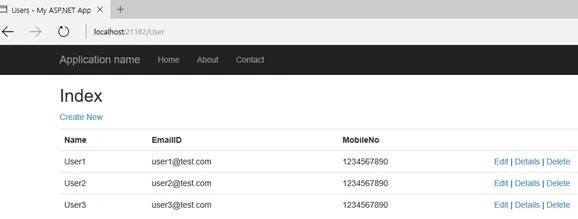
Now, run the project. Here is the output.
Riccardo RossiPosted Mar 27, 2021, 10:04 PM
Hi, I'm new with DI and IoC concepts. Am I wrong or in your example the view is tightly coupled with class UserMaster? With .Net Core we can use the directive @inject, how we can solve with .Net NOT core? Thanks.
Nagi reddy KandiPosted Jan 21, 2020, 3:09 PM
I don't have internet, that time how to install unity.mvc into my project solution? Please help me.
Imran HassanPosted Nov 30, 2019, 1:51 AM
Can ypu please explain how to do dependency injection using N-Tier...UILayer--->BalLayer--->DalLayer--->BOLayer---->
mukesh choudharyPosted Apr 12, 2019, 4:18 AM
Thats Nice One
Fahmi WildanaPosted Feb 24, 2018, 2:32 PM
Thank you for the article, currently I'm writing extension for doing multiple dependency injection by class/interface name using glob pattern to avoid repetitive typing. Looking for feedback :) https://github.com/DrSensor/BatchDI
Dennis ThomasPosted Feb 16, 2018, 5:00 AM
Thank you Pradeep. That is a nice one!
Dan SedlakPosted Dec 21, 2017, 5:21 PM
UnityConfig.RegisterComponents does not exist in the current context. What did I miss?
Sanju C KPosted Dec 19, 2017, 10:36 AM
Why to use dependency injection ? When we are already achieving use interface implementation. If we have not register dependency injection what will be the impact ??