
Dependency Injection
Asking for your dependencies instead of constructing them within the application logic is called "Dependency Injection". This is a software design pattern that implements Inversion Of Control. It shows how to create loosely-coupled classes. Loosely-coupled means the object should only have as many dependencies as it needs to do its jobs, so that the dependencies should be few. Objects should be dependent on an interface that promotes greater reusability. Dependency Injection allows you to inject an object into the class. So there is no need to create concrete objects (using the new keyword) in the class. Objects will be injected into a class by constructors or setter methods, rather than relying on the class to create the object itself.
When to use Dependency Injection
- Dependency Injection is very useful when we implement loosely-coupled modules.
- Unit testing is one of the most useful advantages of Dependency Injection.
Tightly-Coupled
When a class is dependent on a concrete dependency, it is said to be tightly-coupled to that class. For an enterprise-level application it is really difficult to make a change if it is tightly-coupled. Because a change in objects may require changes to a number of other objects.

- public class CustomerBL
- {
- public string GetDALString()
- {
- //Calling CustomerDAL
- CustomerDAL customerObject = new CustomerDAL();
- return customerObject.GetString();
- }
- }
- public class CustomerDAL
- {
- public string GetString()
- {
- return "Hello World";
- }
- }
- public class CustomerDAL1
- {
- public string GetString()
- {
- return "Hello World…1";
- }
- }
loosely-coupled
Objects are not concretely dependent. It reduces the inter-dependencies among components of a system that the risk that changes in one component will require changes in any other component.
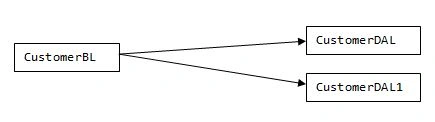
- public interface ICustomerDAL
- {
- string GetString();
- }
- public class CustomerDAL : ICustomerDAL
- {
- public string GetString()
- {
- return "Hello World";
- }
- }
- public class CustomerDAL1 : ICustomerDAL
- {
- public string GetString()
- {
- return "Hello World...1";
- }
- }
- public class CustomerBL
- {
- private ICustomerDAL _customerObject;
- public CustomerBL()
- {
- _customerObject = new CustomerDAL();
- }
- public CustomerBL(bool condition)
- {
- if (condition)
- _customerObject = new CustomerDAL();
- else
- _customerObject = new CustomerDAL1();
- }
- public string GetDALString()
- {
- return _customerObject.GetString();
- }
- }
But the problem is we are initiating an object in the class. That means any changes will force us to change all the referenced classes from where we are calling the CustomerDAL class.
To overcome this problem we introduce a new design pattern called Factory Pattern.
Factory Pattern: Let's start with a small idea of Factory Pattern.
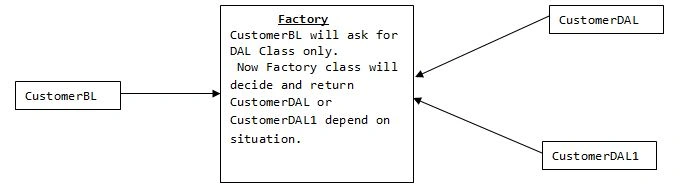
- public interface ICustomerDAL
- {
- string GetString();
- }
- public class Factory
- {
- public static ICustomerDAL InstantiateCustomer()
- {
- if (true) //Condition here
- return new CustomerDAL();
- else
- return new CustomerDAL1();
- }
- }
- public class CustomerDAL : ICustomerDAL
- {
- public string GetString()
- {
- return "Hello World";
- }
- }
- public class CustomerDAL1 : ICustomerDAL
- {
- public string GetString()
- {
- return "Hello World...1";
- }
- }
- public class CustomerBL
- {
- public string GetDALString()
- {
- //Calling CustomerDAL
- ICustomerDAL customerObject = Factory.InstantiateCustomer();
- return customerObject.GetString();
- }
- }
This pattern is known as static Factory Pattern. But you can see there is a problem in static Factory Pattern, that the Factory class is responsible for initiating object. So we are tightly-coupled with Factory class. Now if we want to change factory during runtime then it is not possible.
Abstract Factory Pattern
This problem is already solved by an abstract Factory Pattern that is nothing but one more level of inheritance. We will make an interface for the factory also. See the following example.
- public interface ICustomerDAL
- {
- string GetString();
- }
- public interface IFactory
- {
- ICustomerDAL InstantiateCustomer();
- }
- public class FactoryManager
- {
- private static Dictionary<String, IFactory> factories =
- new Dictionary<String, IFactory>();
- public static void addFactory(String factoryId, IFactory factory)
- {
- factories.Add(factoryId, factory);
- }
- public static IFactory getFactory(String factoryId)
- {
- IFactory factoryObject;
- factories.TryGetValue(factoryId, out factoryObject);
- return factoryObject;
- }
- }
- public class FactoryInitialization
- {
- public void Initialiize()
- {
- FactoryManager.addFactory("CustomerFactory", new Factory());
- }
- }
- public class Factory : IFactory
- {
- public ICustomerDAL InstantiateCustomer()
- {
- if (true) //Condition here
- return new CustomerDAL();
- else
- return new CustomerDAL1();
- }
- }
- public class CustomerDAL : ICustomerDAL
- {
- public string GetString()
- {
- return "Hello World";
- }
- }
- public class CustomerDAL1 : ICustomerDAL
- {
- public string GetString()
- {
- return "Hello World...1";
- }
- }
- public class CustomerBL
- {
- public string GetDALString()
- {
- //Calling CustomerDAL
- tomerDAL customerObject = FactoryManager.getFactory("CustomerFactory").InstantiateCustomer();
- return customerObject.GetString();
- }
- }
Dependency Injection: When using Dependency Injection the responsibility of obtaining the necessary instances is reversed. A class no longer obtains these instances itself. Instead, a Dependency Injection container creates the needed instances and "injects" them into the object. There are the following tree types of injections possible.
Constructor injection: The dependencies are provided by a class constructor. This is a technique of passing an object's dependencies to its constructor.
- public interface ICustomerClass
- {
- string GetString();
- }
- public class ConstructorInjection
- {
- private ICustomerClass _customerObject;
- //Constructor
- public ConstructorInjection(ICustomerClass customerObject)
- {
- _customerObject = customerObject;
- }
- public string GetDALString()
- {
- //Calling CustomerClass
- return _customerObject.GetString();
- }
- }
- public interface ICustomerClass
- {
- string GetString();
- }
- public class SetterInjection
- {
- private ICustomerClass _customerObject;
- // Setter Method, Set the object to be used by this client
- public void SetterMethod(ICustomerClass customerObject)
- {
- _customerObject = customerObject;
- }
- public string GetString()
- {
- //Calling CustomerClass
- return _customerObject.GetString();
- }
- }
- public interface ICustomerClass
- {
- string GetString();
- }
- public interface IInterfaceInjection
- {
- void SetterMethod(ICustomerClass customerObject);
- }
- public class InterfaceInjection : IInterfaceInjection
- {
- private ICustomerClass _customerObject;
- // Setter Method, Set the object to be used by this client
- public void SetterMethod(ICustomerClass customerObject)
- {
- _customerObject = customerObject;
- }
- public string GetString()
- {
- //Calling CustomerClass
- return _customerObject.GetString();
- }
- }
Since we implement Dependency Injection it will become very easy to test a unit of code individually. We will just mock or stub the dependent object to test a unit of code individually.
- public interface ICustomerDataAccessLayer
- {
- int Calculate(int x);
- }
- public class CustomerDataAccessLayer : ICustomerDataAccessLayer
- {
- public int Calculate(int x)
- {
- return x * 2;
- }
- }
- public class CustomerBusinessService
- {
- private ICustomerDataAccessLayer _customerObject;
- public CustomerBusinessService(ICustomerDataAccessLayer customerObject)
- {
- _customerObject = customerObject;
- }
- public int CalculateAmount(int x, int y)
- {
- int z = y * y; //Want to test these logic independently
- return z + _customerObject.GetString();
- }
- }
- using System;
- using Microsoft.VisualStudio.TestTools.UnitTesting;
- using DependencyInjection.Fakes;
- using DependencyInjection;
- namespace UnitTestProject1
- {
- [TestClass]
- public class UnitTest1
- {
- [TestMethod]
- public void TestCalculateAmount()
- {
- var stubbedObject = new StubICustomerDataAccessLayer()
- {
- CalculateInt32 = (x) =>
- {
- return 0;
- }
- };
- var actualResult= new CustomerBusinessService(stubbedObject).CalculateAmount(2, 3);
- Assert.AreEqual<int>(9, actualResult);
- }
- }
- }
I hope you enjoyed this article. If you have any query or remarks then please comment, I will be with you.
Thank you.
Krishnanand SivarajPosted Apr 4, 2015, 12:02 PM
Nice one
Pratik ChakrabortyPosted Apr 3, 2015, 12:35 PM
thanks
Karthik Muthu KaruppanPosted Apr 3, 2015, 11:38 AM
Thanks for sharing
NitinPosted Apr 3, 2015, 6:53 AM
Nice
Tom MohanPosted Apr 3, 2015, 12:57 AM
Good Start :)
Vithal WadjePosted Apr 2, 2015, 4:15 PM
nice