

Introduction
Welcome to my Design Pattern For Beginners article series. In the previous two articles of the series, I explained the Singleton Design Pattern and Factory Design Pattern; you can read about them here:
- Design Pattern For Beginners - Part 1: Singleton Design Pattern
- Design Pattern For Beginners - Part 2: Factory Design Pattern
- Design Pattern For Beginners - Part 3: Prototype Design Pattern
- Design Pattern For Beginners - Part 4: Decorator Design Pattern
- Design Pattern For Beginners - Part 5: Composite Design Pattern
- Design Pattern For Beginners - Part 6: Adaptor Design Pattern
- Design Pattern For Beginners - Part 7: Bridge Design Pattern
- Design Pattern For Beginners - Part 8: memento Design Pattern
- Design Pattern for Beginners - Part-9: Strategy Design Pattern
- Design Pattern for Beginners - Part-10: Observer Design Pattern
- Design Pattern For Beginners - Part 11: Implement Decouple Classes in Application
In today's article, we will learn one more pervasive design pattern called the "Prototype Design Pattern."
As the name suggests, a prototype means copying something that exists. In this context, let me give one nice example. A few days ago, one of my friends went to a Tattoo shop to get a Tattoo on his body. (Yes, my friend is cool and rocking in nature.) After returning from the shop (with a tattoo in hand), he told me, Sourav, they have some preprepared styles that are much less costly, but if we want our design, they said: "it will take time, and the cost will be higher." I said Ok. Now consider this for the situation in software development. If the client demands an object we already have, we can deliver it quickly and at less cost. In software development, there are many scenarios where the exact copy of an existing object is frequently needed.
And this is the basic necessity of the Prototype Design Pattern. So, let's clarify the essential requirement "when we need to create the same object again and again, then we will implement a Prototype Design Pattern." Here is the simple logical diagram of the Prototype Design Pattern.
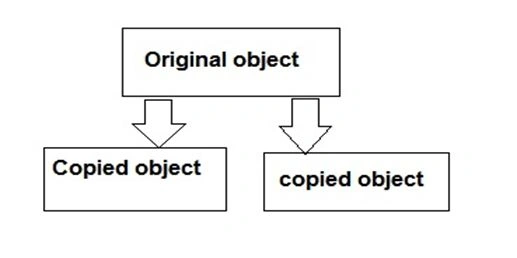
One big misconception occurs when we (basically junior programmers, including me) create the same object in C# or try to copy one object into another. Let's learn the problem first. Then we will see how to solve it.
Look at the following code; here, we will try to create a copy of an existing object.
using System;
using System.Collections;
using System.Globalization;
namespace Test1
{
    class Test
    {
        public string Name;
    }
    class Program
    {
        static void Main(string[] args)
        {
            Test obj1 = new Test();
            obj1.Name = "sourav";
            Test obj2 = obj1; // Trying to make copy in obj2
            obj2.Name = "c-sharpcorner.com";
            Console.WriteLine(obj1.Name);
            Console.ReadLine();
        }
    }
}
And here is the output.
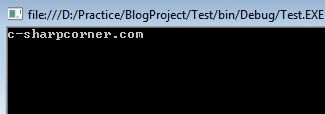
In this code, we are trying to make a copy of one object into another by the following statement.
Test obj2 = obj1;
And we think that one copy of obj1 is getting stored in obj2. But due to the primary concept of the object being a reference type, in other words, if we initialize one object to another, they both point to the exact memory location where the actual value is present.
Now the next line is the most interesting. Here we will see the concept behind the screen. We are initializing a property (data member) of obj2. When we initialize obj1 to obj2, then both are.
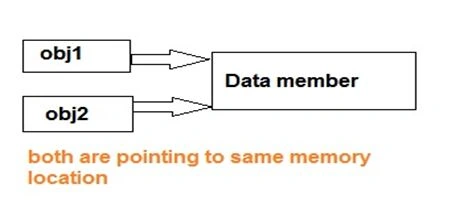
They both point to the same memory location. (Generally, in heap memory and obj1 and obj2 are created on the top of the stack.) In the next line, when we set the property of obj2, it automatically reflected obj1. And that is the reason why, when we are trying to print the property of obj1 (initialized to "Sourav"), we are getting the value of obj2 (c-sharpcorner.com).
Now, this is the problem, and we are sure that, in this example, not all objects are created from the exact copy. Then what is the solution?
Let's use MemberwiseClone() function
.Yes, this is the solution. In the following example, we will see how to implement the MemberwiseClone() function to copy the same object to another object.
using System;
using System.Collections;
using System.Globalization;
namespace Test1
{
    class Test
    {
        public string Name;
        public Test CloneMe(Test t)
        {
            return (Test)this.MemberwiseClone();
        }
    }
    class Program
    {
        static void Main(string[] args)
        {
            Test obj1 = new Test();
            obj1.Name = "sourav";
            Test obj2 = obj1.CloneMe(obj1); // Trying to make copy in obj2
            obj2.Name = "c-sharpcorner.com";
            Console.WriteLine(obj1.Name);
            Console.ReadLine();
        }
    }
}
Here is the output.
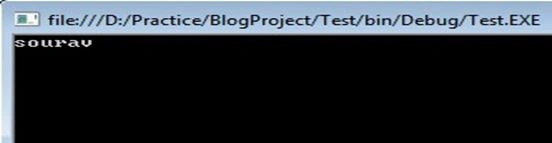
Oh! At last, we have found the right solution to make a copy of the object. And this is an example of the Prototype Design Pattern.
Hmm...Okay, you are thinking, "I understood the Prototype pattern, but the example is meaningless." (If you want to hear it, please visit here.) dear reader, I did not forget the promise I made in my first article of the Design Pattern Series.
Let's talk about a scenario where the Prototype Design Pattern is relevant.
Consider that you want to create one copy of an object multiple times. For your birthday, you want to send an invitation letter to your friends; now, the content and sender name will remain the same, whereas the recipient name will only change. In this situation, we can use a prototype of the invitation card for multiple friends.
Take another example where one object will be created after heavy database operations (as we know, database operations are very costly), and we want that object 100 times. What if we make a clone of the same object by the Prototype Desing Pattern rather than hitting the database 100 times? Good solution, right?
Ok, I am talking too much. Let's implement our first scenario in C# code. Here is the sample code.
And here is the output of what we expected.
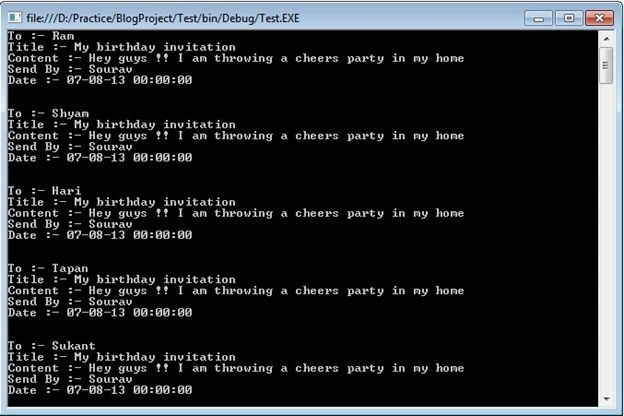
(Guys, believe me, or not. I am writing this article, and it's 23:50; in other words, it is 11.50 PM, and in 10 minutes, it's my birthday on 8-8-2013).
Now think about my crazy friend (the Tattoo fellow). He has a few hundred friends and wants to ask them all. If we use the Factory Design Pattern and give him one application, we hope his problem is solved. And here, for the sake of simplicity of the example, we have invited only five friends.
Conclusion
This article taught us about one more pervasive design pattern called the "Prototype Design Pattern."
Continue Learning
- Design Pattern For Beginners - Part 4: Decorator Design Pattern
- Design Pattern For Beginners - Part 5: Composite Design Pattern
- Design Pattern For Beginners - Part 6: Adaptor Design Pattern
- Design Pattern For Beginners - Part 7: Bridge Design Pattern
- Design Pattern For Beginners - Part 8: memento Design Pattern
- Design Pattern for Beginners - Part-9: Strategy Design Pattern
- Design Pattern for Beginners - Part-10: Observer Design Pattern
- Design Pattern For Beginners - Part 11: Implement Decouple Classes in Application
Dont Compar To OthersPosted Jan 2, 2020, 3:52 AM
Sir please explain Behavioral Pattrens
Rajan MishraPosted Oct 11, 2018, 6:19 AM
The final destination of my prototype pattern confusion thanks, coder.
Naga SankarPosted Sep 26, 2013, 12:20 PM
Superb article
Dinesh BeniwalPosted Aug 9, 2013, 3:41 AM
Belated Happy Bday Sourav
Sourav KayalPosted Aug 8, 2013, 11:21 PM
Thanks guys..
Anurag SarkarPosted Aug 8, 2013, 3:59 PM
Happy Birthday.
Sam HobbsPosted Aug 8, 2013, 3:44 PM
Happy birthday. Thank you for another interesting article, Sourav. I think however that prototype implies that something will be modified, not just copied.