
Introduction
Storyboard
- In simple words Storyboard is one single file for all the views or screens that in yours apps.
- It transitions one screen to another screen.
- It minimizes (reduces) the number of files in your apps.
- Storyboard can put the XIB files.
- Storyboard is universal; that means your apps can run both iPhone and iPad.
- In Storyboard you can also used XIB if you need it in Storyboard.
- Storyboard contains all the controllers, like tool bar, view controller, ant tab bar.
- Storyboard is good for seeing how the controllers connect to each other.
- In Storyboard merging the view and controller is very easy.
- If you don’t want to use Storyboard when creating a new project then you can avoid it by unchecking the Storyboard option.
Disadvantages of Storyboard
- There are so many disadvantages to using Storyboard that are explained here.
- Not compatible with pre iOS 5.
- In my opinion, in Storyboard it is hard to work if the project is too long because every member in a team modifies and updates the file.
- In Storyboard if you have too many views then Storyboard can be confusing.
- It is less flexible.
- In Storyboard you don’t have a file owner.
- In my opinion Storyboard is a loosely coupled object into a big file.
- In Storyboard using table cell is better then XIB because it gives more flexibility.
- In Storyboard it is not easy to handle if you have a large amount of code. It is useful only for a small amount of code.
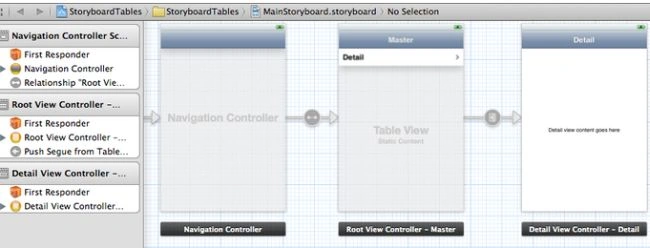
This image shows the flow of control. It shows that the merging of the view is too easy in Storyboard. Storyboard can contain multiple screens at a time.
XIB
- XIB is Mac OS x interface builder. It allows Cocoa Touch and Carbon Touch.
- In XIB the result is stored as a NIB file.
- It is the part of X code.
- In XIB there is no flow of control and transition between the view and controller.
- In XIB modularity is done in a very nice way.
- It contains item like buttons, text fields, labels.
- In XIB it gives you more flexibility, and simplicity in terms of code.
Disadvantage of XIB
- There are many disadvantages of XIB that are explained here.
- In XIB if there is any bug in making a connection then it is to hard too debug.
- In XIB merging is too difficult compared to Storyboard.
- In XIB if we have a dynamic view then it is hard to read compared to Storyboard.
Step 1
@interface ViewController : UIViewController<UITableViewDataSource, UITableViewDelegate>
{
IBOutlet UITableView *tableview;
NSMutableArray *listoftemple;
IBOutlet UISearchDisplayController *searchBar;
NSMutableArray *listofimages;
}
@property(nonatomic,strong)NSMutableArray *listoftemple;
@property(nonatomic,strong)UITableView *tableview;
@property(nonatomic,strong) IBOutlet UISearchDisplayController *searchBar;
@property(nonatomic,strong) NSMutableArray *listofimages;;
@end
In the first step we drag and drop a table view in a ".h" class file. And we we make the array of images and array of data.
Step 2
- (void)viewDidLoad
{
[super viewDidLoad];
listoftemple=[[NSMutableArray alloc]init];
[listoftemple addObject:@"KALI TEMPLE"] ;
[listoftemple addObject:@"GOLDEN TEMPLE"] ;
[listoftemple addObject:@"KORNAK TEMPLE"] ;
[listoftemple addObject:@"AKSHARDHAM TEMPLE"] ;
[listoftemple addObject:@"MODI MANDIR"];
[listoftemple addObject:@"HINDU TEMPLE"] ;
[listofimages= [[NSMutableArray alloc]init];
[ listofimages addObject: @"download.jpeg"];
[ listofimages addObject:@"download (1).jpeg"];
[ listofimages addObject:@"download (2).jpeg"];
[ listofimages addObject:@"download (4).jpeg"];
[ listofimages addObject:@"download (5).jpeg"];
[ listofimages addObject:@"download (6).jpeg"];
}
- (NSInteger)numberOfSectionsInTableView:(UITableView *)theTableView
{
return 1;
}
- (NSInteger)tableView:(UITableView *)tableView numberOfRowsInSection:(NSInteger)section {
return [listoftemple count];
- (UITableViewCell *)tableView:(UITableView *)tableView cellForRowAtIndexPath:(NSIndexPath *)indexPath
{
UITableViewCell *cell;
cell = [tableView dequeueReusableCellWithIdentifier:@"Cell"];
if (cell == nil)
{
cell = [[UITableViewCell alloc] initWithStyle:UITableViewCellStyleDefault reuseIdentifier:@"Cell"];
}
cell.imageView.image= [UIImage imageNamed:[NSString stringWithFormat:@"%@",[listofimages objectAtIndex:indexPath.row]]];
cell.textLabel.text= [listoftemple objectAtIndex:indexPath.row];
cell.accessoryType = UITableViewCellAccessoryDisclosureIndicator;
return cell;
}- (NSString *)tableView:(UITableView *)aTableView titleForHeaderInSection:(NSInteger)section
{
return @"LIST OF TEMPLE";
}
- (void)tableView:(UITableView *)theTableView didSelectRowAtIndexPath:(NSIndexPath *)indexPath
{
}
-(CGFloat)tableView:(UITableView *)tableView heightForRowAtIndexPath:(NSIndexPath *)indexPath
{
return 50;
}
- (void)didReceiveMemoryWarning
{
[super didReceiveMemoryWarning];
}
@end
Output
Sam HobbsPosted Jan 11, 2014, 8:12 PM
I know nothing about iOS development but you obviously know a lot. I think this will help many people.