

Introduction
This article describes the possible ways to send Data from a Controller to a View. Here we use the three ways for passing the data.
- ViewBag
- ViewData
- TempData
ViewBag
A ViewBag is used for passing data from a controller to a view. It is a dynamic feature of C#. ViewBag does require typecasting at the time of passing the object to the class.
ViewData
A ViewData is also used for passing data from the controller to the view. The ViewData property of any controller describes the instance of the ViewDataDictionary class. It uses the key-value for passing the data and it has a need for typecasting.
TempData
TempData is a dictionary that is derived from the TempDataDictionary class. The template Dictionary object persists only from one request to the next. You can mark one or more keys for retention using the keep method.
Example of the application.
Step 1. Create a Web API application as in the following.
- Start Visual Studio 2012.
- From the start window select "Installed" -> "Visual C#" -> "Web".
- Select "ASP.NET MVC4 Web Application" and click on the "OK" button.

- From the "MVC4 Project" window select "Web API".

- Click on the "OK" button.
Step 2. Create Model Class.
- In the "Solution Explorer".
- Right-click on the Model folder.
- Select "Add" -> "Class".
- Select "Installed" -> "Visual C#" and select class.
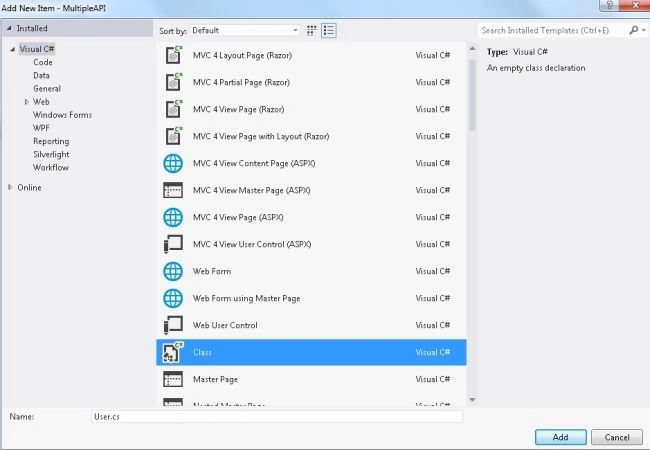
- Click on the "Add" button.
Add the following code.
using System;
using System.Collections.Generic;
using System.Linq;
using System.Web;
using System.ComponentModel.DataAnnotations;

namespace MultipleAPI.Models
{
    public class User
    {
        public String Name { get; set; }
        public String Address { get; set; }
    }
}
Step 3. Create a Controller.
- In the "Solution Explorer".
- Right-click on the Controller folder.
- Select "Add" -> "Controller" and change the name.

- Click on the "OK" button.
Add the following code.
using System;
using System.Collections.Generic;
using System.Linq;
using System.Web;
using System.Web.Mvc;
using MultipleAPI.Models;

namespace MultipleAPI.Controllers
{
    public class UserController : Controller
    {
        // GET: /User/
        public ActionResult Show()
        {
            MultipleAPI.Models.User obj = new MultipleAPI.Models.User();
            obj.Name = "Tayna Sharma";
            obj.Address = "Lucknow";
            ViewBag.User = obj;
            ViewData["obj"] = obj;
            TempData["obj"] = obj;
            return View("Show");
        }
    }
}
Step 4. Create a View


- In the "UserController".
- Right-click on the "Show" Action method.
- Select "Add View" and click on the "Add" button.
Add the following code.
@model MultipleAPI.Models.User
@{
    Layout = null;
}
<!DOCTYPE html>
<html>
<head>
    <title>Show</title>
</head>
<body>
    <div>
    @{
        var ViewBagValue = ViewBag.User;
        var ViewDataValue = (MultipleAPI.Models.User)ViewData["obj"];
        var TempDataValue = (MultipleAPI.Models.User)TempData["obj"];
    }
     Name is :-  @ViewBagValue.Name<br/>
     Name is:-  @ViewDataValue.Name <br/>
     Name is:-  @TempDataValue.Name <br/>
     Address :-  @ViewBagValue.Address<br/>
     Address:-  @ViewDataValue.Address <br/>
     Address:-  @TempDataValue.Address <br/>
    </div>
</body>
</html>
Step 5. Execute the application and change the URL to http://localhost:2669/User/Show

Join the conversation! Your thoughts help the community grow.