

In this article we will learn to call a webservice using mainly two different approaches.
Approach: By WebRefernce
Step 1
To create a webservice click "File" -> "New" -> "Project..." and select ASP.NET Web Service Application as per the following screenshot:
Screenshot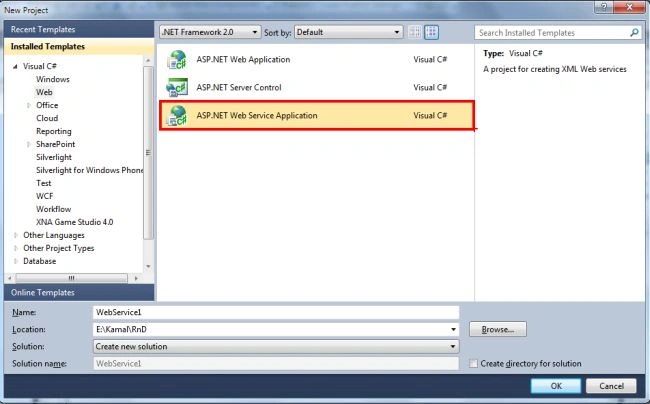
Step 2
On successful creation of the webservice you will find a screen as in the following with a "HelloWorld" web method.
Screenshot
Step 3
The WebService is ready to run, but here the actual process of how to consume it begins, so first we will start with using "WebReference".
In the following screenshot 3.1, right-click on the"References Folder" under the consumer application i.e. the application that will consume the webservice.
Select the "Add Web Reference" with the following screen 3.2 and provide the hosted webservice URL.
Screenshot 3.1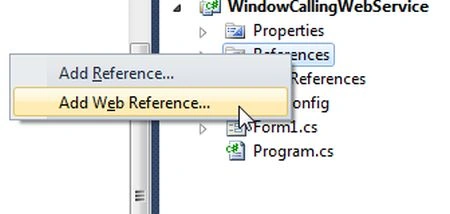
Screenshot 3.2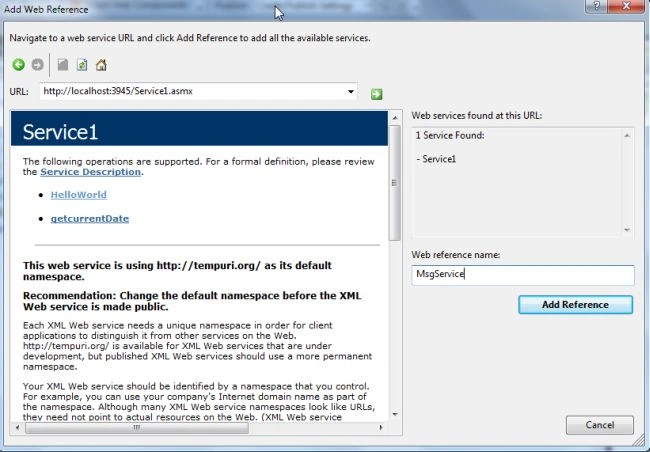
Step 4
Type the Service URL in the TexBox and provide a friendly name under "Web reference name" and click "OK".
Step 5
Once it is done you will see the following screen:
Screenshot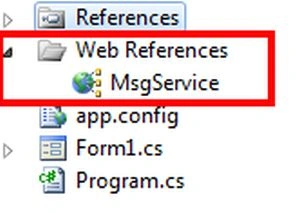
Step 6
Once the "MsgService" reference is done, you can easily access the web-methods of the service as follows:
MsgService.Service1 sobj = new MsgService.Service1();
sobj.HelloWorld();
Whereas MsgService is the reference name and Service1 is the service name and we created sobj as an object to access the methods. "HelloWorld" is being accessed using "sobj".
So this way we can access the webservice using Webreference.
Approach By making HttpCall
In this approach a few lines of code makes life easier to get the response from the web service.
Code Explanation
First of all a request is being created using the Http protocol with the URI http://localhost:3945/Service1.asmx/HelloWorld as the text portion in bold with italic is the service URL, whereas /HelloWorld is the web method to be accessed.
Then a Response is accepted using the WebResponse class and by doing some stream manipulation, data is read from the webservice.
WebRequest request = WebRequest.Create("http://localhost:3945/Service1.asmx/HelloWorld");
request.Method = "POST";
request.ContentType = "application/text";
Stream dataStream = request.GetRequestStream();
dataStream.Close();
// Get the response.
WebResponse response = request.GetResponse();
// Display the status.
lblServiceStatus.Text = "Service Call Status: " + ((HttpWebResponse)response).StatusDescription;
// Get the stream containing content returned by the server.
dataStream = response.GetResponseStream();
// Open the stream using a StreamReader for easy access.
StreamReader reader = new StreamReader(dataStream);
// Read the content.
string responseFromServer = reader.ReadToEnd();
// Display the content.
textBox1.Text = responseFromServer;
// Clean up the streams.
reader.Close();
dataStream.Close();
response.Close();
I hope this article has made clear how to use webservices either by using the WebRefernce approach or by making a direct HTTP call.
Thanks for reading.
Vishnu BhangalePosted Jun 30, 2019, 4:23 AM
Thank but How to Pass Parameter in Approach By making HttpCall
Iqrar AliPosted Dec 9, 2016, 10:55 AM
Write some code on SSL/TLS secured web service that upload and download files.
Edrick LomibaoPosted Aug 24, 2015, 4:07 AM
Thank you for this
Kamal RawatPosted Jan 30, 2013, 2:05 AM
You can pass the string as parameter in the following way: e.g. www.yoururl.com?stringval=<value> and on client side you can fetch this stringval parameter.. Let me know if you need information.
Sathiamoorthy SPosted Jan 18, 2013, 9:36 AM
Thanks! I have a query how to pass a string as parameter to webservice while using HttpCall
Sathiamoorthy SPosted Jan 18, 2013, 9:36 AM
Thanks! I have a query how to pass a string as parameter to webservice while using HttpCall
Gaurav GuptaPosted Sep 27, 2012, 11:36 PM
Good Stuff. I Usually use Approach 1 to call a WebService. Thanks for sharing Second one approach.