

How to disable an extension using LightSwitch Visual Studio 2012
In this article I am going to describe about how to disable an extension after downloading it in LightSwitch using Visual Studio 2012.
In my previous article (http://www.c-sharpcorner.com/UploadFile/18ddf7/downloading-an-extension-in-lightswitch-using-visual-studio/) I described how to download an Extension in LightSwitch in Visual Studio 2012.
Procedure for disabling an extension in LightSwitch using Visual Studio 2012
Step 1
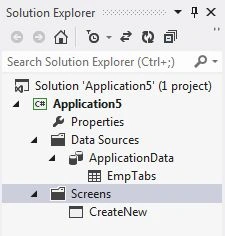
Open the Solution Explorer.
Step 2
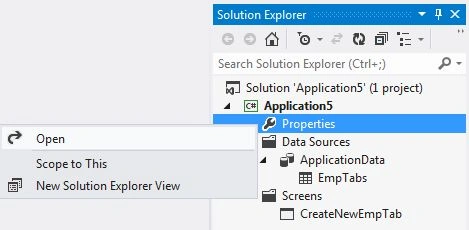
In the Solution Explorer, right-click on the property node and choose "Open".
Step 3
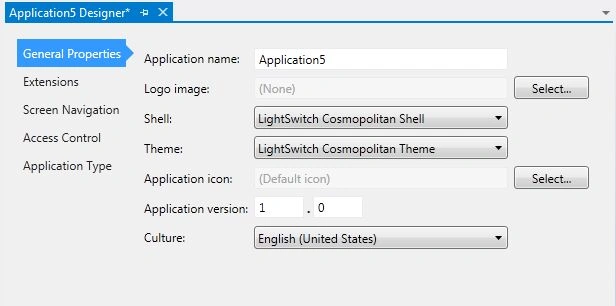
The Application Designer appears.
Step 4
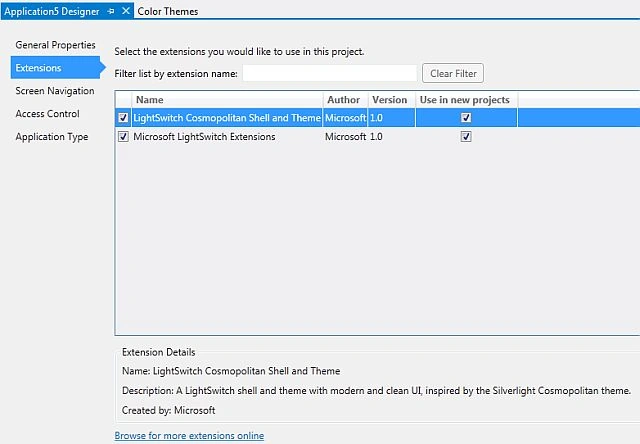
In the Application Designer, select the Extension option.
Step 5
The extension that you have installed is listed in the Extensions list.
Step 6
Uncheck the left side check box of the extension to disable it for use in the current project.

Join the conversation! Your thoughts help the community grow.